Date to Unix Timestamp – Date and Time to Epoch Converter
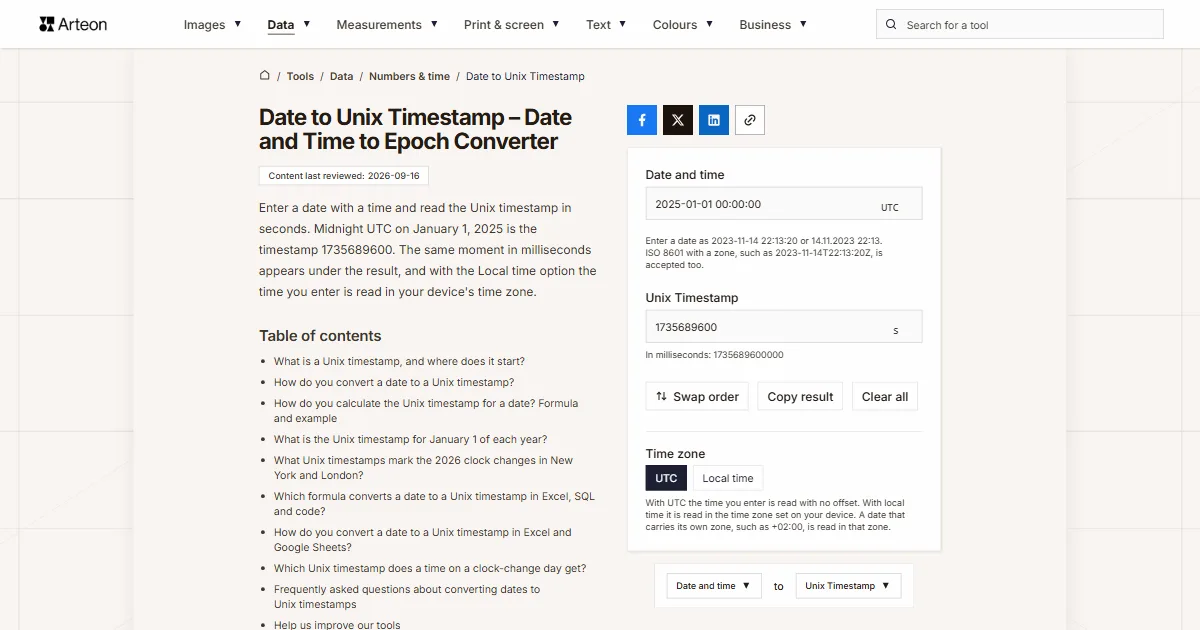
Enter a date with a time and read the Unix timestamp in seconds. Midnight UTC on January 1, 2025 is the timestamp 1735689600. The same moment in milliseconds appears under the result, and with the Local time option the time you enter is read in your device's time zone.
Enter a date as 2023-11-14 22:13:20 or 14.11.2023 22:13. ISO 8601 with a zone, such as 2023-11-14T22:13:20Z, is accepted too.
What is a Unix timestamp, and where does it start?
A Unix timestamp is Unix time written as a single number: the count of seconds since the start of 1970 in UTC[1]. Midnight on January 1, 1970 has the timestamp 0, and the timestamp goes up by one with every second after that.
POSIX, the shared standard for Unix-like systems, gives the formula for the timestamp of a date. The formula adds up the seconds, the minutes times 60, the hours times 3,600 and the days times 86,400, with a correction for leap years[2]. Every day in this calculation has exactly 86,400 seconds.
A date written for people always assumes some time zone, while the timestamp itself holds no time zone information[3]. That is why 10:00 AM on a clock in New York and 10:00 AM on a clock in London give two different timestamps.
How do you convert a date to a Unix timestamp?
Midnight UTC on January 1, 2025 is the Unix timestamp 1735689600. Midnight on the same day in New York came five hours later, because Eastern Standard Time is five hours behind UTC[4]. Its timestamp is 1735707600.
To get the timestamp of any date, enter it in the Date and time field, for example 2025-01-01 00:00:00 or 2025/01/01 00:00. The result in seconds appears in the Unix Timestamp field. Below it, the converter gives the same moment in milliseconds, the unit in which Date.now() returns the time in JavaScript[5].
The converter reads a date without a zone as UTC. If you enter a time from a clock in New York or London, choose Local time in the Time zone switch. The converter then reads the time in your device's time zone, with daylight saving time taken into account.
A date with an offset added, such as 2025-01-01T00:00:00-05:00, is read with that offset under both options.
Copy the result with the Copy result button.
How do you calculate the Unix timestamp for a date? Formula and example
The timestamp is the number of full days since January 1, 1970, multiplied by 86,400, plus the seconds that have passed since midnight on that day[2].
Take November 14, 2023, at 22:13:20 UTC. From January 1, 1970 to that day, 19,675 full days passed. Multiplying by 86,400 gives 1699920000 seconds.
The time 22:13:20 is 80,000 seconds after midnight. Adding the two numbers gives the timestamp 1700000000.
Convert a date written in New York time to UTC first. In winter you add five hours, or 18,000 seconds. During daylight saving time you add four hours, or 14,400 seconds[4]. Midnight on January 1, 2025 in New York is therefore 1735689600 plus 18,000, which is 1735707600. For a time during British Summer Time in the UK, you subtract 3,600 seconds[6].
The Unix timestamp to date converter turns the result back into a date. If a system expects the timestamp in hexadecimal, convert the result in the decimal to hex converter. The timestamp 1700000000 is 6553F100 in hexadecimal.

What is the Unix timestamp for January 1 of each year?
| Year | Midnight UTC | Midnight UTC in milliseconds | Midnight in New York |
|---|---|---|---|
| 2000 | 946684800 | 946684800000 | 946702800 (UTC-5) |
| 2001 | 978307200 | 978307200000 | 978325200 (UTC-5) |
| 2002 | 1009843200 | 1009843200000 | 1009861200 (UTC-5) |
| 2003 | 1041379200 | 1041379200000 | 1041397200 (UTC-5) |
| 2004 | 1072915200 | 1072915200000 | 1072933200 (UTC-5) |
| 2005 | 1104537600 | 1104537600000 | 1104555600 (UTC-5) |
| 2006 | 1136073600 | 1136073600000 | 1136091600 (UTC-5) |
| 2007 | 1167609600 | 1167609600000 | 1167627600 (UTC-5) |
| 2008 | 1199145600 | 1199145600000 | 1199163600 (UTC-5) |
| 2009 | 1230768000 | 1230768000000 | 1230786000 (UTC-5) |
| 2010 | 1262304000 | 1262304000000 | 1262322000 (UTC-5) |
| 2011 | 1293840000 | 1293840000000 | 1293858000 (UTC-5) |
| 2012 | 1325376000 | 1325376000000 | 1325394000 (UTC-5) |
| 2013 | 1356998400 | 1356998400000 | 1357016400 (UTC-5) |
| 2014 | 1388534400 | 1388534400000 | 1388552400 (UTC-5) |
| 2015 | 1420070400 | 1420070400000 | 1420088400 (UTC-5) |
| 2016 | 1451606400 | 1451606400000 | 1451624400 (UTC-5) |
| 2017 | 1483228800 | 1483228800000 | 1483246800 (UTC-5) |
| 2018 | 1514764800 | 1514764800000 | 1514782800 (UTC-5) |
| 2019 | 1546300800 | 1546300800000 | 1546318800 (UTC-5) |
| 2020 | 1577836800 | 1577836800000 | 1577854800 (UTC-5) |
| 2021 | 1609459200 | 1609459200000 | 1609477200 (UTC-5) |
| 2022 | 1640995200 | 1640995200000 | 1641013200 (UTC-5) |
| 2023 | 1672531200 | 1672531200000 | 1672549200 (UTC-5) |
| 2024 | 1704067200 | 1704067200000 | 1704085200 (UTC-5) |
| 2025 | 1735689600 | 1735689600000 | 1735707600 (UTC-5) |
| 2026 | 1767225600 | 1767225600000 | 1767243600 (UTC-5) |
| 2027 | 1798761600 | 1798761600000 | 1798779600 (UTC-5) |
| 2028 | 1830297600 | 1830297600000 | 1830315600 (UTC-5) |
| 2029 | 1861920000 | 1861920000000 | 1861938000 (UTC-5) |
| 2030 | 1893456000 | 1893456000000 | 1893474000 (UTC-5) |
| 2031 | 1924992000 | 1924992000000 | 1925010000 (UTC-5) |
| 2032 | 1956528000 | 1956528000000 | 1956546000 (UTC-5) |
| 2033 | 1988150400 | 1988150400000 | 1988168400 (UTC-5) |
| 2034 | 2019686400 | 2019686400000 | 2019704400 (UTC-5) |
| 2035 | 2051222400 | 2051222400000 | 2051240400 (UTC-5) |
| 2036 | 2082758400 | 2082758400000 | 2082776400 (UTC-5) |
| 2037 | 2114380800 | 2114380800000 | 2114398800 (UTC-5) |
| 2038 | 2145916800 | 2145916800000 | 2145934800 (UTC-5) |
| 2039 | 2177452800 | 2177452800000 | 2177470800 (UTC-5) |
| 2040 | 2208988800 | 2208988800000 | 2209006800 (UTC-5) |
What Unix timestamps mark the 2026 clock changes in New York and London?
| Moment | Clock time | Unix timestamp |
|---|---|---|
| New York, last second of standard time | March 8, 2026, 1:59:59 AM EST | 1772953199 |
| New York, first second of daylight saving time | March 8, 2026, 3:00:00 AM EDT | 1772953200 |
| New York, first 1:30 AM in November | November 1, 2026, 1:30:00 AM EDT | 1793511000 |
| New York, last second of daylight saving time | November 1, 2026, 1:59:59 AM EDT | 1793512799 |
| New York, first second of standard time | November 1, 2026, 1:00:00 AM EST | 1793512800 |
| New York, second 1:30 AM in November | November 1, 2026, 1:30:00 AM EST | 1793514600 |
| London, first second of British Summer Time | March 29, 2026, 2:00:00 AM BST | 1774746000 |
| London, first second of Greenwich Mean Time | October 25, 2026, 1:00:00 AM GMT | 1792890000 |
Which formula converts a date to a Unix timestamp in Excel, SQL and code?
| Where | Formula or expression | Result |
|---|---|---|
| Excel | =(A1-DATE(1970,1,1))*86400 | 1700000000 for the date 2023-11-14 22:13:20 in cell A1 |
| Excel, result in milliseconds | =(A1-DATE(1970,1,1))*86400000 | 1700000000000 |
| Google Sheets | =(A1-DATE(1970,1,1))*86400 | 1700000000 |
| MySQL | SELECT UNIX_TIMESTAMP('2023-11-14 22:13:20'); | 1700000000 when the session time zone is UTC |
| PostgreSQL | SELECT EXTRACT(EPOCH FROM TIMESTAMPTZ '2023-11-14 22:13:20+00'); | 1700000000.000000 |
| Python | datetime(2023, 11, 14, 22, 13, 20, tzinfo=timezone.utc).timestamp() | 1700000000.0 |
| JavaScript | Date.UTC(2023, 10, 14, 22, 13, 20) / 1000 | 1700000000 |
| JavaScript, result in milliseconds | Date.UTC(2023, 10, 14, 22, 13, 20) | 1700000000000 |
How do you convert a date to a Unix timestamp in Excel and Google Sheets?
For a single date, the field above is faster. A spreadsheet converts a whole column of dates to timestamps with one formula dragged down.
Excel: the date difference times 86,400
Enter a date with a time in cell A1 and the formula =(A1-DATE(1970,1,1))*86400 in cell B1. Excel stores dates as sequential serial numbers of days[12], so the difference between two dates is a number of days. Multiplying by 86,400 turns those days into seconds.Excel: a number format in the result cell
If cell B1 shows the result as a date, give it the Number format with no decimal places. You then see 1700000000.Dates in New York or UK time
Google Sheets: the same formula
In Google Sheets, the DATE function takes the arguments year, month and day[13]. The formula =(A1-DATE(1970,1,1))*86400 therefore works the same way as in Excel.Excel: workbooks that use the 1904 date system
A workbook can count dates from January 1, 1904 instead of January 1, 1900, and the two systems differ by 1,462 days[14]. The formula subtracts January 1, 1970 as counted in the same workbook's system, so it gives the same timestamp in both systems.
Which Unix timestamp does a time on a clock-change day get?
On the first Sunday of November, daylight saving time in the US ends at 2:00 AM[7], and clocks go back to 1:00 AM standard time. Every time from 1:00 to 1:59 AM then happens twice, so each of those times matches two timestamps.
In that case the converter, with the Local time option, picks the earlier of the two moments, as the JavaScript Date object does[15]. To get the second moment, one hour later, add the offset to the date. The entry 2026-11-01 01:30:00 -05:00 gives the timestamp 1793514600. On a device set to New York time, you can see both moments as local times when you paste these timestamps into the Unix timestamp to date converter and choose Local time.
On the second Sunday of March, daylight saving time begins at 2:00 AM[7], and clocks jump straight to 3:00 AM. The time 2:30 AM does not appear on US clocks that day. The converter moves such an entry one hour forward, as Date does[15], and gives the timestamp for 3:30 AM daylight saving time.
In the UK, clocks go forward at 1 AM on the last Sunday of March and back at 2 AM on the last Sunday of October[6], so London has the same two situations on those days. With the UTC option, every time you enter has exactly one timestamp, because UTC does not switch to daylight saving time.
Sources
- Unix time — Wikipedia
- The Open Group Base Specifications Issue 8 (POSIX.1-2024), 4.19 Seconds Since the Epoch — The Open Group
- time — PHP Manual — The PHP Group
- Eastern Time Zone — Wikipedia
- Date.now() — MDN Web Docs
- When do the clocks change? — GOV.UK
- Daylight Saving Time Rules — National Institute of Standards and Technology
- MySQL 8.4 Reference Manual, Date and Time Functions — Oracle
- PostgreSQL Documentation, Date/Time Functions and Operators — PostgreSQL Global Development Group
- Date.UTC() — MDN Web Docs
- datetime — Basic date and time types — Python Software Foundation
- DATE function — Microsoft Support
- DATE — Google Docs Editors Help
- Date systems in Excel — Microsoft Support
- Temporal.ZonedDateTime, Ambiguity and gaps from offset transitions — MDN Web Docs
- RFC 7519: JSON Web Token (JWT) — IETF
- Resolution 4 of the 27th CGPM (2022): On the use and future development of UTC — Bureau International des Poids et Mesures
Every figure in the tables was computed from the unit definitions and checked arithmetically before publication. Historical values and the names of local units come from the sources listed above.
Content last reviewed: · written and checked by the Arteon team
Frequently asked questions about converting dates to Unix timestamps
How do I get the Unix timestamp for midnight today in my time zone?
Enter today's date without a time, as YYYY-MM-DD, and choose Local time in the Time zone switch. A date without a time means midnight, and the Local time option reads it in your device's time zone. With the UTC option, the same entry gives midnight UTC.
How do I convert a date to a Unix timestamp in milliseconds?
The converter gives the same moment in milliseconds under the result. That value is the timestamp in seconds multiplied by 1,000. Date.UTC in JavaScript also returns its result in milliseconds[10].
What Unix timestamp goes into the exp claim of a JWT?
The exp claim holds the number of seconds since January 1, 1970 UTC and marks the time on or after which the token must not be accepted[16]. Enter the expiration date and time in the converter, and put the result from the Unix Timestamp field into exp. A token valid for one hour after it was issued has an exp value 3,600 greater than its iat value. To read the expiration date of an existing token, use the Unix timestamp to date converter.
Why is November month 10 in Date.UTC?
Date.UTC counts months from zero: January is 0 and December is 11[10]. The day of the month, hours, minutes and seconds keep their usual values. November 14, 2023 is therefore written as Date.UTC(2023, 10, 14).
Can I enter 23:59:60 with a leap second?
How do I enter a date with a specific time zone?
Add the zone offset to the date, for example 2023-11-14 17:13:20 -05:00, or add Z, UTC or GMT. You can also write the offset without a colon, as -0500. A date with its own zone is read in that zone under both options of the switch.
How should I enter a date with slashes?
Put the year first, as in 2023/11/14. In the US, 11/12/2023 means November 12, and in the UK it means 11 December, while a date that starts with the year means the same day in both. For a date with the year at the end, use periods: 14.11.2023.
How do I convert a Unix timestamp back to a date?
Click Swap order. The Unix timestamp to date converter opens with the timestamp from the Unix Timestamp field already entered. That converter also accepts values in milliseconds, microseconds and nanoseconds.
Help us improve our tools
Have an idea, found a bug, or want to suggest a feature? Drop us a message – we respond within 24 hours.