Pixel and DPI Converter – Check 16 Screen and Print Units
100 px at 96 DPI is 2.646 cm (1.042 in), and at 300 DPI it is 0.8467 cm, because the size of a pixel depends on the resolution. Type a number in the Convert from field, pick the units from the lists below the fields and set the resolution in the Resolution field. You can convert pixels, CSS pixels, Android dp and sp, inches, centimeters, millimeters, points, picas, twips and EMUs from Office files.
A pixel is 1/DPI of an inch, so its size depends on the resolution. 96 DPI is the default in CSS and in Windows at 100% scaling, and print usually uses 300 DPI. You can also enter the resolution in pixels per centimeter (px/cm) or in CSS dppx.
How do I convert pixels to inches and centimeters?
Type a number in the Convert from field and choose its unit from the list below the field, then choose the unit you want below the Convert to field. The result appears as you type, and it works both ways: type a number in the Convert to field and the converter fills in the first one. Both lists have the same 16 units in groups, and the first group, Most used, holds pixels, millimeters, centimeters and inches.
As soon as pixels (px) are picked for either field, a Resolution field with 96 in it appears below. Enter the DPI of your print or screen there, and use the DPI, px/cm and dppx buttons to say which notation you are typing. When you switch the notation, the number in the field converts itself, so 300 DPI becomes 118.1102 px/cm and the result stays exactly the same.
You can also type the unit with the number, such as “12 pt”, “48 dp” or “2 in”, and the converter picks that unit for the field. If you type “300 dpi” in the Convert from field, it tells you that this is a resolution, not a size. The Copy result button copies the number from the Convert to field, and Clear all empties both fields.
Why doesn’t a pixel have a fixed size?
A pixel is the smallest dot of a digital image, and an image file only stores how many pixels it has across and down. Its size on paper or on a screen comes from the resolution: how many pixels go into one inch. That is why a photo 3000 px wide prints 10 inches wide at 300 DPI and 20 inches wide at 150 DPI.
The math is short: inches = pixels ÷ DPI, and pixels = inches × DPI. For centimeters, multiply the inches by 2.54, because an inch is exactly 2.54 cm. At 300 DPI, one centimeter holds 118.11 px and one millimeter 11.81 px.
Strictly speaking, DPI (dots per inch) describes printers and scanners, and PPI (pixels per inch) describes images and screens. Graphics programs call both of them resolution and treat them the same way, so the Resolution field takes either one. Adobe’s Photoshop help says that screen and web images typically use 72–96 PPI, while print images need 300 PPI[1].
How many pixels are in an inch, a centimeter and a millimeter?
| Resolution | Pixels per inch | Pixels per centimeter | Pixels per millimeter |
|---|---|---|---|
| 72 DPI | 72 | 28.346 | 2.835 |
| 96 DPI | 96 | 37.795 | 3.78 |
| 150 DPI | 150 | 59.055 | 5.906 |
| 200 DPI | 200 | 78.74 | 7.874 |
| 300 DPI | 300 | 118.11 | 11.81 |
| 600 DPI | 600 | 236.22 | 23.62 |
| 1,200 DPI | 1,200 | 472.44 | 47.24 |
How many pixels is a Letter or A4 page?
| Paper size | 72 DPI | 96 DPI | 150 DPI | 300 DPI |
|---|---|---|---|---|
| Letter (8.5 × 11 in) | 612 × 792 | 816 × 1,056 | 1,275 × 1,650 | 2,550 × 3,300 |
| Legal (8.5 × 14 in) | 612 × 1,008 | 816 × 1,344 | 1,275 × 2,100 | 2,550 × 4,200 |
| Tabloid or Ledger (11 × 17 in) | 792 × 1,224 | 1,056 × 1,632 | 1,650 × 2,550 | 3,300 × 5,100 |
| A5 (148 × 210 mm) | 420 × 595 | 559 × 794 | 874 × 1,240 | 1,748 × 2,480 |
| A4 (210 × 297 mm) | 595 × 842 | 794 × 1,123 | 1,240 × 1,754 | 2,480 × 3,508 |
| A3 (297 × 420 mm) | 842 × 1,191 | 1,123 × 1,587 | 1,754 × 2,480 | 3,508 × 4,961 |
How do I check and change DPI in Photoshop and GIMP?
In Photoshop, choose Image > Image Size. The dialog box has Width and Height with a unit list next to each field, and a Resolution field[1]. With Resample turned off, a new resolution only changes the print size and the pixel count stays the same. With Resample on, Photoshop adds or removes pixels, which Adobe calls interpolating the pixel information[1].
In GIMP, go to Image > Print Size… and set the X resolution and Y resolution boxes. The manual says this command does not change the number of pixels and does not resample the image. To change the pixel count, use the Scale Image command instead[4].
How many pixels per inch does a phone, monitor or TV have?
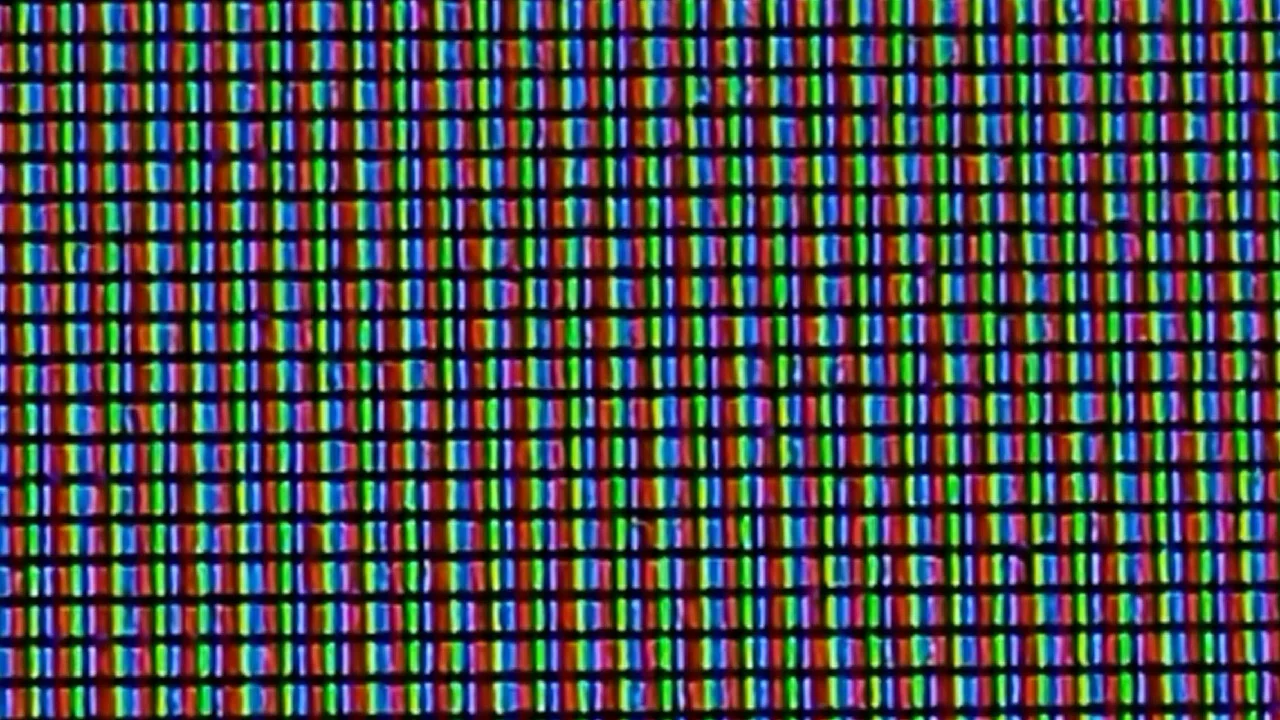
You can work out a screen’s pixel density (PPI) from its resolution and diagonal: square the pixel width and the pixel height, add them, take the square root and divide by the diagonal in inches. A 24-inch Full HD monitor (1920 × 1080) comes out at 91.8 PPI, so each of its pixels is about 0.277 mm across.
The size of one pixel in millimeters is called pixel pitch, and a smaller pitch means a sharper picture[5]. To turn a pitch into PPI, divide 25.4 by it: a 27-inch 4K monitor has a pitch of about 0.156 mm, which gives 163.2 PPI.
Phone screens are much denser. Apple lists the iPhone 17 Pro with a 6.3-inch display at 2622 by 1206 pixels and 460 ppi[6], so one pixel there is about 0.0552 mm. An image 1000 px wide takes up 2.17 inches on that phone and about 10.9 inches on a 24-inch Full HD monitor.
What pixel density do common screens have?
| Screen | Pixel density | Pixel pitch |
|---|---|---|
| 24-inch Full HD monitor (1920 × 1080) | 91.8 PPI | 0.277 mm |
| 27-inch QHD monitor (2560 × 1440) | 108.8 PPI | 0.233 mm |
| 27-inch 4K UHD monitor (3840 × 2160) | 163.2 PPI | 0.156 mm |
| 15.6-inch Full HD laptop | 141.2 PPI | 0.18 mm |
| 55-inch 4K UHD TV | 80.1 PPI | 0.317 mm |
How many pixels is a passport photo?
| Photo | Size in pixels | Resolution |
|---|---|---|
| US passport photo, 2 × 2 in, at 300 DPI | 600 × 600 | 300 DPI |
| US passport photo, 2 × 2 in, at 600 DPI | 1,200 × 1,200 | 600 DPI |
| UK printed photo, 35 × 45 mm, at 300 DPI | 413 × 531 | 300 DPI |
| UK printed photo, 35 × 45 mm, at 600 DPI | 827 × 1,063 | 600 DPI |
| UK digital photo (minimum) | 600 × 750 | about 435 DPI at 35 mm wide |
How is a CSS pixel different from a screen pixel?
Websites measure in CSS pixels. The CSS specification gives them a fixed size: an inch is 2.54 cm and 96 CSS pixels[10], so a CSS pixel is always about 0.2646 mm, which is exactly 0.75 pt. That is why it has its own place on the converter’s list, apart from the ordinary pixel: the Resolution field doesn’t change it.
A high-density screen draws one CSS pixel with several screen pixels. CSS expresses this in dppx, dots per CSS pixel, where 1 dppx is 96 DPI[10]. A 2 dppx screen draws each CSS pixel as a block of 2 × 2 screen pixels and has 192 screen pixels per CSS inch. So the Resolution field takes dppx too, and also pixels per centimeter (px/cm), which CSS writes as dpcm[10].
Windows does the same in its Direct2D graphics library: a device-independent pixel (DIP) is 1/96 of a logical inch. At the standard display scaling settings of 100% (96 DPI), 125% (120 DPI) and 150% (144 DPI), a 200 × 100 DIP rectangle at 144 DPI covers 300 × 150 physical pixels. Microsoft adds that a 12-point font is 16 DIPs[11], the same 16 you get here when you convert 12 points to CSS pixels.
What are dp and sp on Android, and points on iPhone?
Android recommends designing apps in density-independent pixels (dp). One dp is roughly one pixel on a 160 DPI screen, and the system turns dp into screen pixels with px = dp × (dpi / 160)[12]. The converter treats dp as 1/160 inch, so with your phone’s DPI in the Resolution field it shows exactly that pixel count. In app code, the same documentation tells you not to hardcode the formula and to call TypedValue.applyDimension() instead[12].
Android sizes text in scalable pixels (sp). At the default text size, an sp equals a dp, but it grows when someone makes the text bigger in the phone’s settings, which is why the documentation says never to use sp for layout sizes[12].
iPhone and iPad apps measure in points, and a point there is not the 1/72 inch point from Word. Apple’s documentation gives Retina screens a scale factor of 2.0 or 3.0, where one point is drawn with four or nine pixels, and a scale factor of 1.0 on standard screens, where one point is one pixel[13]. So 44 points come out as 88 pixels at 2x and 132 pixels at 3x, without any DPI involved.
How many pixels is a dp in the mdpi, hdpi, xhdpi and xxhdpi folders?
| Drawable folder | Approximate DPI | 1 dp in pixels | 48 dp icon |
|---|---|---|---|
| drawable-ldpi | about 120 DPI | 0.75 px | 36 × 36 px |
| drawable-mdpi | about 160 DPI | 1 px | 48 × 48 px |
| drawable-hdpi | about 240 DPI | 1.5 px | 72 × 72 px |
| drawable-xhdpi | about 320 DPI | 2 px | 96 × 96 px |
| drawable-xxhdpi | about 480 DPI | 3 px | 144 × 144 px |
| drawable-xxxhdpi | about 640 DPI | 4 px | 192 × 192 px |
What are points, picas, twips, dxa and EMUs?
The point (pt) this converter uses is 1/72 inch, about 0.3528 mm[10]. Word gives font sizes in points, so 12 pt text has a font size of about 0.1667 inches, or 16 px on a 96 DPI screen. A pica (pc) is 12 points, or a sixth of an inch[10].
A twip is a twentieth of a point, so an inch has 1,440 twips. The old Word format (.doc) stores margins and page sizes in twips, so a 1-inch margin is 1,440 twips in the file[14]. Access works in twips too: the Width property of a form returns and takes a number of twips[15], so a value of 7200 in VBA is a form 5 inches wide.
In the XML inside a .docx file, the same twentieth of a point is called dxa: Microsoft’s Open XML SDK describes Dxa as a width in twentieths of a point[16]. A table cell with w:w="2880" and w:type="dxa" is therefore 2 inches wide. Type a number with “dxa” after it, and the converter reads it in twips.
An EMU (English Metric Unit) belongs to the Office Open XML format, the .docx, .xlsx and .pptx files. Microsoft defines it as 914,400 per inch and 360,000 per centimeter[17], so both inches and centimeters divide into it evenly. A number like 914400 in a PowerPoint file means exactly 1 inch.
When do micrometers, quarter-millimeters, meters, feet and yards come in?
Micrometers (µm) suit very small sizes, such as a single screen pixel. A pixel on a 27-inch 4K UHD monitor is about 156 µm, or 0.00613 inches.
The quarter-millimeter (Q) is a CSS unit equal to a fortieth of a centimeter[10], so 0.25 mm.
Feet, yards and meters help with large-format prints: a 10-foot banner at 100 DPI is 12,000 px wide, and a 3-meter one at the same resolution 11,811 px.
Which units does this converter know?
| Unit | In inches | In pixels at 96 DPI | Group on the list |
|---|---|---|---|
| pixel (px) | 0.0104167 | 1 | Most used |
| CSS pixel | 0.0104167 | 1 | Screens, websites and apps |
| density-independent pixel (dp) | 0.00625 | 0.6 | Screens, websites and apps |
| scalable pixel (sp) | 0.00625 | 0.6 | Screens, websites and apps |
| micrometer (µm) | 0.0000393701 | 0.00377953 | Metric (SI) |
| millimeter (mm) | 0.0393701 | 3.77953 | Most used |
| quarter-millimeter (Q) | 0.00984252 | 0.944882 | Metric, outside the SI |
| centimeter (cm) | 0.393701 | 37.7953 | Most used |
| meter (m) | 39.3701 | 3,779.53 | Metric (SI) |
| inch (in) | 1 | 96 | Most used |
| foot (ft) | 12 | 1,152 | Imperial and US customary |
| yard (yd) | 36 | 3,456 | Imperial and US customary |
| point (pt) | 0.0138889 | 1.33333 | Typographic |
| pica (pc) | 0.166667 | 16 | Typographic |
| twip | 0.000694444 | 0.0666667 | Office file units |
| English Metric Unit (EMU) | 0.00000109361 | 0.000104987 | Office file units |
What can you type in the Convert from field?
| What you type | Unit below the Convert from field | Result in the Convert to field | How we read it |
|---|---|---|---|
| 100 | pixel (px) | 2.64583333333333 cm | A number without a unit counts in the unit set below the field, here pixels. |
| 2.5 | pixel (px) | 0.0661458333333333 cm | The point is the decimal separator, so we count two and a half pixels. |
| 1,500 | pixel (px) | 39.6875 cm | A comma followed by three digits separates thousands, so the field holds fifteen hundred pixels. A line below the field says “Read as 1500. If you meant 1.5, type 1.5.” |
| 2,5 | pixel (px) | 0.0661458333333333 cm | A comma followed by one or two digits is a decimal comma, as in most of Europe, so this is two and a half pixels. |
| 3/4 | pixel (px) | 0.01984375 cm | The field counts a fraction as written, so three quarters of a pixel. |
| 1e3 | pixel (px) | 26.4583333333333 cm | The field reads scientific notation from a spreadsheet as one thousand. |
| 12 pt | point (pt) | 0.423333333333333 cm | The point symbol from Word sets the typographic point below the field. |
| 48 dp | density-independent pixel (dp) | 0.762 cm | The dp symbol sets the Android density-independent pixel. |
| 2 in | inch (in) | 5.08 cm | The inch symbol sets the inch. |
| 1440 dxa | twip | 2.54 cm | The dxa unit from Word’s XML counts in twips. |
| 914400 EMU | English Metric Unit (EMU) | 2.54 cm | A number from an Office file with EMU after it counts in English Metric Units. |
Sources
- Resize images in Photoshop — Adobe
- Letter (paper size) — Wikipedia
- CSS Paged Media Module Level 3, §7.1 — W3C
- 6.23. Print Size (GIMP 3.0) — GIMP
- Dot pitch — Wikipedia
- iPhone 17 Pro - Tech Specs — Apple
- Passport Photos — U.S. Department of State
- Get a passport photo: Printed photos — GOV.UK
- Get a passport photo: Digital photos — GOV.UK
- CSS Values and Units Module Level 4, §6.2 and §7.4 — W3C
- DPI and device-independent pixels — Microsoft Learn
- Support different pixel densities — Android Developers
- UIScreen: scale — Apple Developer Documentation
- [MS-DOC]: Example of a section — Microsoft Learn
- Form.Width property (Access) — Microsoft Learn
- TableWidthUnitValues Enum (DocumentFormat.OpenXml.Wordprocessing) — Microsoft Learn
- [MS-OE376]: ST_Coordinate (Coordinate) — Microsoft Learn
- How do I change sensitivity (DPI) on my G705 mouse? — Logitech
Every figure in the tables was computed from the unit definitions and checked arithmetically before publication. Historical values and the names of local units come from the sources listed above.
Content last reviewed: · written and checked by the Arteon team
Frequently asked questions about pixels and DPI
Do images for the web have to be 72 DPI?
No. A browser shows an image by its pixel count, and the resolution stored in the file doesn’t change how big it looks on the page. The 72–96 PPI range that Adobe gives for screen images[1] is not a requirement: what matters is how many pixels wide the image is.
How many pixels do I need for a 4 × 6 print?
At 300 DPI, a 4 × 6 inch print needs 1,200 × 1,800 px, and at 150 DPI 600 × 900 px. With fewer pixels, the print comes out softer, because each pixel covers more of the paper.
Will a higher DPI setting improve my photo?
No. Changing only the resolution, without adding pixels, just changes the print size. When a program adds pixels (Resample in Photoshop), it works them out from the neighboring ones, which Adobe calls interpolation[1], so detail that wasn’t in the photo won’t appear.
What does DPI mean on a mouse?
Mouse DPI is its sensitivity: a number that says how far the cursor moves on the screen when you move your hand. Logitech describes DPI simply as the speed of the mouse on the screen[18]. It has nothing to do with image size, so don’t enter it in the Resolution field.

Have a question or suggestion?
If a unit is missing or a result looks different from what your program shows, write to us. It helps most if you tell us the program and the values you see in it.