Why people give photo editing apps one star: we read 400 reviews
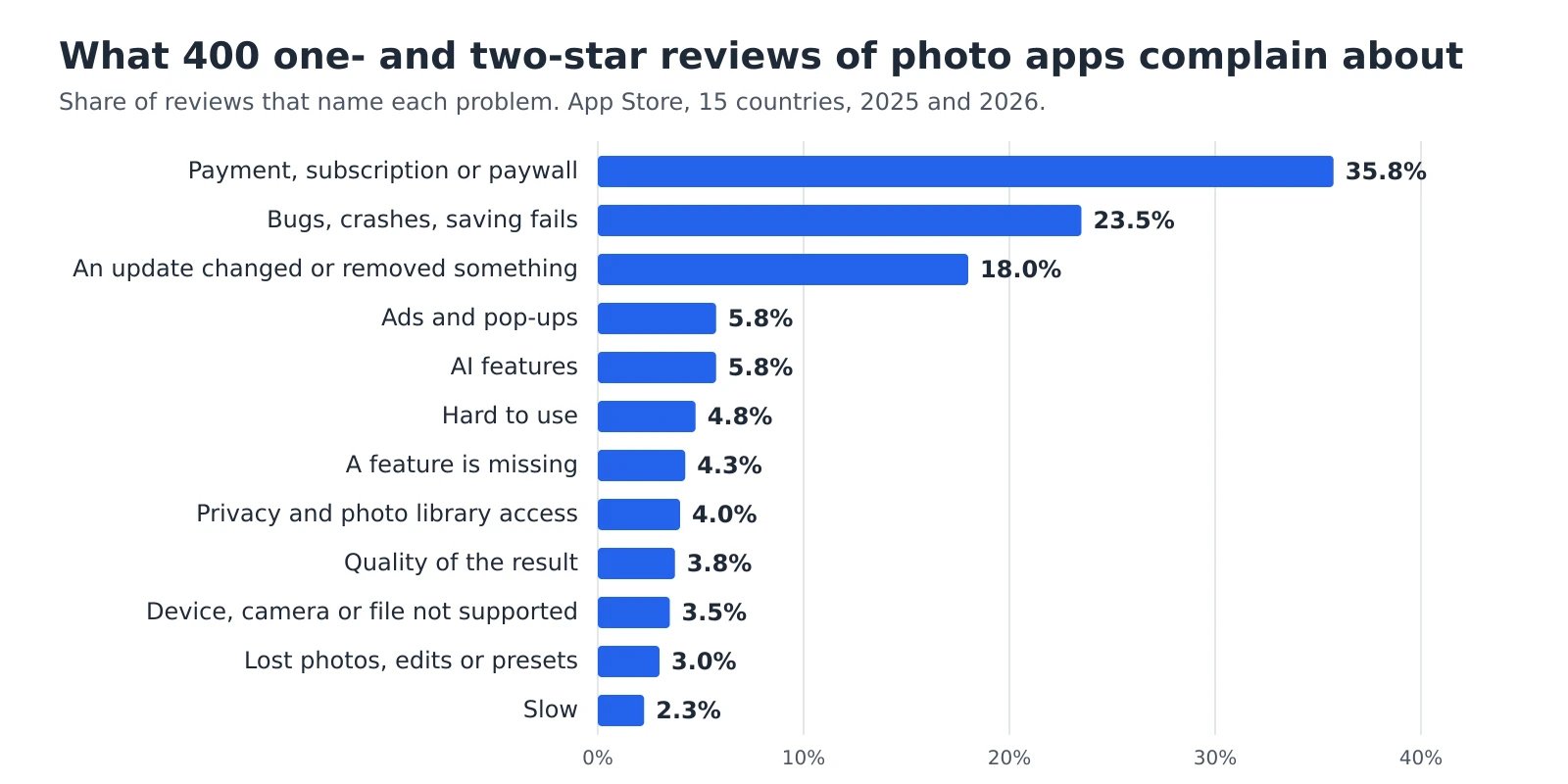
Before choosing a photo editor, it helps to know what goes wrong for the people who already use one. We collected 32,150 App Store reviews of 14 popular photo editing apps from 15 countries and read 400 of the one- and two-star reviews written in 2025 and 2026, one by one. More than a third of them are about money, and some describe being asked to pay only after the editing was already done.
How did we collect and read the reviews?
Apple publishes the newest reviews of every app in each country as a public feed. On 19 November 2026 we downloaded the reviews of 14 popular photo editing apps from 15 countries: the United States, the United Kingdom, Canada, Australia, Germany, Austria, Switzerland, France, Spain, Mexico, Italy, Brazil, Portugal, Poland and the Czech Republic. The apps include photo editors from large software companies, smaller editors for enthusiasts, a phone gallery with a built-in editor and a design app with photo tools. That gave us 32,150 reviews, of which 18,095 were written in 2025 or 2026 and 5,651 of those gave one or two stars.
Counting keywords in thousands of reviews gives a rough picture at best: the Italian word “ai” means “to the”, and “pixel” also catches an app name. So we drew 400 low-rated reviews at random and read each one in its own language. For every review we noted the main complaint, and a second one when the review clearly named two. We also read 200 random five-star reviews from the same years to see what people praise.
A sample of 400 is enough to show the order of the problems, not their exact share. For a result of around 36%, the margin of error at 95% confidence is about 5 percentage points either way (Wikipedia), so the true share in all 5,651 reviews is very likely between 31% and 41%. The gap between the top three problems and the rest is far larger than that.
What do people complain about most?
| Problem | Share of reviews | What the reviews describe |
|---|---|---|
| Payment, subscription or paywall | 35.8% | Free tools moved behind a subscription, trials that turned into a yearly charge, a limit on saved photos, a watermark on the free version. |
| Bugs, crashes, saving fails | 23.5% | The app closes when a photo opens, edits don’t save, imported photos don’t appear or the app doesn’t start after an update. |
| An update changed or removed something | 18.0% | A new layout hides the tools, a favourite feature disappeared or long-time users have to learn the app again. |
| Ads and pop-ups | 5.8% | Video ads between photos, a pop-up asking to subscribe on every launch or an ad that has to be watched before saving. |
| AI features | 5.8% | AI tools that take up the screen and can’t be turned off, credits that run out after a few tries or results that look artificial. |
| Hard to use | 4.8% | Too many options on one screen, or the reviewer can’t find how to do a simple edit. |
| A feature is missing | 4.3% | No before-and-after view, no perspective correction or no way to edit photos stored on an external drive. |
| Privacy and photo library access | 4.0% | The app refuses to work with access to selected photos only and asks for the whole photo library. |
| Quality of the result | 3.8% | Exported photos come out smaller or more compressed, or the colours look different after saving. |
| Device, camera or file not supported | 3.5% | RAW files from a new camera don’t open or open with the wrong colours, or the app doesn’t run on an older iPad. |
| Lost photos, edits or presets | 3.0% | Presets disappeared after an update, or edits were undone when the reviewer didn’t buy the paid version. |
| Slow | 2.3% | Sliders lag, photos take long to load, or the app freezes with large files. |
Why do payments cause the most one-star reviews?
Price alone isn’t the main problem. Of the 143 reviews about money, only 43 complain about the price itself, about a subscription replacing a one-time purchase or about a lifetime licence that no longer covers new versions. The other 100 describe a change in the rules after the reviewer had already started using the app:
- 46 reviews say that tools which used to be free now need a subscription. Two of these reviewers write that they had used the app for 10 years or more.
- 38 reviews are about billing: a free trial that became a paid plan before the reviewer could cancel, a charge after cancelling, no way to cancel inside the app or a refund that was refused.
- 16 reviews describe paying at the moment of saving: three free saves a day, a watermark or a QR code on the free version, an ad game before each export, or edits that would be undone unless the reviewer bought the paid version.
That last group is small, but it shows why the timing matters. The reviewer has already spent time editing, and the app asks for money only when they want the result. One reviewer from Austria calls it a trick: you put in the work for free and find out at the end that you have to pay to keep it.
Why do updates make people leave a photo app?
In 72 reviews the problem appeared after an update, and in many of them nothing is actually broken. The tools are still there, but in new places: rotating a photo now takes three menus, the sliders have swapped sides, or photos are no longer grouped by day. Reviewers who used an app daily for years write that they now edit in another one. Updates also bring bugs: 23.5% of reviews describe crashes, failed saves or an app that no longer starts, and many of them say the trouble started with the last update.
For you, this means that an app you like today can change without asking. Keeping your own copies, such as your original files and exported presets, protects your work more than any single app can.
Do people want AI in a photo editor?
Opinions split. In the low-rated reviews, 23 complain about AI: a large AI prompt box that can’t be hidden, tools pushed in front of basic editing, credits that run out within a few tries of a free trial and generated results that don’t look like the person in the photo. At the same time, 10 of the 200 five-star reviews praise AI features, and one low-rated review asks for more of them. What reviewers object to most is being given no choice.
What do five-star reviews praise?
Almost half of the 200 five-star reviews say nothing specific, such as “great app” or “best editor”. Of the 103 that do, 38 praise the results and the range of tools, and 29 say the app is easy or quick to use. Only 9 mention that the app is free or fairly priced, and 4 praise the filters. Put next to the complaints, the picture is consistent: people stay with an editor that gives good results without effort, and leave when the rules or the layout change under them.
What should you check before you choose a photo editor?
Each check answers one of the complaints that come up most often in the reviews.
1. Save one test photo first
Before you edit a whole set, edit one photo and save it in the free version. You’ll see straight away whether the app limits saving, adds a watermark or makes the photo smaller.2. Know how to cancel a trial before you start it
On an iPhone, open Settings, tap your name, then Subscriptions, choose the subscription and tap Cancel Subscription (Apple Support). Set a reminder a day before the trial ends.3. Give access to selected photos only
An app that edits one photo doesn’t need your whole library. If it refuses to work with selected photos, ask yourself why it needs the rest.4. Keep your own copies
Keep the original files and export your presets or settings to a file now and then. If the app changes or you stop paying, your work stays with you.
How did these reviews shape Helios?
Before we built Helios, our free photo editor, an earlier round of this research, with 18,754 App Store reviews, showed the same problems, and several of the editor’s rules come straight from them. There’s no account and no trial, and saving costs nothing, in full resolution and without a watermark. Your photos are edited in your browser and never sent to a server, so there is no photo library to give access to. Helios has no AI features. The Download settings button saves your edits to a file, and Download my filters does the same with your own filters, so they don’t depend on one browser.
Helios has its own limits, and we name them on its page: it has no brush for fixing a single spot and no tool for removing objects. If a RAW file from your camera opens with the wrong colours, write to us through the form on the Helios page, because new cameras are exactly the case the reviews warn about.
Sources
- Margin of error, Wikipedia
- Cancel a subscription from Apple, Apple Support
Frequently asked questions about the review study
Why don’t you name the apps?
Most of the problems come up in several apps at once, and the article is about what to watch out for, not about ranking particular apps. The share of each problem would also change with the mix of apps, so a ranking based on 400 reviews wouldn’t be fair to any of them.
Do one-star reviews show what most users think?
No. Five-star reviews outnumbered one- and two-star reviews in our data. The low-rated reviews show what goes wrong for people who had a problem, which is what you want to avoid.
Are the reviews from Android users included?
No. Google Play has no public review feed, so we only read reviews from Apple’s App Store. Most of these apps are also available on Android, but their Android reviews aren’t in the data.
More guides
 6 min read
Can you fix an overexposed photo? What RAW gets back and JPG doesn’t
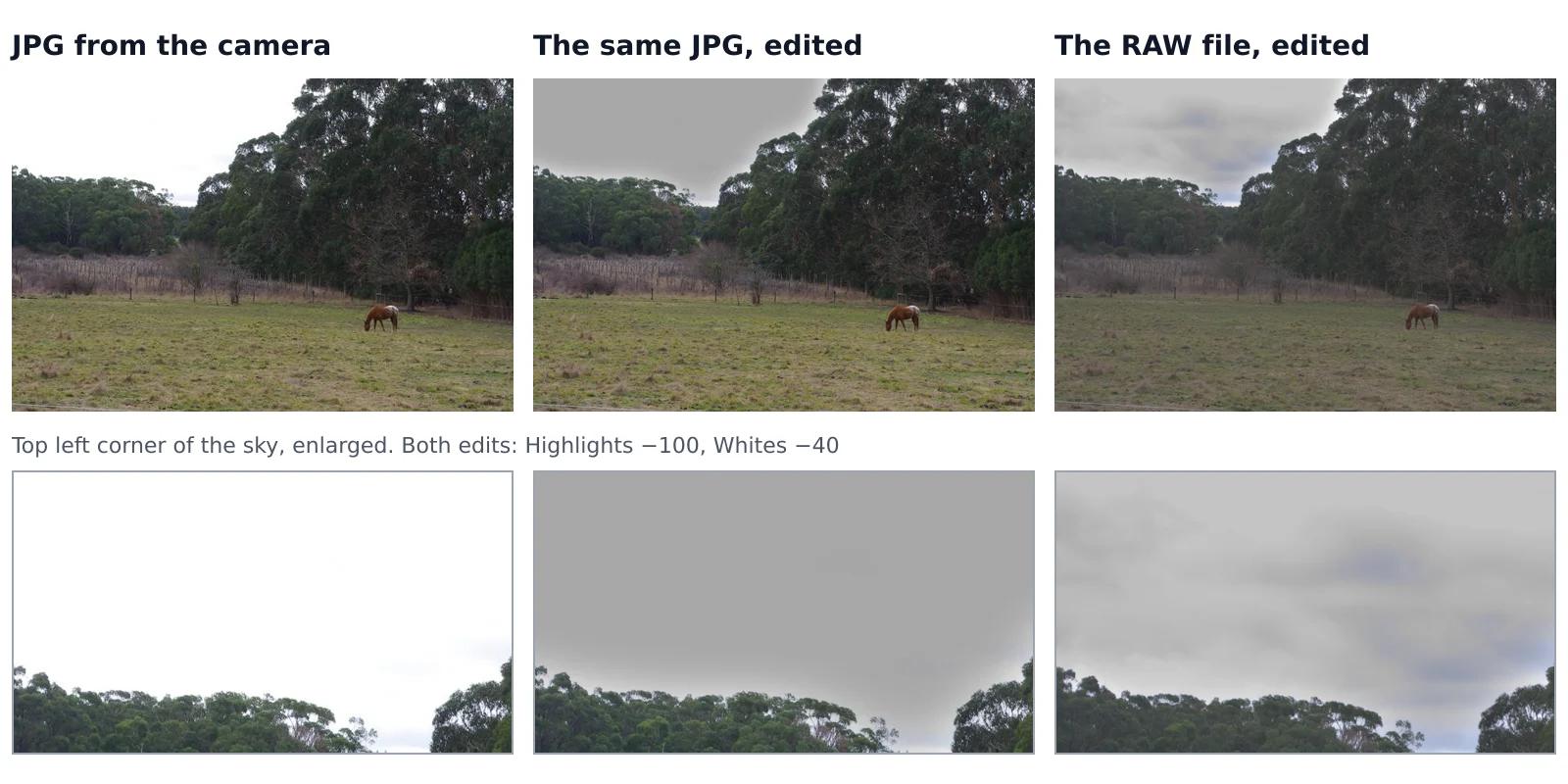
A sky that came out pure white looks the same whether you shot JPG or RAW, but it isn’t the same. In a JPG, the camera has already thrown away everything brighter than white. A RAW file often keeps some of it, and an editor can bring it back. We tested this on one shot that the camera saved both as a RAW file and as a JPG, with the same sliders on both.Read the guide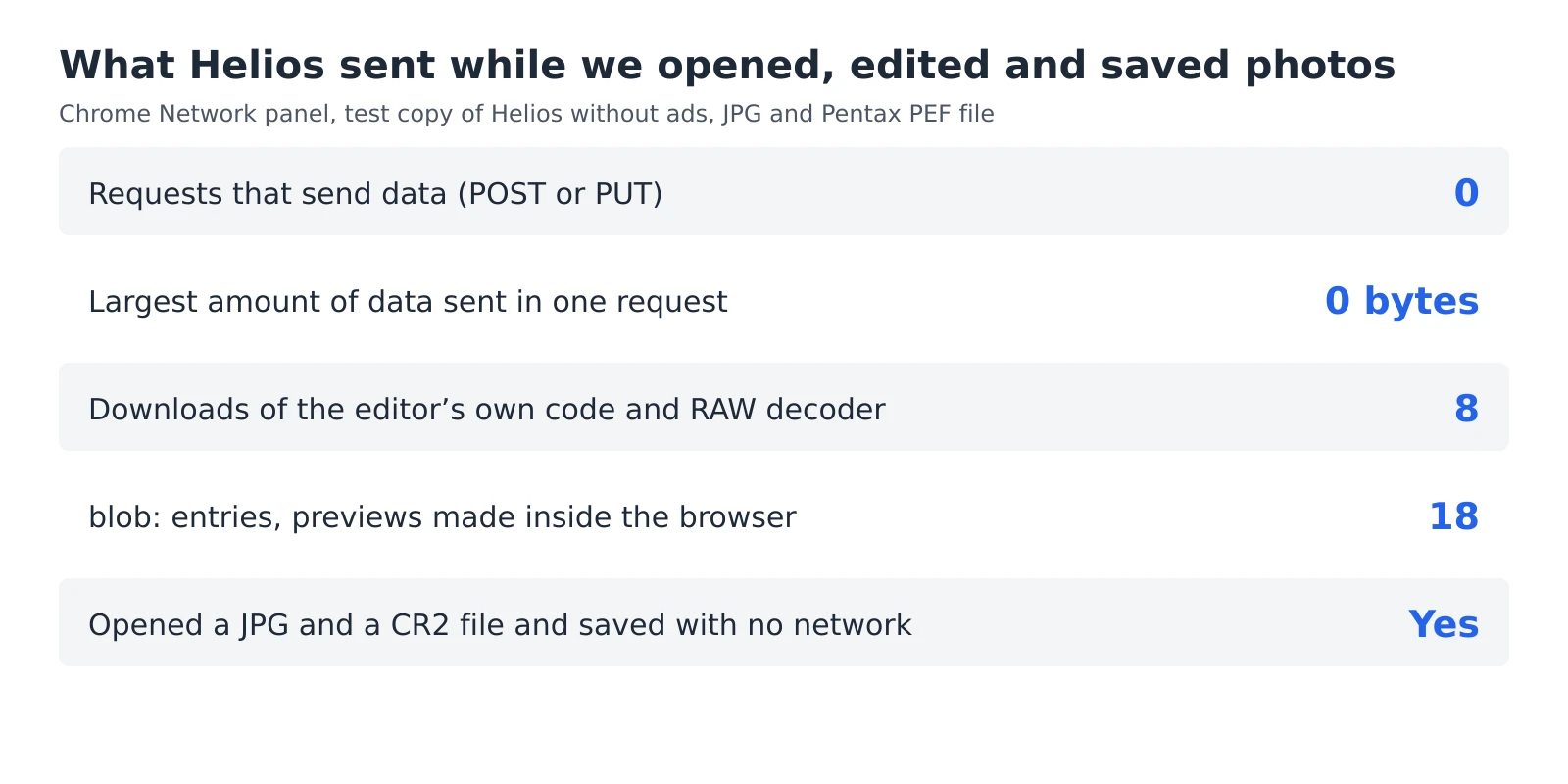 6 min read
How to check whether a photo editor uploads your photos
An editor can say that your photos stay private, but you don’t have to take its word for it. Every browser has a built-in list of everything a web page sends and receives, and a second test needs nothing more than switching off your Wi-Fi. Together they take five minutes and work with any editor that runs in a browser, including ours.Read the guide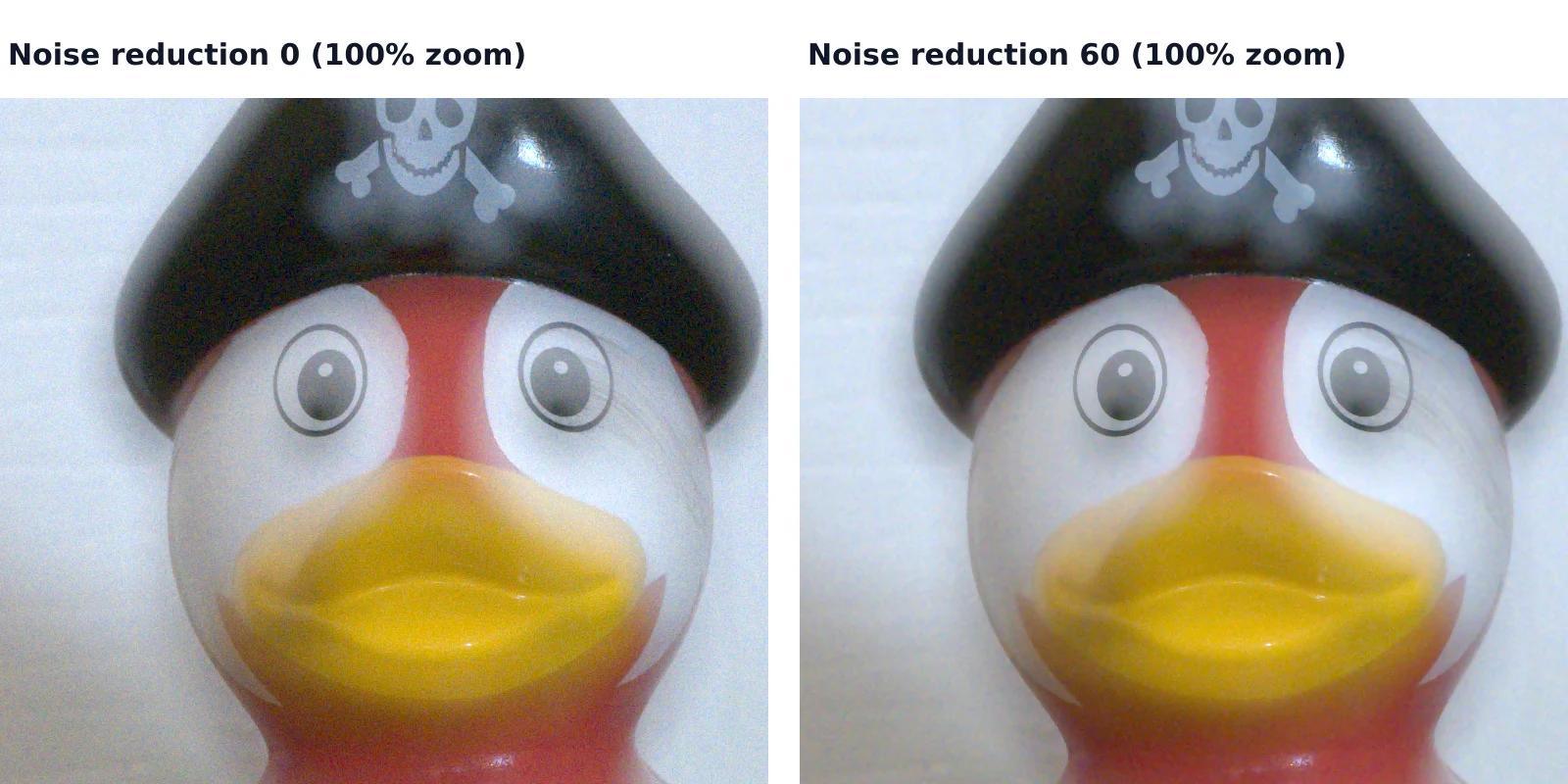 7 min read
How to reduce noise in a photo without AI
A photo taken indoors or at dusk often looks fine on the phone screen and grainy on a computer. That grain is noise, and you can reduce it without any AI tool or subscription, with filters that photo editors have used for years. They work well up to a point, and we measured that point on a real photo taken at ISO 6400.Read the guide