Free CSV to JSON converter – with separator detection
Paste the contents of a CSV file and the tool turns every row into a separate JSON object, taking the field names from the first row. It works out the separating character on its own, so a comma, semicolon, tab and pipe are all read the same way. Quoted values keep their commas.
What is CSV, and what is JSON?
CSV (Comma-Separated Values) is the plainest way of writing a table into an ordinary text file. A line of the file answers to a row of the table, and one repeating character marks out the columns, a comma in the notation RFC 4180 describes[1]. A column is visible only because the same character separates the values — all the rest of the work is done by whichever program opens the file.
That plainness has a consequence. RFC 4180 describes the format, yet states itself that no formal specification of CSV exists and that this allows a wide variety of interpretations[1]. That is why there are files in which sometimes a comma stands, sometimes a semicolon and sometimes a tab, and in which quotes are present or left out.
JSON (JavaScript Object Notation) is described differently: the field name stands here next to the value, and the format has one document binding on everyone — RFC 8259, which the IETF gave the status of Internet Standard STD 90[2]. The conversion therefore gives every value the name of the column it stood under.
How do you convert CSV to JSON?
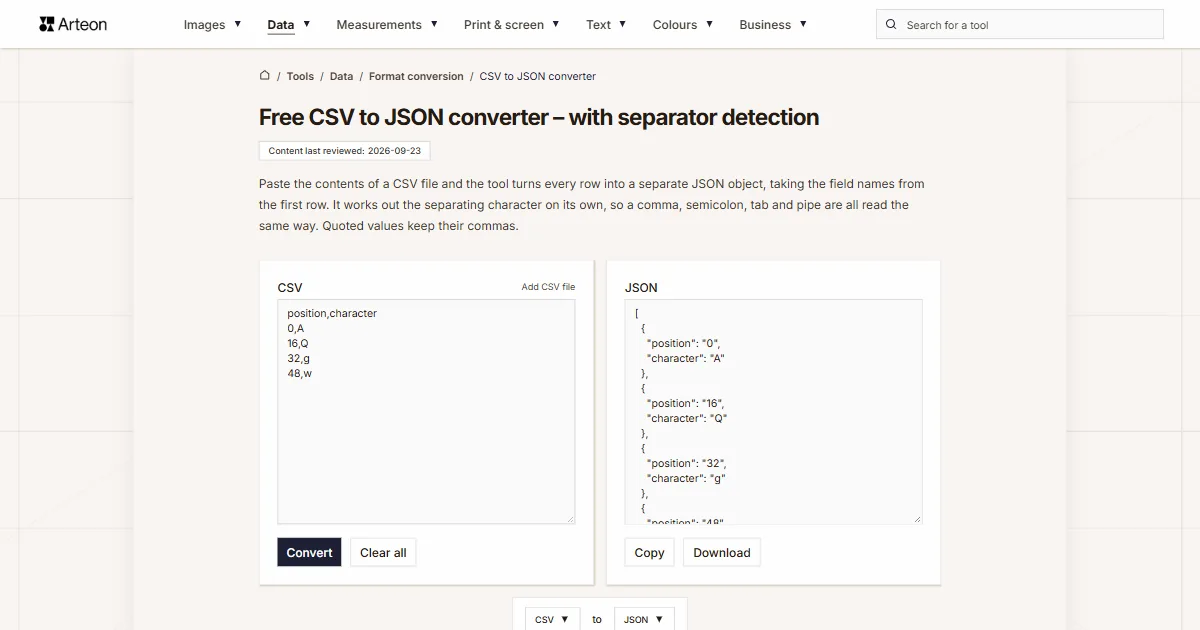
Paste the contents of the CSV file into the left panel and click Convert. The tool takes the column names from the first row and turns each following row into a separate object. The result is an array of such objects, written with a two-space indent and ready to paste into code.
Take a file whose first row reads name,age,city and the second John,30,Bristol. The result is one object: {"name":"John","age":"30","city":"Bristol"}. Every further row of data adds one more object like it to the array.
The separating character needs no setting. The tool checks the first rows and picks the comma, semicolon, tab or pipe, whichever gives every row as many fields as the row of column names. A British and a German spreadsheet file are therefore read the same way.
You can paste the contents or choose a file on disk with the Add CSV file link above the field. Download saves the finished result, and Copy puts it on the clipboard.
What are the quotes in a CSV file for?
A quote settles the case where a value holds the very character that separates the columns. The address Bristol, England in a comma-separated file is written as "Bristol, England" and then stays one value. The same rule covers a line break: text with a return inside it, wrapped in quotes, remains one field of one record[1].
A quote inside such a value is written twice over. The text 15" looks in the file like "15""", and the converter gives it back as 15"[1]. Quotes cover spaces as well: RFC 4180 says a space is part of a field, so " John " keeps the padding on both sides. The same value written without quotes loses that padding.
The reverse conversion is done by the JSON to CSV converter, where you also choose the separating character for your spreadsheet. When the data is needed in a settings file, the JSON to YAML converter and the JSON to XML converter prepare the same content.
Two other converters produce JSON as well. An XML file is turned into JSON by the XML to JSON converter, and a YAML settings file by the YAML to JSON converter. The program receiving the data then gets one format, whatever the source was written in.

What does the converter do with each element of a CSV file?
| Element of the file | What the converter does | Example |
|---|---|---|
| First row | Column names become the field names of the object | name,age gives the fields name and age |
| Separating character | Recognised from the first rows, with nothing to set | name;age works exactly like name,age |
| Comma in a column name of a semicolon file | Stays part of the name | Name;Price, EUR gives the fields Name and Price, EUR |
| sep=; line at the start of the file | Sets the separating character and stays out of the result | sep=; above name;age gives the fields name and age |
| Quoted value | Quotes removed, content left untouched | "Bristol, England" gives Bristol, England |
| Doubled quote | Read as one character of content | "15""" gives 15" |
| Quote inside an unquoted value | Read as an ordinary character | Monitor 15" LG gives Monitor 15" LG |
| Line break inside quotes | Stays inside the value | A value with a return gives one field in one record |
| Spaces around a quoted value | Kept | " John " gives a value with the padding |
| Spaces around an unquoted value | Removed from both sides | John , 30 gives John and 30 |
| Row in which every field is empty | Skipped | An empty line creates no object |
| Missing value in a row | The field gets an empty string | 1,2 against three columns gives an empty value in the third |
| Value with no column of its own | Skipped | 1,2,3 against two headings gives two fields |
| Repeated column name | Later columns get a number | phone,phone gives the fields phone and phone_2 |
| BOM at the start of the file | Skipped, so it stays out of the first field name | A file with a BOM gives a correct first field name |
| Added file in Windows-1252 encoding | Read with its accented letters | café stays café |
| Every value | Written as text | 30 gives "30", a string |
Which separating characters does the converter recognise?
| Character | Name | Where you will meet such a file |
|---|---|---|
| , | Comma | The default of Google Sheets and of programming libraries; the name of the format itself comes from it |
| ; | Semicolon | Excel on settings where the comma serves as the decimal mark, including French, German and Spanish settings |
| tab | Tab | Files with the .tsv extension and data copied straight out of a spreadsheet |
| | | Pipe | Exports from systems whose field contents hold both commas and semicolons |
How does CSV differ from the formats that record levels?
| Format | Multi-level data | Value types | Reference document |
|---|---|---|---|
| CSV | None, the file is a flat table | Every value is text | RFC 4180, Informational, 2005 |
| JSON | An object can hold further objects and arrays | String, number, boolean, null | RFC 8259, Internet Standard STD 90, 2017 |
| XML | An element can hold further elements | Element content is text | W3C Recommendation of 26 November 2008 |
| YAML | Mappings and sequences can nest | String, number, boolean, null | YAML specification, revision 1.2.2 |
Which three things decide the result of the conversion?
Before you paste the file, check these three places — each of them is visible in a plain text editor.
1. Check the first row
The field names in the JSON come from it. If the file starts straight with data, add a row of column names above it. When the first row holds only separators and no name at all, the tool stops the conversion and says that the column names are missing.2. Look at the character between values
Open the file in Notepad or another text editor and look at the first line. The converter recognises four characters and picks the right one by itself, so this check is needed only when the result looks different from what you expected.3. Look at the quotes
A value holding the separating character or a line break stays whole when it is wrapped in quotes. A spreadsheet adds them where needed when saving, and in a file written by hand check them yourself.
Why is every value in the result text?
A CSV file holds no place where it would be written down what a given value is. The text 30 is simply two characters, and whether it means a number, a postal code or a house number is known only to the person reading the column name. JSON tells a string and a number apart, so the conversion has to pick one of the two[2].
We picked text, because only text keeps the notation exactly as it stands. The ZIP code 07310 stays 07310 together with its leading zero. A thirteen-digit barcode keeps all thirteen digits in the same shape. Turning values into numbers is then one line in the program receiving the data, and it happens deliberately, column by column. A column holding a Unix timestamp, such as 1700000000, stays text as well, and the Unix timestamp to date converter reads the date from it.
The same care applies to the encoding. A file saved by a spreadsheet in UTF-8 can start with a BOM, three bytes that mark that encoding[6]. The converter skips that mark, so it stays out of the first column name and the first field of the object is called exactly what the spreadsheet shows. A file you add that is not saved in UTF-8 is read as Windows-1252, so accented letters stay in place.
Convert other files to JSON
Sources
- RFC 4180: Common Format and MIME Type for Comma-Separated Values (CSV) Files — IETF
- RFC 8259: The JavaScript Object Notation (JSON) Data Interchange Format — IETF
- Import or export text (.txt or .csv) files — Microsoft
- Extensible Markup Language (XML) 1.0 (Fifth Edition) — W3C
- YAML Ain't Markup Language (YAML) revision 1.2.2 — YAML Language Development Team
- Opening CSV UTF-8 files correctly in Excel — Microsoft
Every figure in the tables was computed from the unit definitions and checked arithmetically before publication. Historical values and the names of local units come from the sources listed above.
Content last reviewed: · written and checked by the Arteon team
Frequently asked questions about converting CSV to JSON
Are CSV and JSON the same kind of file?
No. Both are ordinary text files, but they record data differently: CSV lays it out as a table in which the column names stand once, in the first row, while JSON puts a name next to every value. That is why JSON records an order together with its list of items, and CSV needs such data spread across separate rows or columns.
What happens when rows hold different numbers of values?
The first row sets the number of columns. When a value is missing in some row, the field answering to it gets an empty string. When there are more values than headings, the surplus is skipped, since there is no name under which it could enter the object.
Does a file from a German or French spreadsheet need any setting?
No. Such a spreadsheet separates columns with a semicolon, because the comma serves there as the decimal mark, and the tool recognises the semicolon by itself. The same mechanism works for files with a tab and with a pipe.
How do I get numbers in the JSON result?
The program that receives the data turns the values into numbers. In JavaScript Number(value) is enough, in Python int or float, and when loading into a database the column type does the same job. The converter leaves the notation untouched, so codes with a leading zero and long identifiers keep every digit.
Can the file hold empty rows?
Yes. A row in which every field is empty is skipped and creates no object in the result. Empty lines at the end of a file, which some exporting programs leave behind, therefore have no bearing on the result.
Where does the message about column names come from?
It appears when the first row holds only separators, such as commas, and no name at all. Type the column names into that row and run the conversion again. The tool skips empty lines at the start of the file.
Does the CSV file you add get stored anywhere?
No. The Add CSV file link reads the contents into the field inside your browser and sends nothing anywhere. The result is built in that same tab and disappears when you close it, together with what was read.
Help us improve our tools
Have an idea, found a bug, or want to suggest a feature? Drop us a message.
Explore other useful tools


Meta title & description checker
Check title and description length in pixels. Live Google preview and optimization tips.

PNG to JPG
Convert PNG files to JPG in your browser. No file limits, no signup, no server uploads.

Favicon generator
Create a complete favicon.ico set for your website from one image. All required sizes, no login.

Color palette generator
Generate 17 palettes from one color: monochromatic, complementary, triadic and more. HEX codes.

WebP to JPG
Convert WebP files to universally compatible JPG. Works in every app and platform.

Color contrast checker
Check text and background contrast per WCAG 2.1 AA and AAA. Automatic color correction.

Free QR code generator
Create a QR code for a website, vCard business card or print. Export PNG and SVG, no registration.

Word & character counter
Count words, characters with and without spaces, sentences, paragraphs and the average sentence length.

Lorem Ipsum Generator
Free Lorem Ipsum generator — 8 text styles, paragraphs, sentences or words. Copy in one click.