Free JSON to CSV converter – with a separator of your choice
Paste an array of JSON objects and the tool lays it out as a table: field names go into the header row and every object gets a row of its own. You pick the separator, because a spreadsheet in London expects a comma while one in Berlin expects a semicolon. The file downloads in UTF-8.
Excel in the United States and the United Kingdom splits columns on a comma; where the comma marks decimals, it expects a semicolon.
What is JSON, and what is CSV?
JSON (JavaScript Object Notation) is a way of writing data in which every value carries its own name. It is described by RFC 8259, which the IETF gave the status of Internet Standard STD 90[1]. The format covers four simple types: string, number, boolean and the empty value null. Two structured types come on top of that, the object and the array[1]. Those two hold further values, so data can have several levels: an order holds a list of items, and each item its own set of fields.
CSV (Comma-Separated Values) describes data differently. The file is a table: the first row usually gives the column names, each following row is one record, and a single character separates the values inside a row, a comma in the notation RFC 4180 describes[2]. Field names appear once, at the very top of the file, and govern the whole column beneath them.
The whole conversion follows from that one difference. The tool writes JSON field names into the header row and the values beneath them.

How do you convert JSON to CSV?
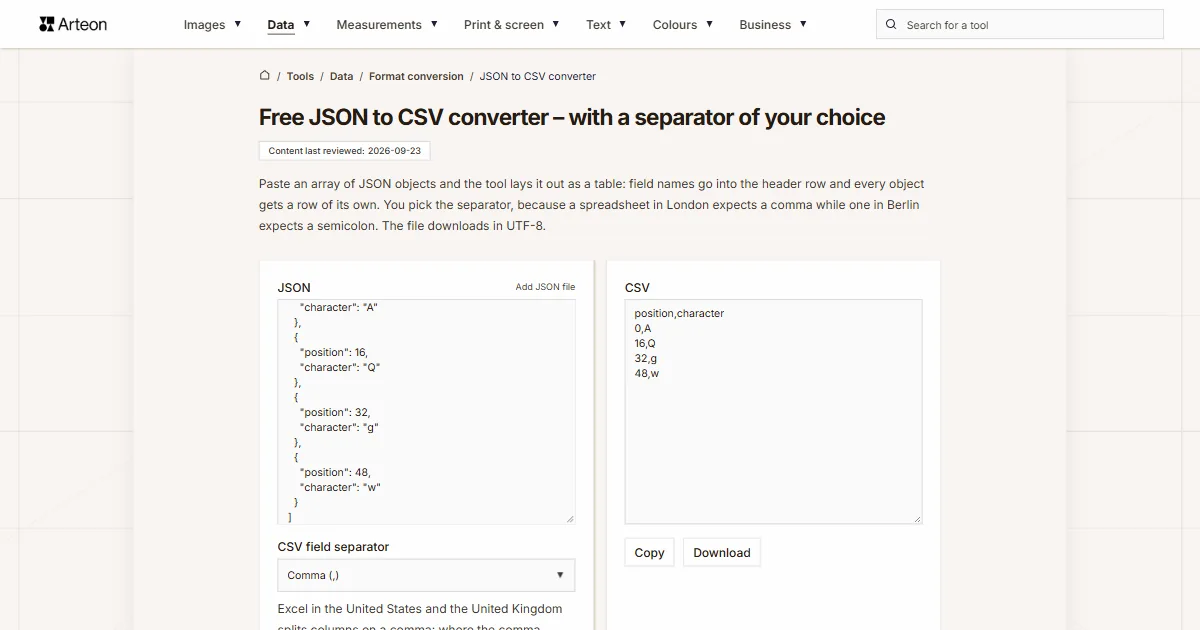
Paste an array of JSON objects into the left panel and click Convert. The tool collects the field names from every object, builds the first row out of them, and adds one row per object. The CSV appears on the right.
Take two people written as [{"name":"John","age":30},{"name":"Anne","age":25}]. The result is three rows. The first is the header name,age. The second reads John,30 and the third Anne,25.
The tool gathers field names from every object in the array. When the second object carries a field the first one lacks, the column is created anyway, and records without it get an empty cell. Data from an API with optional fields is therefore saved in full.
That leaves the character which will separate the columns. You pick it in the CSV field separator list under the input panel, and it decides whether a spreadsheet spreads the data across columns or keeps the whole row in one. Download saves the file, and Copy puts the text on the clipboard.
What does the tool do with nested data and empty values?
The tool writes an object or an array from inside a record into a single cell as JSON text. The field {"street":"Baker Street 5"} therefore takes one column and keeps its whole content, ready to be read again. The reason is straightforward: a CSV column holds one value, while an object holds several of them together with their names.
A null value gives an empty cell. So does the place where a record simply has no such field. When a value holds the chosen separator, a quote or a line break, the tool wraps it in quotes and doubles the quote inside — this is the notation described in RFC 4180[2], so spreadsheets and libraries read such a cell correctly. A timestamp from an API, such as 1700000000, goes into the cell as a number, and the Unix timestamp to date converter reads the date from it.
The downloaded file is encoded in UTF-8 and starts with a byte order mark, BOM for short. By those three bytes a program recognises that the rest is written in UTF-8. Microsoft says it plainly: a CSV file in UTF-8 opens normally if it was saved with a BOM[3]. Names and addresses with accented letters therefore display correctly even when you open the file with a double click.
The reverse conversion is done by the CSV to JSON converter, which turns the same table back into records. If the data should keep its levels, use the JSON to XML converter and the JSON to YAML converter, because both formats record multi-level data.
It also happens that the data meant for a spreadsheet is written in XML or YAML. Two steps are needed then: first the XML to JSON converter or the YAML to JSON converter, and then this tool, which finds the list of records in the result by itself.

How does every kind of JSON value look in the CSV file?
| Value in JSON | What is written in the cell | Example |
|---|---|---|
| String | The text itself, without quotes | "Bristol" gives Bristol |
| String holding the separator | Wrapped in quotes | "Bristol, England" gives "Bristol, England" |
| String holding a quote | Quote doubled, whole value wrapped in quotes | The text 15" gives "15""" |
| Number | Written as in the JSON, with a decimal point | 19.99 gives 19.99 |
| Number larger than 9,007,199,254,740,991, such as an order ID | Every digit unchanged | 12345678901234567890 gives 12345678901234567890 |
| Boolean | The word true or false | true gives true |
| null | Empty cell | null gives an empty cell |
| Object | JSON text inside one cell | {"a":2} gives "{""a"":2}" |
| Array | JSON text inside one cell | [1,2] gives "[1,2]" |
| Field the record does not carry | Empty cell in an existing column | a missing age field gives an empty cell |
Which separator suits your spreadsheet?
| Where you will open the file | Separator | Why this one |
|---|---|---|
| Excel on United States or United Kingdom settings | Comma | The decimal mark there is a point, which leaves the comma free for columns |
| Excel on French, German, Spanish, Italian, Portuguese, Polish or Czech settings | Semicolon | The comma serves as the decimal mark there, so the list separator becomes a semicolon |
| Google Sheets | Comma | Import has its own Separator character field, and automatic detection recognises the comma |
| LibreOffice Calc | Any of the four | The Text Import dialog lets you tick the character before the data is read |
| Reading with a script or loading into a database | Comma | This is the default of the csv module in Python and of fgetcsv in PHP |
| Data holding both commas and semicolons | Tab or pipe | Commas and semicolons in the content then need no quotes, because neither of them separates the columns |
How do JSON and CSV differ according to their reference documents?
| Feature | JSON | CSV |
|---|---|---|
| Reference document | RFC 8259 | RFC 4180 |
| Year of publication | 2017 | 2005 |
| Status of that document | Internet Standard STD 90 | Informational |
| MIME type | application/json | text/csv |
| Encoding for exchange between systems | UTF-8, required | Any from the IANA registry; RFC 4180 names US-ASCII as common usage |
| Value types | String, number, boolean, null, object, array | Every value is text |
| Multi-level data | An object can hold further objects and arrays | None, the file is a flat table |
| Field names | Stand next to every value | Stand once, in an optional header row |
| Separating character | Fixed by the syntax: colon and comma | Depends on the program and its regional settings |
How do you open the finished CSV file in a spreadsheet?
Excel, Google Sheets and LibreOffice Calc each ask about the separator and the encoding in a different window.
Excel 2016 and newer
Go to the Data tab and click From Text/CSV[4]. The preview window is where you set the encoding and the separating character before the data enters the sheet. A file from this converter also opens on a double click. The BOM then takes care of accented letters, and the chosen separator decides the split into columns.Google Sheets
At the top click File, then Import[5]. The Separator character field offers Detect automatically, Tab, Comma and Custom, where you can type a semicolon or a pipe.LibreOffice Calc
The program opens a CSV file through the Text Import dialog[6]. Encoding goes in the Character Set field and the separating character under Separated by, where tab, comma and semicolon are among the options.
What if a colleague abroad sees the whole row in column A?
The commas then show up inside the cell together with the data. It means the spreadsheet was looking for a different separating character than the one in the file. Excel takes that character from the system settings, which tie the list separator to the decimal mark[4].
On British and American settings the decimal mark is a point, so the comma stays free for columns and the default works. On French, German or Czech settings the comma is the decimal mark, which leaves the semicolon for columns. For a file meant for such a spreadsheet, pick Semicolon in the CSV field separator list and convert once more.
You can also set the separating character in the spreadsheet itself: the import on the Data tab lets you choose it by hand, whatever the system settings are. This helps when the file comes from someone else and cannot be produced again.
Convert JSON to other formats
Sources
- RFC 8259: The JavaScript Object Notation (JSON) Data Interchange Format — IETF
- RFC 4180: Common Format and MIME Type for Comma-Separated Values (CSV) Files — IETF
- Opening CSV UTF-8 files correctly in Excel — Microsoft
- Import or export text (.txt or .csv) files — Microsoft
- Import datasets and convert them for Google Sheets — Google
- Text Import — LibreOffice Help — The Document Foundation
Every figure in the tables was computed from the unit definitions and checked arithmetically before publication. Historical values and the names of local units come from the sources listed above.
Content last reviewed: · written and checked by the Arteon team
Frequently asked questions about converting JSON to CSV
What kind of JSON does the converter accept?
An array of objects, meaning a text that opens with a square bracket and holds objects inside, for example [{"name":"John"}]. Every object becomes one row of the CSV file. The converter also accepts an object with such an array stored inside it, such as the output of the XML to JSON converter. When the array is empty or the text has another shape or a syntax error, a message below the field describes the problem.
Why does a nested object end up in a single cell?
Spreading it across columns would mean guessing what to call the new headings and what to do with records that lack the object altogether. JSON text in one cell keeps the whole content in a shape that can be read again later, and it keeps the number of columns the same in every row.
Where do the headings come from when records carry different fields?
The header row is built from the names gathered across every object in the array, in order of first appearance. A record without a given field gets an empty cell in that column, so no value is lost and every row has the same number of columns.
Why do accented letters look wrong after opening the file in Excel?
Excel is reading the file by the system code page, while our file is in UTF-8. The file downloaded here starts with a BOM, by which Excel recognises UTF-8 — Microsoft names the BOM as the condition for opening such a file correctly. If you copy the result and save it as a file in Notepad, Notepad saves it in UTF-8 without a BOM. Open such a file through the Data tab and From Text/CSV, where you set the encoding by hand.
What happens when the same key appears twice in one object?
RFC 8259 says names within an object should be unique, and notes that programs behave differently when they repeat. Our converter keeps the value that stands last in the text and creates a single column for that key.
Can the result be opened as a tab-separated text file?
Yes. Pick Tab in the CSV field separator list and download the result with the Download button. The file is named converted.csv and tabs separate its columns, so in the import window of Excel or LibreOffice choose tab as the separating character.
Does the data reach a server?
No. The code that performs the conversion runs in your browser, so the pasted text and the added file stay on your computer. They are cleared from memory when you close the tab.
Help us improve our tools
Have an idea, found a bug, or want to suggest a feature? Drop us a message.
Explore other useful tools


Meta title & description checker
Check title and description length in pixels. Live Google preview and optimization tips.

PNG to JPG
Convert PNG files to JPG in your browser. No file limits, no signup, no server uploads.

Favicon generator
Create a complete favicon.ico set for your website from one image. All required sizes, no login.

Color palette generator
Generate 17 palettes from one color: monochromatic, complementary, triadic and more. HEX codes.

WebP to JPG
Convert WebP files to universally compatible JPG. Works in every app and platform.

Color contrast checker
Check text and background contrast per WCAG 2.1 AA and AAA. Automatic color correction.

Free QR code generator
Create a QR code for a website, vCard business card or print. Export PNG and SVG, no registration.

Word & character counter
Count words, characters with and without spaces, sentences, paragraphs and the average sentence length.

Lorem Ipsum Generator
Free Lorem Ipsum generator — 8 text styles, paragraphs, sentences or words. Copy in one click.