Free XML to JSON converter
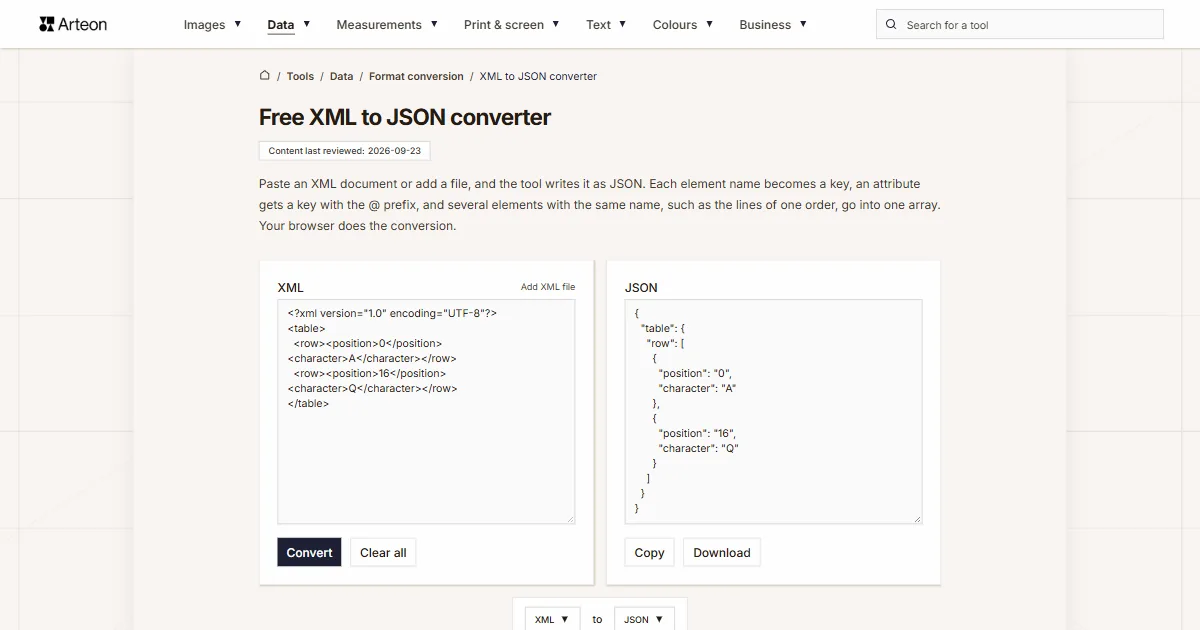
Paste an XML document or add a file, and the tool writes it as JSON. Each element name becomes a key, an attribute gets a key with the @ prefix, and several elements with the same name, such as the lines of one order, go into one array. Your browser does the conversion.
What is XML, and what is JSON?
XML (Extensible Markup Language) stores data in elements. An element has an opening and a closing tag, for example <city>Boston</city>, and extra information can sit in its attributes, such as currency="USD". The specification from the W3C (World Wide Web Consortium) requires a document to have exactly one root element that contains all the others[1].

<div> tag has a matching </div>, and the closing tags appear in the reverse order of the opening ones. XML follows the same nesting rule. You can turn HTML code like this into Markdown with the HTML to Markdown converter. Photo: Valery Sysoev, Unsplash.JSON (JavaScript Object Notation) arranges the same data in objects and arrays. An object sits in curly brackets and holds pairs of a name and a value, and an array sits in square brackets and holds a list of values. It is defined in RFC 8259 from the IETF (Internet Engineering Task Force), which allows six kinds of values: object, array, string, number, boolean and null[2].
XML is also the format of sitemaps that tell search engines which pages a site has. Google's documentation calls the XML sitemap the most versatile of the supported formats and limits a single sitemap to 50 MB uncompressed or 50,000 URLs[3].
<price currency="USD">19.99</price>, so a program can read it by name. Photo: Camilo Rueda Lopez, Unsplash.How do you convert XML to JSON?
Paste the document into the XML field, or click the Add XML file link above the field and choose a file. After you click Convert, the result appears in the JSON field. The Copy button copies it, and the Download button saves the file converted.json.
The converter uses the notation Stefan Goessner described on XML.com in 2006[4]. The element name becomes the key, and the element text becomes the value. An attribute gets a key with the @ prefix, and the text of an element that has attributes goes under the #text key. That is why <price currency="USD">19.99</price> gives {"price": {"@currency": "USD", "#text": "19.99"}}.
When one element holds several elements with the same name, their values form an array. An empty element, for example <notes/>, gives an empty string. The result has two spaces of indentation per nesting level. The converter reads a file in an encoding other than UTF-8, for example windows-1252, according to the declaration at the start of the document.
How does the converter handle order, values and namespaces?
XML and JSON treat the order of data differently. The XML Information Set specification describes the children of an element as an ordered list[5], while RFC 8259 calls a JSON object an unordered collection[2]. A JSON array keeps its order, so elements with the same name appear in the result in the same order as in the document.
In the document <list><a>1</a><b>2</b><a>3</a></list> the converter collects both a elements into the array ["1", "3"], and the b element gets its own key. The result alone no longer shows that b stood between the two a elements. Goessner named this property of the notation directly: such a structure does not preserve element order[4].
Every value in the result is a JSON string, including the number 3 and the word true, because the converter reads the document alone, without a schema. That is why the Boston ZIP code 02108 keeps its leading zero. Types such as boolean, decimal and date are defined in a separate W3C specification for XSD (XML Schema Definition)[6].
A namespace prefix stays part of the key, so the element <soap:Body> gives the key "soap:Body". The declaration xmlns:soap="…" goes into the result as the key "@xmlns:soap", so the prefix keeps the address of its namespace. The Namespaces in XML specification requires such a declaration for every prefix a document uses[7].
<soap:Body> element comes from SOAP, which the W3C describes as a protocol for exchanging structured information in a decentralized, distributed environment using XML technologies. Photo: Albert Stoynov, Unsplash.The result contains elements, attributes and text, including the content of CDATA sections. Comments and processing instructions stay only in the XML file and get no keys of their own in the result. JSON has no syntax for comments[8].
You can turn the result back into XML with the JSON to XML converter, which writes @ keys as attributes again. When the result is a list of records you need in a spreadsheet, the JSON to CSV converter arranges it into a table, and the JSON to YAML converter writes it as YAML.
What does each part of an XML document look like in JSON?
| Part of the document | XML example | JSON result |
|---|---|---|
| Element with text | <city>Boston</city> | {"city": "Boston"} |
| Empty element | <notes/> | {"notes": ""} |
| Attribute and text | <price currency="USD">19.99</price> | {"price": {"@currency": "USD", "#text": "19.99"}} |
| Attribute only | <product sku="A-17"/> | {"product": {"@sku": "A-17"}} |
| One child element | <order><line>A</line></order> | {"order": {"line": "A"}} |
| Two elements with the same name | <order><line>A</line><line>B</line></order> | {"order": {"line": ["A", "B"]}} |
| Nesting | <customer><address><city>Seattle</city></address></customer> | {"customer": {"address": {"city": "Seattle"}}} |
| Text next to an element | <p>The <b>quick</b> fox</p> | {"p": {"#text": "The fox", "b": "quick"}} |
| Number and boolean | <record><quantity>3</quantity><active>true</active></record> | {"record": {"quantity": "3", "active": "true"}} |
| CDATA section | <code><![CDATA[a < b && c]]></code> | {"code": "a < b && c"} |
| Entity | <company>Smith & Sons</company> | {"company": "Smith & Sons"} |
| Comment | <name>Anna<!-- first name --></name> | {"name": "Anna"} |
| XML declaration | <?xml version="1.0" encoding="UTF-8"?><a>1</a> | {"a": "1"} |
| Namespace with a prefix | <soap:Envelope xmlns:soap="http://schemas.xmlsoap.org/soap/envelope/"><soap:Body>x</soap:Body></soap:Envelope> | {"soap:Envelope": {"@xmlns:soap": "http://schemas.xmlsoap.org/soap/envelope/", "soap:Body": "x"}} |
| Spaces around text | <a> text </a> | {"a": "text"} |
How do XML and JSON differ according to their specifications?
| Feature | XML | JSON |
|---|---|---|
| Reference document | XML 1.0, fifth edition, W3C 2008 | RFC 8259, IETF 2017 |
| Document status | W3C Recommendation | Internet Standard STD 90 |
| MIME type | application/xml | application/json |
| Top level of the document | Exactly one root element | Any single value, even a lone number |
| Order | Child elements form an ordered list | An object is unordered, an array is ordered |
| Data describing an element | Attributes in the opening tag, where their order carries no meaning | Every value sits in an object next to its name |
| Comments | Allowed outside tags | No comment syntax |
| Value types | Text, with types defined by an XSD schema | String, number, boolean, null, object, array |
| Namespaces | Defined in a separate W3C Recommendation | No equivalent in the specification |
| Encoding | A parser must accept UTF-8 and UTF-16 | UTF-8 for exchange between systems |
| Characters & and < in text | Written as & and < or inside a CDATA section | Written as they are inside quotation marks |
What should you do when the converter shows an XML error message?
The message below the field then says that the XML is invalid. These three checks cover XML 1.0 rules that stop a parser from reading a document that breaks them.
Check that every tag is closed
The tag<line>needs a matching</line>with the same name, and you can write an element without content in the short form<line/>. Tags close in the reverse order of opening, so the correct form is<a><b></b></a>[1].Write & and < as entities
The specification does not allow an ampersand or a less-than sign in the plain text of an element[1]. Write Smith & Sons asSmith & Sonsand the inequality 1 < 2 as1 < 2. You can also put a longer fragment with such characters inside a<![CDATA[ … ]]>section.Keep one root element and valid names
Wrap two top-level elements, for example<a/><b/>, in a shared element, because a document has exactly one root element[1]. An element name can contain letters, digits, underscores, hyphens and full stops, and it must start with a letter or an underscore.
Convert other files to JSON
Sources
- Extensible Markup Language (XML) 1.0 (Fifth Edition) — W3C
- RFC 8259: The JavaScript Object Notation (JSON) Data Interchange Format — IETF
- Build and submit a sitemap — Google Search Central
- Converting Between XML and JSON — XML.com (Stefan Goessner)
- XML Information Set (Second Edition) — W3C
- W3C XML Schema Definition Language (XSD) 1.1 Part 2: Datatypes — W3C
- Namespaces in XML 1.0 (Third Edition) — W3C
- JSON — Wikipedia
- RFC 7303: XML Media Types — IETF
- Sitemaps XML format — sitemaps.org
- Encoding Standard — WHATWG
Every figure in the tables was computed from the unit definitions and checked arithmetically before publication. Historical values and the names of local units come from the sources listed above.
Content last reviewed: · written and checked by the Arteon team
Frequently asked questions about converting XML to JSON
Why does one element give a plain value in JSON and several elements an array?
The converter creates an array when one element holds at least two child elements with the same name. Without a schema, the document alone does not say whether a single order line is a list with one entry, so the converter writes it as a plain value. In the program that reads the result, turn such a value into an array before looping over the lines.
Can the converter open a sitemap.xml file?
Yes. A sitemap is an XML file with the root element urlset and one url element for each page[10], so you can add it with the Add XML file link or paste its content into the XML field. With two or more pages, the url key holds an array, and each entry has a loc key with the page address. With a single page, the url key holds an object in place of an array.
Can the result be turned back into XML?
Yes, with the JSON to XML converter. Keys with @ become attributes again, the #text key becomes element text, and the root element keeps its name. After this round trip, elements with the same name stand next to each other, even if they were mixed with other elements in the original document.
Why do I get an error message when I paste JSON?
This page converts XML to JSON, so for the XML parser, text that starts with a curly bracket is a document with a syntax error. For the other direction, use the JSON to XML converter.
Does the converter keep characters such as é from a file saved in windows-1252?
Yes, if the file starts with a declaration that names the encoding, for example <?xml version="1.0" encoding="windows-1252"?>. The XML specification requires such a declaration in every file stored in an encoding other than UTF-8 or UTF-16[1]. The converter reads the declaration before decoding the file and recognises the encoding name according to the Encoding Standard from the WHATWG (Web Hypertext Application Technology Working Group). Under that standard, a file declared as ISO-8859-1 is also decoded as windows-1252[11]. The converter reads a file without a declaration as UTF-8, or as windows-1252 when it is not valid UTF-8.
Is the XML file sent to a server?
No. The DOMParser built into your browser reads the document, and the browser creates the JSON in the same tab. A file you add stays on your disk.
How large an XML file can the converter handle?
The converter works in the memory of your browser tab, and that memory sets the size limit. In our test in the Chromium browser, we converted a 1.1 MB document. It held 20,000 records, and the conversion to JSON took less than half a second.
Help us improve our tools
Have an idea, found a bug, or want to suggest a feature? Drop us a message.
Explore other useful tools


Meta title & description checker
Check title and description length in pixels. Live Google preview and optimization tips.

PNG to JPG
Convert PNG files to JPG in your browser. No file limits, no signup, no server uploads.

Favicon generator
Create a complete favicon.ico set for your website from one image. All required sizes, no login.

Color palette generator
Generate 17 palettes from one color: monochromatic, complementary, triadic and more. HEX codes.

WebP to JPG
Convert WebP files to universally compatible JPG. Works in every app and platform.

Color contrast checker
Check text and background contrast per WCAG 2.1 AA and AAA. Automatic color correction.

Free QR code generator
Create a QR code for a website, vCard business card or print. Export PNG and SVG, no registration.

Word & character counter
Count words, characters with and without spaces, sentences, paragraphs and the average sentence length.

Lorem Ipsum Generator
Free Lorem Ipsum generator — 8 text styles, paragraphs, sentences or words. Copy in one click.