Free BMP to TIFF converter
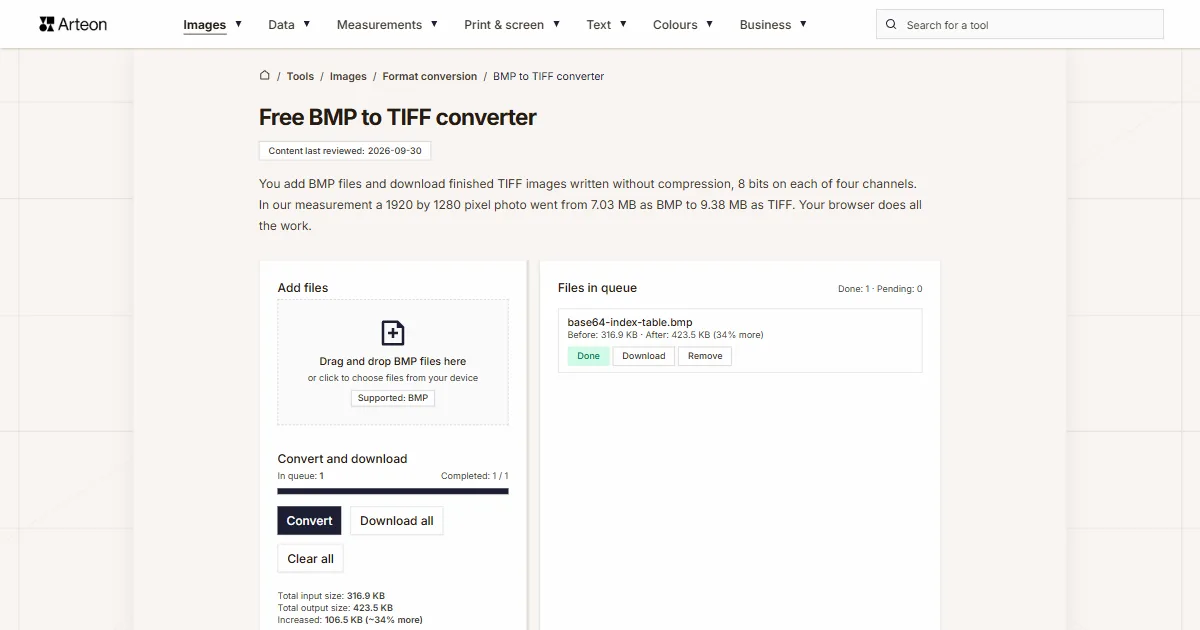
You add BMP files and download finished TIFF images written without compression, 8 bits on each of four channels. In our measurement a 1920 by 1280 pixel photo went from 7.03 MB as BMP to 9.38 MB as TIFF. Your browser does all the work.
Files in queue
What is BMP and what is TIFF?
A BMP file opens with two headers. The first one gives the size of the file and the point where the image data begins. The second one describes the width, the height, the number of bits per pixel and the way the data is stored. Right after them come the rows of pixels, and in the palette variants a colour table as well. Microsoft documentation describes this layout.[1]
The format was created for OS/2 and moved on to Windows, where it stayed for good.[2] Office scanners, measuring devices and older graphics software still write it today. In the 24-bit variant every pixel gets one byte for red, one for green and one for blue. When you need a bitmap made out of a photograph, it is prepared by the JPG to BMP converter.
TIFF is built along completely different lines. The name stands for Tagged Image File Format, meaning an image file described by tags. Each tag carries a single piece of information: the size of the image, the number of channels, the number of bits per channel or the way the data is arranged. Revision 6.0 of 3 June 1992 allows the data to sit uncompressed, and next to that it allows PackBits, LZW, CCITT and JPEG compression.[3]
The format itself was developed in 1986 by Aldus Corporation together with Microsoft and Hewlett-Packard, and the rights later passed to Adobe.[4] In print shops, photo studios and archives TIFF is still the standard, so swapping one format for the other leads from a system file to the file a studio expects.
What comes out of a BMP to TIFF conversion?
The converter reads the BMP file in your browser, moves the image onto a canvas and writes a TIFF file out of it. Every pixel takes four bytes in the result: one for the red channel, one for green, one for blue and one for transparency. The image data sits in the file uncompressed, and all the rows form one continuous block.
The writing itself is done by UTIF.js, a TIFF encoder written in JavaScript and running on your own computer.[5] It is needed because browsers do not write TIFF out of a canvas: on 6 September 2026 we asked Chromium 148 and Firefox 150 for such a file and each of them handed back a PNG image.
Reading the input file is handled by the browser itself, and it copes with six variants of BMP storage: 1, 4, 8, 16, 24 and 32 bits per pixel. We checked this on a single photo saved six different ways. All six files came out of the converter as TIFF files of identical weight, because the weight of the result follows from the size of the image alone.
When you want a smaller file that still keeps every pixel, the same image is prepared by the BMP to PNG converter. An image meant for a web page is written by the BMP to WebP converter.
How much does a file weigh before and after BMP to TIFF conversion?
| Test file | Dimensions in pixels | BMP | TIFF | Change |
|---|---|---|---|---|
| Landscape photo | 1920 × 1280 | 7.03 MB | 9.38 MB | 33 percent larger |
| Product photo on a light background | 1200 × 1200 | 4.12 MB | 5.49 MB | 33 percent larger |
| Screenshot with text | 1440 × 900 | 3.71 MB | 4.94 MB | 33 percent larger |
| Logo with a transparent background | 1024 × 1024 | 4.00 MB | 4.00 MB | unchanged |
| Icon with transparency | 256 × 256 | 192.1 KB | 257.0 KB | 34 percent larger |
| Text page, as from a scanner | 1654 × 2339 | 11.1 MB | 14.8 MB | 33 percent larger |
How much does the TIFF file weigh after conversion?
You can work out the weight of both files before the conversion, and the result does not depend on what the image shows.
Let us start on the BMP side. Microsoft documentation gives the formula for the length of a single row: the number of bits in a row is rounded up to a full four bytes.[6] A row of a photo 999 pixels wide therefore takes 3,000 bytes, although the pixels themselves need 2,997. On top of all the rows come 54 bytes of header, and in the palette variants the colour table as well.
On the TIFF side the sum is shorter. You multiply the width of the image by its height, multiply the result by four bytes and add a thousand bytes of header.
width in pixels × height in pixels × 4 B + 1000 B = weight of the TIFF file
Let us follow both sums on a scan measuring 3000 by 2000 pixels. One row holds 3,000 pixels of three bytes each, which is 9,000 bytes, and at that width nothing needs padding. There are 2,000 rows, so the pixels alone take 18,000,000 bytes. Together with the header the BMP file weighs 18,000,054 bytes.
The same image holds 6,000,000 pixels, and each of them gets four bytes in the TIFF file. The image data therefore takes 24,000,000 bytes, and with the thousand bytes of header that comes to 24,001,000 bytes. The converter queue prints both values as Before: 17.2 MB · After: 22.9 MB (33% more).
The whole difference comes from the fourth channel. BMP gives three bytes to a pixel and TIFF gives four, so the weight grows by a third, and you see the same growth at every image size.
When the finished files are to take less room on the disk, the image from a TIFF is moved on by the TIFF to PNG converter, and for photographs by the TIFF to JPG converter.
What happens to BMP files of different colour depth?
| How the BMP is stored | Weight of the BMP file | Weight of the TIFF file | Difference in the queue |
|---|---|---|---|
| 1 bit per pixel, two colours | 96.1 KB | 3.00 MB | 3099% more |
| 4 bits per pixel, 16 colours from a palette | 384.1 KB | 3.00 MB | 700% more |
| 8 bits per pixel, 256 colours from a palette | 769.1 KB | 3.00 MB | 300% more |
| 16 bits per pixel | 1.50 MB | 3.00 MB | 100% more |
| 24 bits per pixel | 2.25 MB | 3.00 MB | 33% more |
| 32 bits per pixel | 3.00 MB | 3.00 MB | 0% |
How does BMP differ from TIFF?
| Property | BMP | TIFF |
|---|---|---|
| Full name | Windows Bitmap | Tagged Image File Format |
| MIME type | image/bmp | image/tiff |
| File extension | .bmp | .tiff and .tif |
| Compression allowed by the specification | RLE for 4-bit and 8-bit storage | PackBits, LZW, CCITT and JPEG |
| How the image is stored | Rows of pixels one after another | Tags describing the image plus a data block |
| Colour depth | 1, 4, 8, 16, 24 and 32 bits per pixel | 8, 16 and 32 bits per channel |
| Transparency | In 32-bit storage with a V4 or V5 header | A fourth channel next to the three colour channels |
| Display in the browser | All browsers | Safari |
| File from this converter | Input format | Uncompressed, 8 bits on each of four channels |
How do you convert BMP to TIFF?
Add your BMP files
Drag the images onto the Add files field or click that field and pick the files from your disk. You can choose a whole batch at once — the converter puts it in the queue on the right, together with the weight of every file.Click Convert
The Convert button sits in the Convert and download section. The progress bar shows how many files are already finished, and every row of the queue gets its own status: Pending, Processing and Done.Download the TIFF files
A single file is saved with the Download button next to its name, and the whole batch with the Download all button. The file name stays the same and the extension changes to .tiff.
What to look out for when converting BMP to TIFF?
Single files up to 100 MB
The converter accepts BMP files weighing up to 100 MB. A heavier file stops with the message File is too large (max 100 MB), so you know at once where it stopped. A hundred megabytes holds a 24-bit scan measuring 6800 by 5100 pixels.Transparency from a V4 or V5 header
A BMP stored in 32 bits with a V4 or V5 header carries an alpha channel mask, and transparency passes from it into the fourth channel of the TIFF file. We checked this on our own test file: the transparent half of the image came out of the converter with zero opacity. A file with a plain BITMAPINFOHEADER is read by the browser as fully opaque.The image size stays as it was
The photo keeps its size in pixels up to a side of 16,384 pixels and an area of 268 million pixels. An image above that threshold is written by the converter at a proportionally smaller size.Print resolution is set in your software
The tags of the finished file hold the number 72 together with a note that the unit of measurement is left undefined. You therefore enter the print resolution in the graphics program you open the file in, or set it earlier in the scanner software.The finished file opens in graphics software
TIFF files are read by Adobe Photoshop, GIMP, Affinity, IrfanView and the macOS system preview. Among browsers the image is shown by Safari.The files stay with you
The whole conversion is done by code the browser runs on your own computer. The images stay on your disk, so you can also put confidential scans through this converter.
Where is a TIFF file required?
Institutions that keep digitised collections describe the file format in a separate document, and TIFF keeps coming up in them. The Technical Guidelines for Digitizing Cultural Heritage Materials, used by United States federal agencies, name TIFF 6.0 as the master file format and accept it either uncompressed or with DEFLATE compression.[9]
A file from this converter meets the first of those conditions right away: it is a single-page TIFF 6.0 with the image data left uncompressed. The scanning resolution is set earlier, in the scanner software, and that is where you enter the 300 or 400 dots per inch the guidelines ask for.
The same group of recipients includes print shops that accept material in TIFF files and photo studios that work on files without lossy compression. If you are assembling one document out of many scans, that is done by the BMP to PDF converter.
Convert other files to TIFF
Convert BMP to other formats
Sources
- Bitmap Storage — Microsoft Learn
- BMP file format — Wikipedia
- TIFF Revision 6.0, 3 June 1992 — Adobe Developers Association
- TIFF — Wikipedia
- UTIF.js, a TIFF encoder and decoder for the browser — Photopea
- BITMAPINFOHEADER — Microsoft Learn
- Image file type and format guide — MDN Web Docs
- Can I use: AVIF, WebP, HEIF — caniuse.com
- Technical Guidelines for Digitizing Cultural Heritage Materials, 3rd edition, May 2023 — Federal Agencies Digital Guidelines Initiative
The file sizes in the tables were measured by running finished images through this converter in a browser, and we report them the way the tool counts them. What the page says about either format rests on the sources listed above.
Content last reviewed: · written and checked by the Arteon team
Common questions about converting BMP to TIFF
Why does the TIFF file weigh more than the BMP file?
A 24-bit BMP gives three bytes to a pixel, while a TIFF file from this converter gives four: three for colour and one for transparency. On the same image that means a third more. A 3000 by 2000 pixel scan goes in as 17.2 MB and comes out as 22.9 MB.
Does the image quality change when BMP becomes TIFF?
Pixel values pass into the new file unchanged, because the data sits there without compression and without any reduction of the colour count. The writing itself is checked by a test that encodes an image, reads it back and compares every byte.
Which BMP variants does the converter accept?
The browser reads files stored at 1, 4, 8, 16, 24 and 32 bits per pixel, including the variants that use a colour palette. All six give a TIFF file of the same weight, because the weight of the result follows from the size of the image in pixels.
What happens to transparency from a 32-bit BMP?
Transparency stays when the file carries a BITMAPV4HEADER or BITMAPV5HEADER with an alpha channel mask — the opacity values go into the fourth channel of the TIFF file. A 32-bit file with a plain BITMAPINFOHEADER is read by the browser as fully opaque, and that is how it comes out of the converter.
How many BMP files can I convert at once?
You add as many files to the queue as you need and the converter goes through them one by one. A single file may weigh up to 100 MB. The whole batch is saved with one Download all button.
Do my files go to a server?
The conversion happens entirely on your device, in code the browser runs. The files stay on your disk, and once you close the tab the browser releases the memory it held the images in.
Which program opens the finished TIFF file?
The file is read by Adobe Photoshop, GIMP, Affinity, IrfanView and the macOS system preview. We also checked it with the libtiff library, which read the image size, four channels of 8 bits and pixel values matching what was written. Among browsers the image is shown by Safari.
Does the TIFF file from the converter carry a print resolution?
The tags of the file hold the number 72 together with a note that the unit of measurement is left undefined. You set the print resolution in the graphics program or in the layout program you open the file in.
How do I get from a TIFF file back to an ordinary image?
The image from a TIFF file is moved on by the TIFF to PNG converter when you want to keep every pixel, or by the TIFF to BMP converter when the file is going into older software. We have gathered every pair from this group on the Format conversion subcategory page.
Does the converter work on a phone?
Yes. The converter uses the same browser features on a phone as on a computer, and the page layout adapts to the width of the screen. With large files the working time depends on the memory of the device.
Help us improve our tools
Got an idea for a new feature, found a bug or want to suggest another tool? Write to us.
Try our other useful tools


Meta title & description checker
Check title and description length in pixels. Live Google preview and optimization tips.

PNG to JPG
Convert PNG files to JPG in your browser. No file limits, no signup, no server uploads.

Favicon generator
Create a complete favicon.ico set for your website from one image. All required sizes, no login.

Color palette generator
Generate 17 palettes from one color: monochromatic, complementary, triadic and more. HEX codes.

WebP to JPG
Convert WebP files to universally compatible JPG. Works in every app and platform.

Color contrast checker
Check text and background contrast per WCAG 2.1 AA and AAA. Automatic color correction.

Free QR code generator
Create a QR code for a website, vCard business card or print. Export PNG and SVG, no registration.

Word & character counter
Count words, characters with and without spaces, sentences, paragraphs and the average sentence length.

Lorem Ipsum Generator
Free Lorem Ipsum generator — 8 text styles, paragraphs, sentences or words. Copy in one click.