BMP to WebP converter
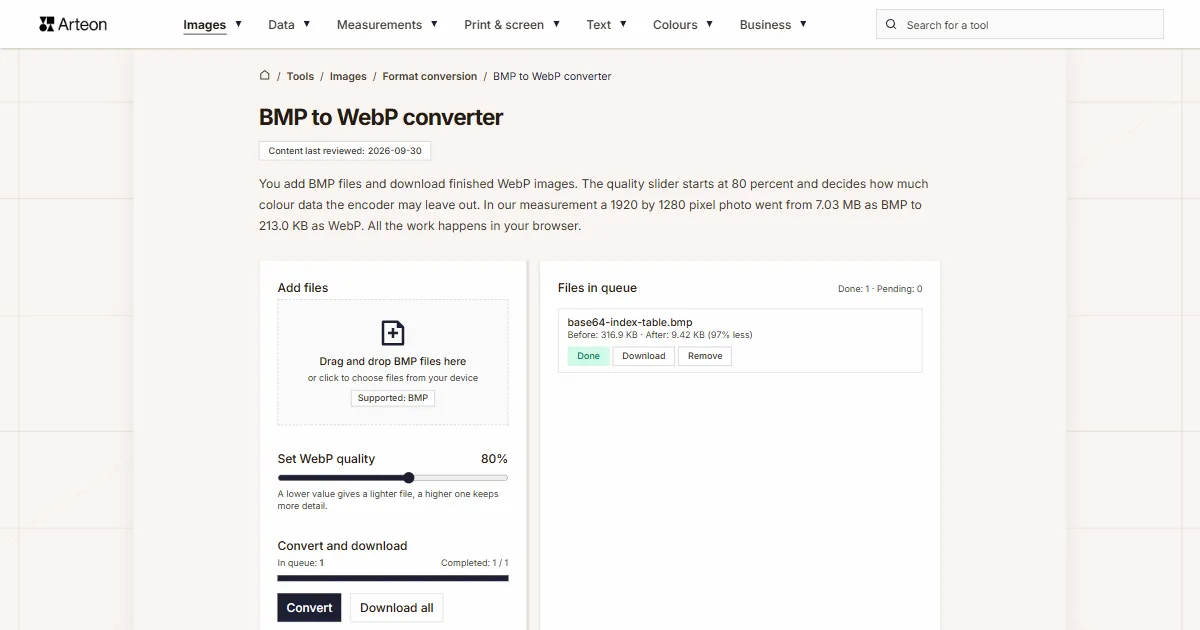
You add BMP files and download finished WebP images. The quality slider starts at 80 percent and decides how much colour data the encoder may leave out. In our measurement a 1920 by 1280 pixel photo went from 7.03 MB as BMP to 213.0 KB as WebP. All the work happens in your browser.
Files in queue
What is BMP, and what is WebP?
A BMP file is a list of colour values, one after another, in the order the pixels sit on the image. The format grew out of OS/2, moved into Windows and stayed there.[1] In the 24-bit variant a single pixel takes three bytes: one each for red, green and blue. Every pixel is written out in full, so the size of the file follows from the dimensions of the image alone. A photo of 3000 by 2000 pixels always weighs 18,000,054 bytes in this format, which is 17.2 MB.
WebP came out of Google and was announced on 30 September 2010.[2] It describes the same image in a completely different way. For each block of pixels it works out a prediction from the neighbours, stores only the difference against that prediction, and packs the result into a RIFF container. The format has two modes. Lossy mode carries the image as 8-bit Y'CbCr 4:2:0, which means brightness is stored for every pixel and colour once per group of four.[3] Lossless mode works on full RGBA.
Since November 2024 WebP has its own IETF document, RFC 9649, describing the container, the chunks and the limits.[4] That is also where the size ceiling comes from: a WebP image is at most 16,383 pixels on a side. The format carries an 8-bit alpha channel per pixel and animation built from frames. This converter writes a still image in lossy mode, and that is the mode the quality slider controls.
How do you convert BMP to WebP?
Drag your BMP files onto the Add files box, or click the box and pick the images from your drive. You can add many files at once. Then press Convert.
Above the buttons sits the Set WebP quality slider. It runs from 60 to 95 percent and starts at 80. The value tells the encoder how much colour detail it may leave out, so every move of the slider changes the size of the finished file. What each setting does to three different images is in the slider measurement table.
You can download the finished images one by one with the Download button on the queue row, or all of them at once with Download all. Clear all empties the whole queue, and the Remove label on a row takes a single file out of it.
In the queue on the right every file shows its size before and after conversion, together with the difference in percent. Our 1440 by 900 pixel screenshot printed Before: 3.71 MB · After: 45.4 KB (99% less) there. The same summary for the whole batch sits under the buttons, on the Saved line.
The write itself is done by the browser with its own WebP encoder, and the quality setting works because WebP is a lossy format.[5] Your file stays on your device from the first click to the end of the job. Under the converter sits a format switch reading BMP to WebP. Clicking either format opens a list, and picking from it takes you to the page of the converter for that pair. All the pairs in this group are also collected on the Format conversion page.
Why is a WebP file so much smaller than a BMP?
The size of a BMP file can be worked out in advance, and the answer has nothing to do with what the picture shows. Each pixel takes three bytes and each row of the image is padded with zeros to a full four bytes; Microsoft documentation gives the formula for it.[6] On top of that come 54 bytes of header.
Follow it through on a photo of 3000 by 2000 pixels. One row holds 3000 pixels at three bytes each, which is 9000 bytes. At that width nothing needs padding, because 9000 divides by four. There are 2000 rows, so the pixels alone take 18,000,000 bytes. With the header the file weighs 18,000,054 bytes, which is the 17.2 MB the tool reports.
WebP in lossy mode saves space in three ways at once. First it predicts the value of each block of pixels from its neighbours and stores only the difference against the prediction. Second it carries the image as Y'CbCr 4:2:0, so colour is recorded once per group of four pixels while brightness stays per pixel.[3] Third it leaves out the detail the quality setting allows it to leave out.
That is where the spread in our measurement comes from. When the same image has to come out untouched pixel for pixel, the BMP to PNG converter is the one to use.
How much does a file weigh before and after BMP to WebP conversion?
| Test file | Dimensions in pixels | BMP | WebP | Change |
|---|---|---|---|---|
| Landscape photo | 1920 × 1280 | 7.03 MB | 213.0 KB | 33.8 times smaller |
| Product photo on a light background | 1200 × 1200 | 4.12 MB | 237.5 KB | 17.8 times smaller |
| Screenshot with text | 1440 × 900 | 3.71 MB | 45.4 KB | 83.7 times smaller |
| Logo with a transparent background | 1024 × 1024 | 4.00 MB | 16.1 KB | 255 times smaller |
| Icon with transparency | 256 × 256 | 192.1 KB | 3.46 KB | 55.5 times smaller |
| Text page, as from a scanner | 1654 × 2339 | 11.1 MB | 142.6 KB | 79.5 times smaller |
What does the quality slider change in a WebP file?
| Slider setting | Photo 1920 × 1280 | Screenshot 1440 × 900 | Graphic 1024 × 1024 | Average colour shift |
|---|---|---|---|---|
| 60% | 145.3 KB | 36.0 KB | 12.9 KB | 2.74 |
| 70% | 164.3 KB | 38.6 KB | 13.8 KB | 2.55 |
| 80%, the default | 213.0 KB | 45.4 KB | 16.1 KB | 2.18 |
| 90% | 356.2 KB | 60.2 KB | 22.5 KB | 1.57 |
| 95% | 559.7 KB | 74.8 KB | 28.7 KB | 1.21 |
How does BMP differ from WebP?
| Format property | BMP | WebP |
|---|---|---|
| Compression | None at 24 bits per pixel, lossless RLE only at 4 and 8 bits | Lossy through VP8 or lossless through VP8L |
| Size of a 3000 × 2000 image | Always 18,000,054 bytes | Depends on the image content and the quality setting |
| How colour is stored | A full value at every pixel | Brightness at every pixel, colour once per group of four in lossy mode |
| Transparency | An alpha channel mask in the BITMAPV4HEADER and later headers | 8-bit alpha channel per pixel |
| Animation | No | Yes, frames inside the RIFF container |
| Largest image | 32,767 or 2,147,483,647 pixels a side, depending on the header version | 16,383 pixels a side |
| Origin | OS/2, reached Windows in 1990 with version 3.0 | Google, 30 September 2010 |
| Browser support | Every version of Chrome, Firefox, Safari and Edge in use today | Every version of Chrome, Firefox, Edge and Opera in use today, Safari from 14 on macOS 11 |
What does the converter do with a BMP file?
Eight things worth knowing before you drop a larger batch of images into the queue.
It reads five BMP variants
We checked them one by one on the same 800 by 600 pixel image: 24-bit with rows from the bottom, 24-bit with rows from the top, 8-bit with a palette, and two 32-bit files, one with the 40-byte header and one with the version five header. All five were read, and all five produced an 800 by 600 pixel image.The pixel count stays the same
A 3000 by 2000 pixel photo comes out as a WebP measuring 3000 by 2000 pixels. We read those values back from the finished file after loading it into the browser again. Only the way of storing the image changes; the framing and the resolution are left alone.Colours shift slightly
A lossy write leaves out part of the colour data, so the finished file carries colours close to the original. At the default 80 percent setting the average shift on our 1920 by 1280 pixel photo came to 2.18 values out of 255. The highest slider setting brings that number down to 2.83.Transparency carries over
Our 32-bit test file with the version five header had 196,104 fully transparent pixels out of 480,000. The finished WebP kept every one of them, because the format carries an 8-bit alpha channel.The write takes a fraction of a second
The encoder runs on your own computer, so the time depends on its power. In our measurement a 1920 by 1280 pixel photo was written in 0.61 seconds. A 1024 by 1024 pixel graphic was ready in 205 milliseconds. All six images went through the queue in 1.8 seconds, and the bar above the buttons shows how many files are done.Up to 100 MB per file
That is what the converter takes from a single file. Anything larger brings up the message File is too large (max 100 MB). An uncompressed BMP of roughly 5900 by 5900 pixels fits inside that limit.Very large images are fitted to the format limit
A WebP image is at most 16,383 pixels on a side, and that ceiling comes from the format specification itself. Anything wider or taller is scaled down proportionally so the whole picture fits in the result. The browser canvas limit of roughly 268 million pixels in total applies separately.The file stays on your device
The page code loads the image in your browser, draws it on a canvas and writes it from there as WebP. Nothing goes to a server, and once you close the tab the files are gone from the browser memory.
When is WebP the right choice, and when is another format?
The image is going on a website
This is where WebP does its best work: the file comes out many times lighter than a bitmap, and browsers have read it for years. The MDN guide lists it as a good choice for both photographs and animated graphics.[7]The same image as AVIF
The newer format writes the same image through the BMP to AVIF converter. When you are after the smallest file, compare both results on your own image.Every pixel has to stay untouched
For working material that will go back into an editor, the value of each pixel is what counts. The BMP to PNG converter gives you that, because PNG reproduces the image exactly as it was stored.Everyone on the receiving end has to open it
A photo sent by e-mail or uploaded into an older system travels more easily as JPG, since practically every graphics program and every office suite reads that format. The BMP to JPG converter prepares it.A scan is going by e-mail or to an office
A scanned page is easier to send as a PDF than as an image. The BMP to PDF converter builds one: each image goes on its own A4 page, with the orientation matched to the proportions of the photo.The source file is in another format
When the image is already in a different format, the same WebP output comes from the PNG to WebP converter and the JPG to WebP converter. The quality slider works the same way in both.The other way round
Sometimes a finished WebP has to go back to being a bitmap, because the program at the other end opens this format and no other. The WebP to BMP converter handles that: 24 bits per pixel, no compression. The same output comes from the JPG to BMP converter and the PNG to BMP converter when the source file is in another format.
Convert other files to WebP
Convert BMP to other formats
Sources
- BMP file format — Wikipedia
- WebP — Wikipedia
- WebP frequently asked questions — Google for Developers
- WebP Image Format (RFC 9649) — IETF
- HTMLCanvasElement: toBlob() method — MDN Web Docs
- BITMAPINFOHEADER (wingdi.h) — Microsoft Learn
- Image file type and format guide — MDN Web Docs
- Can I use: AVIF, WebP, HEIF — caniuse.com
- WebP Compression Study — Google for Developers
The file sizes in the tables were measured by running finished images through this converter in a browser, and we report them the way the tool counts them. What the page says about either format rests on the sources listed above.
Content last reviewed: · written and checked by the Arteon team
Common questions about converting BMP to WebP
How much lighter will my file be?
The content of the image decides, and the spread is wide. The more smooth surface and repeated runs of pixels an image holds, the harder the compression works.
Which slider setting should I pick?
The default 80 percent works for most photographs and graphics heading for a website. For material where the detail matters, a product photo viewed enlarged for instance, move the slider to 90 or 95 percent. The average colour shift then drops from 2.18 to 1.21 values out of 255. For thumbnails and previews go down to 60 percent, where the file comes out lightest of the whole range.
Will converting BMP to WebP cost me quality?
The converter writes WebP in lossy mode, so part of the colour data is set aside. We measured how much. At the default 80 percent setting the average channel shift on a 1920 by 1280 pixel photo came to 2.18 out of 255. The largest single difference in the same file reached 100. The dimensions and the pixel count stay as they were. When you need a write that is faithful to the value of every pixel, reach for the BMP to PNG converter.
What happens to transparency from a 32-bit BMP?
It depends on the header version in the source file. With the version five header, which carries the alpha channel mask, transparency is read and carried over: our test file had 196,104 transparent pixels out of 480,000 and the finished WebP kept every one. With the classic 40-byte header the fourth byte of a pixel does not describe opacity, and the image comes out fully opaque.
Do my files go to a server?
No. The page code loads the image in your browser, draws it on a canvas (Canvas API) and writes it from there as WebP. The file stays on your device for the whole job, and once you close the tab it is gone from the browser memory.
Will a WebP file open on any device?
WebP is read by Chrome, Edge, Firefox and Opera in all of their versions. Safari on macOS needs version 14 or newer along with macOS 11 or newer.[7] Graphics programs and file managers joined that list later than browsers, so when you are sending to someone on older software, a file from the BMP to JPG converter is the safer choice.
How many files can I convert at once?
You can add as many files to the queue as you like; the tool works through them in order and shows the progress above the buttons. Six images weighing 30.1 MB together went through the queue in 1.8 seconds for us. A single file may weigh up to 100 MB, and the total number of files depends on the memory of your device.
How does WebP differ from JPG on the same photo?
Both formats pack the image lossily, but WebP does it more effectively. A Google study on three photo sets showed that at the same value of the SSIM similarity index a WebP file is 25 to 34 percent smaller than a JPEG.[9] WebP also carries an alpha channel, so transparent areas stay transparent in the finished file.
Help us improve our tools
Got an idea for a new feature, found a bug or want to suggest another tool? Write to us.
Take a look at our other tools


Meta title & description checker
Check title and description length in pixels. Live Google preview and optimization tips.

PNG to JPG
Convert PNG files to JPG in your browser. No file limits, no signup, no server uploads.

Favicon generator
Create a complete favicon.ico set for your website from one image. All required sizes, no login.

Color palette generator
Generate 17 palettes from one color: monochromatic, complementary, triadic and more. HEX codes.

WebP to JPG
Convert WebP files to universally compatible JPG. Works in every app and platform.

Color contrast checker
Check text and background contrast per WCAG 2.1 AA and AAA. Automatic color correction.

Free QR code generator
Create a QR code for a website, vCard business card or print. Export PNG and SVG, no registration.

Word & character counter
Count words, characters with and without spaces, sentences, paragraphs and the average sentence length.

Lorem Ipsum Generator
Free Lorem Ipsum generator — 8 text styles, paragraphs, sentences or words. Copy in one click.