AVIF to WebP converter
Every current browser reads WebP. AVIF is younger and only reached Edge in 2024, so images get moved to WebP when they have to open everywhere. In our measurement a 1920 by 1280 pixel photo went from 169.9 KB as AVIF to 203.6 KB as WebP.
Files in queue
What is WebP, and what is AVIF?
WebP was announced on 30 September 2010. Google built it on the VP8 video codec, a way of storing pictures that arrived with its purchase of On2 Technologies, which makes the format a close relative of the WebM container.[1] It had one job: to give the same picture in a smaller file than JPG and PNG, the two formats every website rested on at the time.[1] It has two write modes, lossy and lossless, it stores an alpha channel, meaning the transparency of every single point, it can hold animation, and it takes images up to 16,383 pixels on a side. Colour is described with eight bits per channel.[2]
AVIF is a decade younger and stands on a newer codec. The Alliance for Open Media wrote the AV1 Image File Format specification to describe how a single AV1 frame is stored in a HEIF container — the same container an iPhone uses for HEIC photos. Version 1.2.0 of that document is dated 16 October 2025 and it sets out what the format can do: 8, 10 or 12 bits per colour channel, a wide colour gamut, high dynamic range, an alpha channel and image sequences.[3]
Both formats therefore describe exactly the same thing: a grid of coloured points. What they differ in is how tightly they can pack it. MDN gives that difference as a median measured over one set of photographs: AVIF halves a JPG file, WebP takes about thirty percent off it.[2] That difference is where everything that happens to file weight in this conversion comes from.
How do you turn AVIF into WebP?
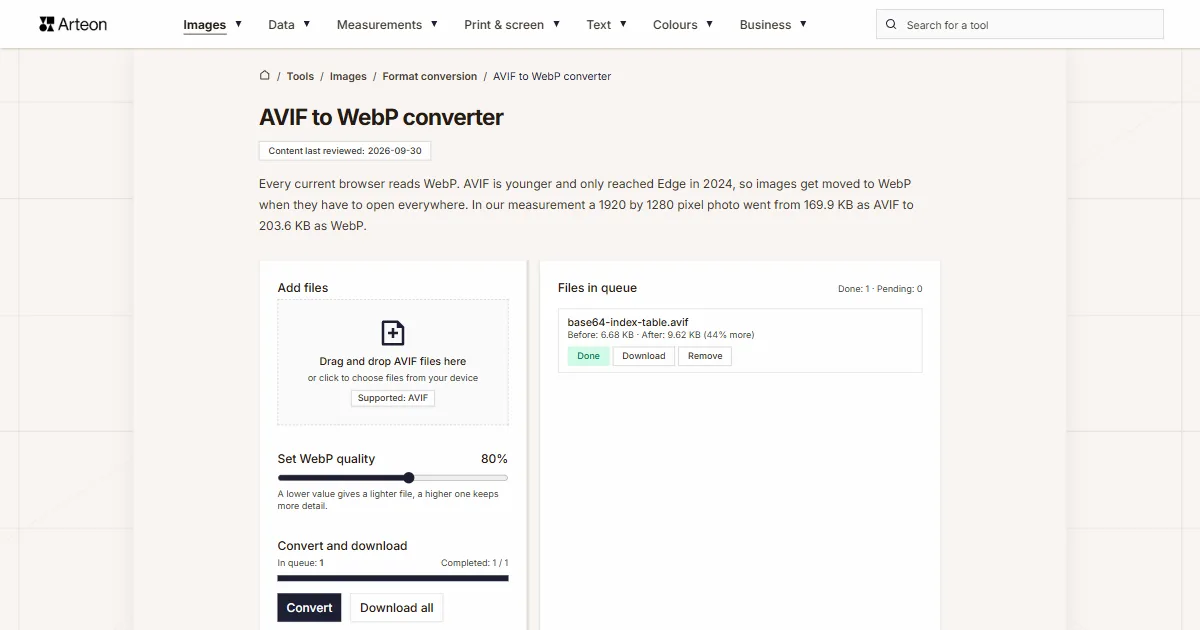
Drag your AVIF files onto the Add files box, or click it and pick the images from your disk. Below the box sits the Set WebP quality slider, which starts at 80 percent. Once the quality suits you, press the Convert button.
You can save finished images one at a time with the Download label on a queue row, or all at once with the Download all button. Clear all empties the whole queue, and the Remove label takes a single file out of it.
In the queue on the right, every file shows its weight before and after conversion together with the difference in percent. The same summary for the whole batch sits under the buttons: Total input size, Total output size, and below them a line reading Increased or Saved, depending on which way the weight went.
All the work happens on your own machine. The page code reads the AVIF file, draws it onto the browser canvas, the element a page paints pictures on, and writes the WebP from there. The image stays on your device from the first click to the last, and it leaves memory when you close the tab.
Under the converter sits a format switcher reading AVIF to WebP. Clicking either format opens a list, and picking from it takes you to the page for that pair.
Why does the WebP file weigh more than the AVIF?
Both encoders work the same way. Each one predicts the contents of the next patch of the image from the patches around it and stores only the difference, and in lossy mode it throws away detail the eye will not catch in ordinary viewing. What separates them is how accurate that prediction is.
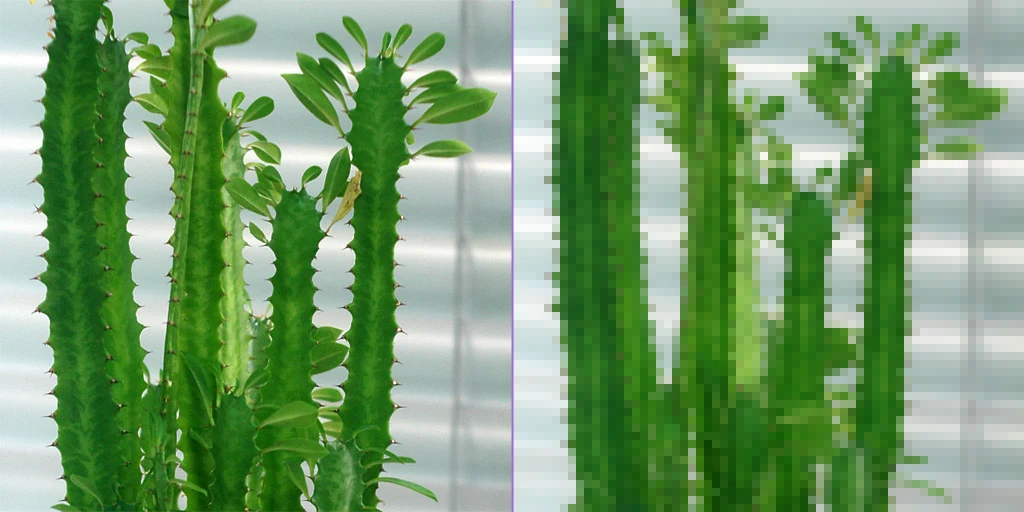
WebP uses the VP8 codec, which dates from 2008. AVIF stands on AV1, a decade newer. Those ten years of work on prediction show up in the finished file, and that is exactly why an image moved from AVIF to WebP takes more room on disk than it did before.
Our measurement says how much room that is. We ran eight files through this converter, all at the default slider setting. The logo with the transparent background grew most, by 125 percent.
A line reading Increased then appears under the buttons, with the number of kilobytes and the percentage the batch put on. The quality slider gives you control over that: at a lower setting the WebP file can come out lighter than the AVIF it started from.
How much does a file weigh before and after AVIF to WebP conversion?
| Test file | Dimensions in pixels | AVIF | WebP | Change |
|---|---|---|---|---|
| Landscape photo | 1920 × 1280 | 169.9 KB | 203.6 KB | 20 percent larger |
| High-resolution camera photo | 4000 × 2667 | 496.5 KB | 570.2 KB | 15 percent larger |
| Product photo on a light background | 1200 × 1200 | 165.0 KB | 220.3 KB | 34 percent larger |
| Leaf macro with fine detail | 1600 × 2015 | 516.2 KB | 935.7 KB | 81 percent larger |
| Screenshot with text | 1440 × 900 | 41.4 KB | 45.3 KB | 9 percent larger |
| Logo with a transparent background | 1024 × 1024 | 12.8 KB | 28.7 KB | 2.2 times larger |
| Icon with transparency | 256 × 256 | 3.56 KB | 5.39 KB | 51 percent larger |
| Text page, as from a scanner | 1654 × 2339 | 82.2 KB | 143.6 KB | 75 percent larger |
How does the quality slider change the weight of the WebP?
| Slider setting | Weight of the WebP file | What the queue shows |
|---|---|---|
| 60% | 139.4 KB | 18% less |
| 70% | 158.6 KB | 7% less |
| 80% (default) | 203.6 KB | 20% more |
| 85% | 246.8 KB | 45% more |
| 90% | 326.2 KB | 92% more |
| 95% | 483.0 KB | 184% more |
AVIF and WebP side by side
| Format feature | AVIF | WebP |
|---|---|---|
| Lossy compression | Yes | Yes |
| Lossless compression | Yes | Yes |
| Alpha channel, that is transparency | Yes | Yes |
| Animation | Yes, as an image sequence | Yes, through the ANIM and ANMF chunks |
| Sample depth per channel | 8, 10 or 12 bits | 8 bits |
| High dynamic range (HDR) | Yes | No |
| EXIF metadata | Yes | Yes |
| The browser version that first reads it | Chrome 85+, Firefox 93+, Edge 121+, Safari 16.4+ | Chrome 32, Firefox 65, Safari 14 on macOS Big Sur, Edge 18 |
What does the converter do with an AVIF file?
Eight things worth knowing before you drop a larger batch of photographs into the queue.
The pixel count stays the same
An image of 2400 by 1600 pixels comes out as a WebP of 2400 by 1600 pixels. Only the way it is stored changes, while the framing and the resolution are left alone.Transparency comes through unchanged
We checked this on a graphic of 800 by 600 pixels. In it, 302,713 points were fully transparent and another 63,581 were partly so. After the WebP was written we compared the opacity of all 480,000 points in the image, and every one matched the input exactly. That is how the format itself works: even inside a lossy file, the alpha channel is stored losslessly.[6]The slider decides how heavy the result is
The range runs from 60 to 95 percent and starts at 80. The hint under the slider says that 80–85% is a good balance, and the table of slider settings shows what that choice costs in kilobytes.Colour is written with eight bits
The browser canvas works with eight bits per channel, and a lossy WebP holds an image at exactly that depth. An AVIF file written in 10 or 12 bits therefore gets an eight-bit equivalent. Photographs and screen graphics look the same afterwards, because a typical monitor shows eight bits per channel too.Animation comes out as a still image
In this tool the encoder is handed a single browser canvas, so it writes a single frame. We checked the finished file: the WebP comes out with one frame and no sequence.Only the picture goes into the WebP
The camera model, the time of the shot and the GPS coordinates stay in the original AVIF file. We checked this on a file with camera data written into it: the finished WebP carried the pixels alone, so you can pass it on without checking what else is inside.Single files of up to 100 MB
That is what the converter takes from one file. Anything larger brings up the message File is too large (max 100 MB). How many files fit in the queue then depends only on your browser's memory, because the images are processed one after another.Very large images are fitted to the canvas
The browser canvas holds 16,384 pixels on a side and roughly 268 million pixels in total, while the WebP format itself takes an image of up to 16,383 pixels per side. Anything past that limit is scaled down proportionally so that the whole picture fits into the result.
When to pick WebP, and when another format?
The image has to open everywhere
WebP is read by Chrome from version 32, Firefox from 65, Edge from 18 and Safari from 14. AVIF only reached Safari in 16.1 and Edge in 121, so on older kit WebP will show up where AVIF needs a newer browser.The photo is going onto a WordPress site
The WordPress media library has taken WebP files since version 5.8, released on 20 July 2021.[7] You upload them there exactly the way you upload a JPG or a PNG.The graphic has a transparent background
A logo, an icon and a drawing with the background cut out all need an alpha channel, and WebP stores one losslessly. Put the result on a coloured background and it keeps its shape.The file still has editing ahead of it
Opening and saving in a lossy format again and again slowly eats into the detail. When the image still has an editor to visit, the AVIF to PNG converter is the easier choice, because PNG writes losslessly.A photograph with no transparent background
When the file has to land in a program that knows only the classic formats, JPG remains the safest bet. The AVIF to JPG converter will take you there.The road back
Finished WebP files can be slimmed down with the WebP to AVIF converter. It is the same pair of formats, only turned around.
Convert other files to WebP
Convert AVIF to other formats
Sources
- WebP — Wikipedia
- Image file type and format guide — MDN Web Docs
- AV1 Image File Format (AVIF), version 1.2.0 — Alliance for Open Media
- Can I use: AVIF, WebP, HEIF — caniuse.com
- WebP image format — Can I use
- WebP Container Specification — Google for Developers
- WordPress 5.8 — WordPress.org
The file sizes in the tables were measured by running finished images through this converter in a browser, and we report them the way the tool counts them. What the page says about either format rests on the sources listed above.
Content last reviewed: · written and checked by the Arteon team
Common questions about turning AVIF into WebP
Why does the WebP come out larger than the AVIF?
Because AVIF squeezes an image harder. Over the same set of photographs AVIF halves a JPG file while WebP takes about thirty percent off it, so moving an image from one format to the other puts weight on. In our measurement the files grew by between 9 and 125 percent at the default slider setting.
How do I make the WebP file smaller after conversion?
Take the Set WebP quality slider below its default 80 percent.
Is the transparent background from the AVIF file kept?
Yes. The alpha channel passes into the WebP pixel by pixel and keeps the exact opacity values, because the format stores transparency losslessly even when it stores the picture itself with loss. A cut-out background stays cut out, and semi-transparent shadows keep their opacity.
Do my files go to a server?
No. The conversion is done by the page code in your own browser, using the canvas (Canvas API). The image stays on your device the whole time, and it leaves the browser's memory when you close the tab.
How many files can I convert at once?
You can add as many files to the queue as you like, and the tool works through them one by one while showing progress above the buttons. A single file can weigh up to 100 MB, and the total number of files depends on your device's memory.
What happens to an animated AVIF file?
The result is a still WebP image with one frame. In this tool the encoder is handed a single canvas, so it writes one frame rather than a whole sequence.
Does the converter work on a phone?
Yes, the page layout adapts to the width of the screen. What you need is a browser that reads AVIF files, which on a phone means Chrome from version 85 or Safari from version 16.1.
My program will not open a file with an .avif extension. What now?
Run that file through this converter and carry on working in WebP. It is a decade older as a format, so far more programs and systems read it.
Help us improve our tools
Have an idea, found a bug, or want to suggest a feature? Drop us a message.
Explore other useful tools


Meta title & description checker
Check title and description length in pixels. Live Google preview and optimization tips.

PNG to JPG
Convert PNG files to JPG in your browser. No file limits, no signup, no server uploads.

Favicon generator
Create a complete favicon.ico set for your website from one image. All required sizes, no login.

Color palette generator
Generate 17 palettes from one color: monochromatic, complementary, triadic and more. HEX codes.

WebP to JPG
Convert WebP files to universally compatible JPG. Works in every app and platform.

Color contrast checker
Check text and background contrast per WCAG 2.1 AA and AAA. Automatic color correction.

Free QR code generator
Create a QR code for a website, vCard business card or print. Export PNG and SVG, no registration.

Word & character counter
Count words, characters with and without spaces, sentences, paragraphs and the average sentence length.

Lorem Ipsum Generator
Free Lorem Ipsum generator — 8 text styles, paragraphs, sentences or words. Copy in one click.