Convert HEIC photos to WebP in your browser
Add HEIC photos from an iPhone, iPad or Samsung and download WebP files that display in every current browser. In our measurement, the photo of a shelf with decorations went from 1.38 MB as HEIC to 415.3 KB as WebP.
Files in queue
What is HEIC, and what is WebP?
A HEIC file holds a photo encoded with the HEVC codec inside a HEIF container, defined in the ISO/IEC 23008-12 standard[1]. The iPhone 7 and later models running iOS 11 or later save photos in this format[2], and since Android 10 in 2019, so do phones with a suitable hardware encoder[1].
WebP was developed by Google, which announced the format on 30 September 2010. It stores images with lossy or lossless compression and supports transparency and animation[3]. According to MDN, lossy WebP is on average 25 to 35 percent smaller than JPEG at similar visual quality[4], and it displays in Chrome 32, Edge 18, Firefox 65, Safari 16 and later[5].
Among browsers, only Safari 17 and later displays HEIC files[6], and Windows opens them only when two extensions from the Microsoft Store are installed[7]. A photo converted to WebP can go on a web page and display in every current browser, and in our measurement every WebP file came out smaller than the original.
How do you convert HEIC to WebP?
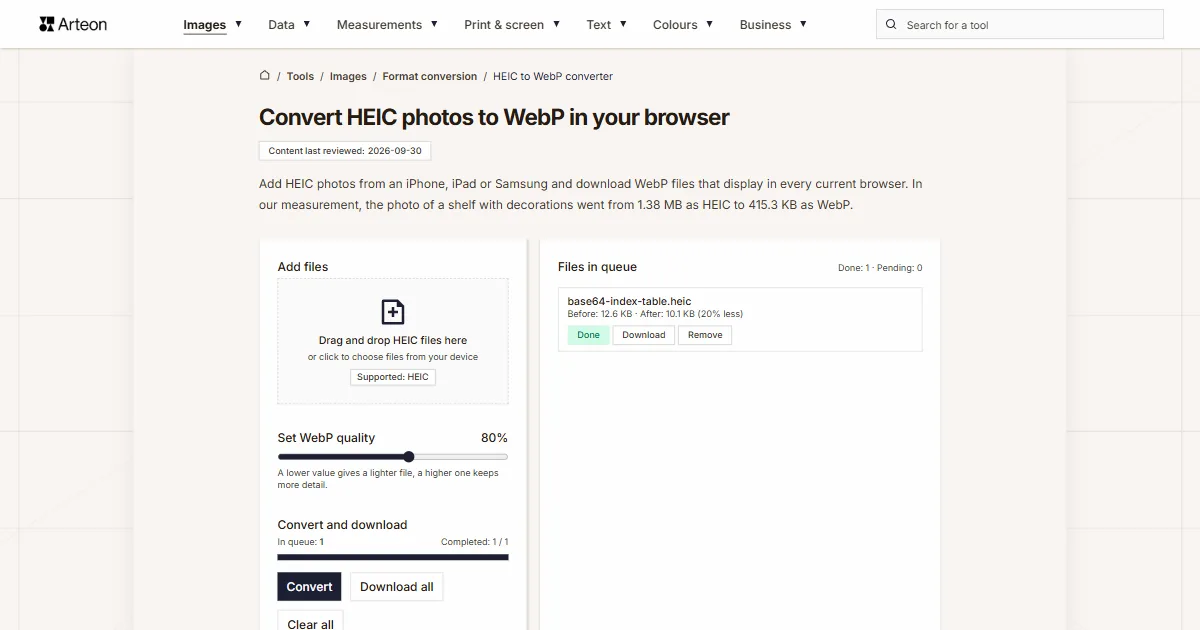
- Drag your photos onto the Add files field, or click it and pick files. The converter accepts .heic and .heif files, several at once.
- Move the Set WebP quality slider to a value between 60 and 95 percent (default 80); the current value appears next to its name.
- Click Convert. Each finished photo shows Done.
- Save one file with Download or all of them with Download all, which packs several files into a ZIP archive. Only the extension changes, to .webp.
The queue shows the Before and After weight of each file with the difference in percent and, below the buttons, the totals for the batch.
Moving the slider sets finished files back to Pending, so clicking Convert again saves them with the new setting.
Everything happens in your browser: its HEVC decoder reads the HEIC photo, and the browser saves the WebP, or the libwebp library when the browser cannot.
How much does a file weigh before and after HEIC to WebP conversion?
| Test photo | Device | Dimensions in pixels | HEIC | WebP | Change |
|---|---|---|---|---|---|
| Theater stage in colored light | iPad Air (5th generation) | 4032 × 3024 | 1.54 MB | 552.3 KB | 2.9 times smaller |
| Scene from a children’s show | iPad Air (5th generation) | 4032 × 3024 | 1.27 MB | 443.1 KB | 2.9 times smaller |
| Car against the sun | iPhone 12 Pro | 3024 × 4032 | 1.87 MB | 910.9 KB | 2.1 times smaller |
| Café interior with two dogs | iPhone 12 Pro | 3024 × 4032 | 1.64 MB | 997.4 KB | 41 percent smaller |
| Brick pillar with a wall safe | iPhone 12 Pro | 3024 × 4032 | 2.70 MB | 1.45 MB | 46 percent smaller |
| Spools of colored thread | Samsung Galaxy A32 5G | 4000 × 3000 | 1.52 MB | 847.0 KB | 46 percent smaller |
| Shelf with Christmas decorations | Samsung Galaxy A32 5G | 4000 × 3000 | 1.38 MB | 415.3 KB | 3.4 times smaller |
| Close-up of a mixing console | Samsung Galaxy A32 5G | 3000 × 4000 | 1.16 MB | 439.2 KB | 2.7 times smaller |
How much smaller is WebP than a HEIC photo?
At the default slider setting, each of the eight photos came out smaller, by 41 to 71 percent. The Christmas shelf photo went from 1.38 MB to 415.3 KB, and the café interior from 1.64 MB to 997.4 KB. The whole batch weighed 13.1 MB as HEIC and 5.95 MB as WebP.
The converter encodes the image as a new WebP at the quality set on the slider, so that setting decides most of the weight. At 95 percent, the car photo from the iPhone 12 Pro weighs 2.59 MB, which is 39 percent larger than the HEIC file, and at the default 80 percent it weighs 910.9 KB.
WebP uses lossy compression here, so some of the finest detail disappears. Look at the result zoomed in before you delete the originals. MDN also advises keeping a fallback version of the image in JPEG or PNG when you use WebP on a web page[4], and the HEIC to JPG converter prepares one.
How much does a WebP weigh at different slider settings?
| Slider setting | Car, iPhone 12 Pro, HEIC 1.87 MB | Change | Thread spools, Samsung Galaxy A32 5G, HEIC 1.52 MB | Change |
|---|---|---|---|---|
| 60% | 528.6 KB | 3.6 times smaller | 591.0 KB | 2.6 times smaller |
| 65% | 568.2 KB | 3.4 times smaller | 624.8 KB | 2.5 times smaller |
| 70% | 627.7 KB | 3.1 times smaller | 667.9 KB | 2.3 times smaller |
| 75% | 675.0 KB | 2.8 times smaller | 703.3 KB | 2.2 times smaller |
| 80% (default) | 910.9 KB | 2.1 times smaller | 847.0 KB | 46 percent smaller |
| 85% | 1.18 MB | 37 percent smaller | 1.01 MB | 34 percent smaller |
| 90% | 1.68 MB | 10 percent smaller | 1.33 MB | 12 percent smaller |
| 95% | 2.59 MB | 39 percent larger | 2.07 MB | 36 percent larger |
HEIC vs WebP: how do these formats differ?
| Feature | HEIC | WebP |
|---|---|---|
| Origin | MPEG group, specification finished in 2015 | Google, format announced in 2010 |
| Compression | HEVC codec, also known as H.265 | lossy or lossless |
| Transparency | yes, as a separate auxiliary image | yes |
| Animation or several images in a file | yes, for example burst photos | yes, animation |
| Display in browsers | Safari 17 and later only | Chrome 32, Edge 18, Firefox 65, Safari 16 and later |
Which HEIC files does the converter accept?
| File you add | What the converter saves as WebP |
|---|---|
| Photo from an iPhone, iPad or Samsung phone | a WebP with the same pixel dimensions, in portrait or landscape just as on the phone |
| File with the .heif extension instead of .heic | the same as with a .heic file |
| HEIC file with several images | a WebP of the primary image, the one the phone shows as the photo |
| HEIC file with transparent or semi-transparent pixels | in our test in Chrome and Edge: a WebP without transparency and the message This file has transparency the browser cannot read, so the image is saved without it. |
| Photo with EXIF data, such as location | a WebP without EXIF data, so also without location coordinates |
| File larger than 100 MB | the message File is too large (max 100 MB). |
| Damaged file or text with a .heic extension | the status Error and the message Failed to load the image. |
| HEIC photo added in a browser without an HEVC decoder, such as Firefox | a warning above the Add files field saying that this browser cannot read HEIC photos, and the status Error next to the file |
What happens to EXIF data and colors in a WebP file?
EXIF data does not carry over to the WebP file. The device model, date taken and location coordinates are removed with it. We checked this on the eight files from our measurement: each HEIC file had EXIF data with the device model, and none of the output files still had it.
In our measurement in Chrome, every WebP file got an sRGB color profile and 8 bits per channel. If a side of the image exceeds 16,383 pixels, the converter scales the image down proportionally to that limit, because the WebP format cannot store a longer side[4]. The photos in our measurement have at most 4,032 pixels on the longer side.
If you want an even smaller file and your audience uses newer browsers, compare the result with a file from the HEIC to AVIF converter. Smaller dimensions for a page column can be set in the Helios editor, and a WebP image saved from a website becomes a JPG in the WebP to JPG converter. Photos you already have as JPG become WebP in the JPG to WebP converter.
Convert other files to WebP
Convert HEIC to other formats
Sources
- High Efficiency Image File Format — Wikipedia
- Using HEIF or HEVC media on Apple devices — Apple Support
- WebP — Wikipedia
- Image file type and format guide — MDN Web Docs
- WebP image format — Can I use
- HEIF/HEIC image format — Can I use
- HEIF Image Extension — Microsoft Store
- AV1, H265 support in 2026: Data from 1M+ devices — WebCodecs Fundamentals
The file sizes in the tables were measured by running finished images through this converter in a browser, and we report them the way the tool counts them. What the page says about either format rests on the sources listed above.
Content last reviewed: · written and checked by the Arteon team
Common questions about converting HEIC to WebP
How do I convert HEIC to WebP?
Drag your HEIC photos onto the Add files field, adjust the Set WebP quality slider, click Convert and download the result. The converter runs in the browser, so the photos are not uploaded to a server.
Is WebP smaller than HEIC?
In our measurement, yes: at the default 80 percent, eight photos came out 41 to 71 percent smaller. At the highest slider settings, a WebP file can come out larger than the original.
Which browsers display WebP files?
Chrome from version 32, Edge from 18, Firefox from 65 and Safari from 16. On older devices, JPG is the safer choice.
Will WebP keep transparency?
It is kept only when the browser can read it from the HEIC file. In our test, Chrome and Edge could not, so the converter saved just the image and showed a note about it next to the file.
Does the converter remove EXIF data?
Yes. The WebP file gets no EXIF data, so the phone model, date and location coordinates are removed.
Which slider setting should I choose?
Start with the default 80 percent and look at the result zoomed in. If you see detail disappearing, raise the value, and if the file should be lighter, lower it. The table on this page shows the weights for every setting.
Which browsers can convert HEIC photos?
You can use Safari, as well as Chrome and Edge on devices that have an HEVC decoder. Firefox almost never has one. If your browser cannot read HEIC photos, you will see a warning above the Add files field as soon as the page opens.
How many photos can I convert at once?
There is no limit on the number of files, and a single file can weigh up to 100 MB. Download all packs the finished files into one ZIP archive.
Have a question or a suggestion?
If a HEIC file did not go through the converter or the result looks different from what we describe, write to us.
Explore other useful tools


Meta title & description checker
Check title and description length in pixels. Live Google preview and optimization tips.

PNG to JPG
Convert PNG files to JPG in your browser. No file limits, no signup, no server uploads.

Favicon generator
Create a complete favicon.ico set for your website from one image. All required sizes, no login.

Color palette generator
Generate 17 palettes from one color: monochromatic, complementary, triadic and more. HEX codes.

WebP to JPG
Convert WebP files to universally compatible JPG. Works in every app and platform.

Color contrast checker
Check text and background contrast per WCAG 2.1 AA and AAA. Automatic color correction.

Free QR code generator
Create a QR code for a website, vCard business card or print. Export PNG and SVG, no registration.

Word & character counter
Count words, characters with and without spaces, sentences, paragraphs and the average sentence length.

Lorem Ipsum Generator
Free Lorem Ipsum generator — 8 text styles, paragraphs, sentences or words. Copy in one click.