Base64 to image converter
Paste a Base64 string, click Decode and download the finished image file. The converter recognises eight image formats, and the result is byte for byte identical to the file that was encoded. Its text form runs about a third longer than the file itself.
Image preview
What is Base64, and what is a data URI?
Base64 writes binary data — a finished image file included — as a string of ordinary text characters. The conversion works three bytes at a time. A byte holds eight bits, while a single Base64 character carries six. Three bytes of a file therefore fit into exactly four characters of text. The alphabet has 64 positions: capital letters A to Z, small letters a to z, digits 0 to 9, plus and slash. When the data runs out before a group of four is complete, an equals sign fills the free places.[1]
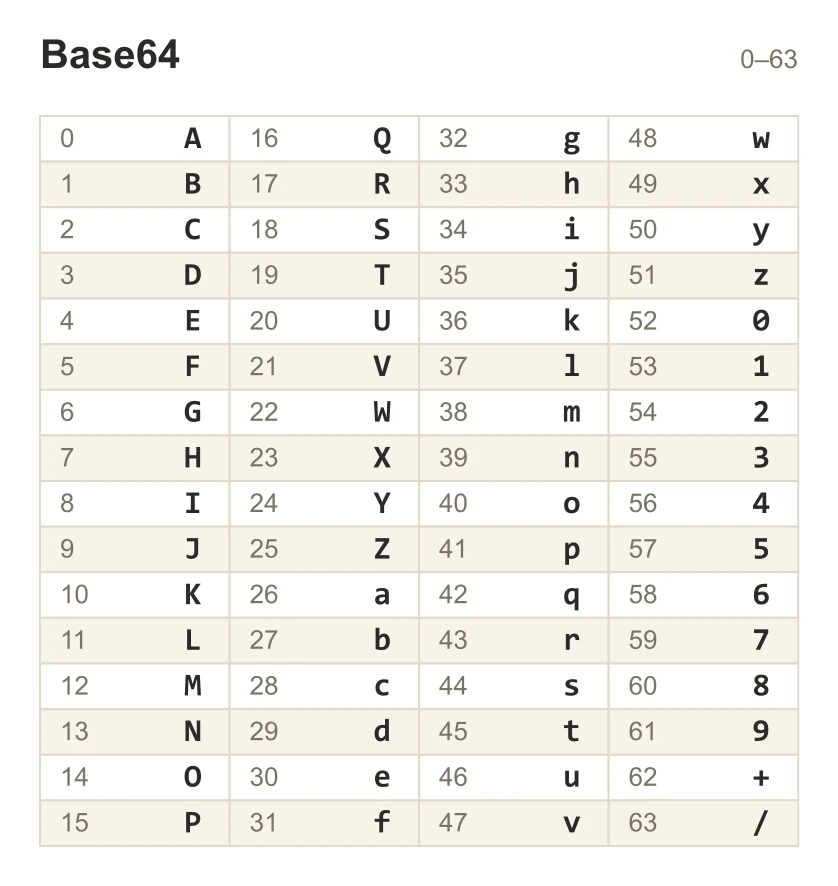
E-mail attachments are carried this way, and an image reaches the code of a page the same way, with no separate file on the server.[2]
The string on its own says nothing about what it shows. That is the job of a data URI, an address whose shape is set out in RFC 2397 from August 1998. It reads data:[type][;base64],data. For a PNG image the opening looks like this: data:image/png;base64, — and the string itself follows the comma. When the type is left out, the receiving side assumes it was handed plain text.[3]
Browsers now block opening data: addresses in the main window, because phishing pages were being served that way.[4] An image held in such an address is therefore read in the code that contains it, or in a tool that understands the address. Paste the string into the field above and press the Decode button.
How do you turn Base64 into an image?
Paste the string into the Base64 field on the left and press the Decode button. The image appears in the Image preview card, and a Download button underneath saves it to disk as decoded-image. The Clear all button empties the field and the preview together.
The data:image/png;base64, prefix can come along with the string, or stay behind in the code you copied from. Without it the converter reads the first eighteen bytes of data and recognises the format from the file signature. That reading decides the extension of the download: a BMP image is saved as decoded-image.bmp, and a site icon as decoded-image.ico.
All of the work happens on your own computer. The string stays in the memory of the open tab, the file is built on your device, and both leave the browser memory once the page is closed.
Does the converter read a string broken into lines?
A string copied out of an e-mail source is usually broken every 76 characters, and the converter reads it in exactly that shape. The standard that browsers follow when reading Base64 calls for every whitespace character to be removed first, spaces and line endings included.[5] A string pasted across a dozen lines gives the same image as one pasted in a single line. The opposite direction is handled by the image to Base64 converter, which writes the whole string on a single line, with no breaks.
Why is a Base64 string longer than the file?
The text form needs four characters for every three bytes, so the string takes up more room than the data it describes. The arithmetic is short: divide the number of bytes by three, round up, and multiply by four.
Two numbers come out of that formula and they give the scale. A site icon weighs 2,678 bytes and encodes to 3,572 characters. A photo measuring 1920 by 1280 pixels weighs 476,485 bytes, and its text form runs to 635,316 characters. The growth comes to roughly a third each time, around 33 percent.[2] That is also how much a stylesheet or a message template grows once such an image is pasted into it.
Base64 carries data across and changes nothing inside it. What you get after decoding is byte for byte the file that was encoded. We checked this on eight files of different formats, comparing their checksums before encoding and after reading them back.
The length of the string is capped by the browser itself. Chromium and Firefox accept data: addresses up to 512 MB today, and Safari up to 2048 MB. In Firefox that ceiling moved twice. Version 97 raised it from 256 KB to 32 MB. Version 136 took it to the present 512 MB.[4]
Which formats does the converter recognise?
| Image format | File signature | MIME type | Extension |
|---|---|---|---|
| PNG | 89 50 4E 47 | image/png | .png |
| JPG | FF D8 | image/jpeg | .jpg |
| WebP | RIFF + WEBP | image/webp | .webp |
| GIF | GIF87a / GIF89a | image/gif | .gif |
| AVIF | ftypavif | image/avif | .avif |
| BMP | BM | image/bmp | .bmp |
| SVG | <svg / <?xml | image/svg+xml | .svg |
| ICO | 00 00 01 00 | image/x-icon | .ico |
How many characters does an image take in Base64?
| Image | Size in pixels | File size in bytes | Characters in the Base64 string |
|---|---|---|---|
| Site icon in PNG | 32 × 32 | 2,678 | 3,572 |
| Page graphic in WebP | 800 × 600 | 104,128 | 138,840 |
| Blog post photo in JPG | 1200 × 630 | 157,419 | 209,892 |
| Banner photo in JPG | 1920 × 1280 | 476,485 | 635,316 |
| Logo with a transparent background in PNG | 512 × 512 | 577,420 | 769,896 |
| Camera photo in JPG | 3840 × 2560 | 1,405,512 | 1,874,016 |
How do the two Base64 alphabets differ?
| Part of the encoding | Standard alphabet | URL and filename safe alphabet |
|---|---|---|
| Character at index 62 | plus | hyphen |
| Character at index 63 | slash | underscore |
| Padding character | equals sign | equals sign, usually left out in tokens |
| Where you meet it | data URIs, page code, e-mail attachments | URL parameters, JWT tokens, file names |
| What to do with such a string | paste it into the field and press Decode | paste it into the field and press Decode, the converter swaps the characters itself |
What can you paste into the field?
| What you paste | Example | What the converter does |
|---|---|---|
| The Base64 string alone | iVBORw0KGgoAAAANSUhEUgAA… | Recognises PNG from the first bytes and saves decoded-image.png |
| A data URI | data:image/png;base64,iVBORw0KGgo… | Takes the type from the prefix and saves decoded-image.png |
| A line from a stylesheet | background-image: url("data:image/png;base64,iVBORw0KGgo…"); | Takes the address out of url(…) and saves decoded-image.png |
| An img tag from page source | <img src="data:image/jpeg;base64,/9j/4AAQSkZJRg…" alt=""> | Takes the address out of the src attribute and saves decoded-image.jpg |
| A JSON value in quotation marks | "iVBORw0KGgoAAAANSUhEUgAA…" | Leaves out the quotation marks and saves decoded-image.png |
| The alphabet for URLs and file names | _9j_4AAQSkZJRgABAQ… | Swaps - and _ for + and / and saves decoded-image.jpg |
| An SVG written with percent signs | data:image/svg+xml,%3Csvg xmlns='http://www.w3.org/2000/svg'… | Reads it without Base64 and saves decoded-image.svg |
| A prefix in capital letters | DATA:IMAGE/PNG;BASE64,iVBORw0KGgo… | Reads the prefix whatever the letter case and saves decoded-image.png |
Where do you find a Base64 string to paste?
Four places where an image is stored as text, along with the part to select.
Page source holds the string in the src attribute
Open the page and press Ctrl+U, or Cmd+Option+U on a Mac. In the source window look for the fragmentdata:image. Select it together with the whole string that follows, up to the quotation mark closing thesrcattribute. You can also copy the whole<img>tag, and the converter takes the address out of it. If you convert the whole page into a .md file with the HTML to Markdown converter, such an image stays in the result as the same long string in parentheses after ![description].A stylesheet keeps it in the background-image property
A background image is often written asbackground-image: url("data:image/png;base64,…"). Paste the whole line or the address alone, and the converter takes the address out ofurl(…)by itself.An e-mail carries it inside its source
Viewing the source of a message shows the images embedded in the body. They come after aContent-Transfer-Encoding: base64header, and the string itself starts after a blank line and is broken every 76 characters. Copy it whole, line breaks and all.An API response hands it over as a field value
JSON carries text and nothing else, so services that return an image return it in Base64, as the value of a single field. Copy the value of that field, with or without the quotation marks around it.
What can you do with the image once it is decoded?
The downloaded file is an ordinary image and goes into every other tool. Below the fields sits a format switcher reading Base64 to JPG. Clicking either of the two formats opens a list, and picking from it takes you to the converter that handles that pair.
The image gets new dimensions
A file pulled out of code has the dimensions somebody chose for that page. New ones are set in the Helios editor, where you crop the frame and give it a target width.The file is heading for a website
A PNG pulled out of a stylesheet usually weighs more than a page today needs. A lighter file that keeps its transparency comes from the PNG to WebP converter.The decoded file turned out to be a site icon
An.icoextension means the decoded file is the icon of a website. The remaining icon sizes, together with the tags ready to paste into your code, come from the favicon generator.The reverse direction
Your own image becomes a string ready to paste into code in the image to Base64 converter. It is the same pair of tools, turned around.
Convert other files to JPG
Sources
- RFC 4648: The Base16, Base32, and Base64 Data Encodings — IETF
- Base64 — Wikipedia
- RFC 2397: The "data" URL scheme — IETF
- Data URLs — MDN Web Docs
- Infra Standard, forgiving base64 decode — WHATWG
The file sizes in the tables were measured by running finished images through this converter in a browser, and we report them the way the tool counts them. What the page says about either format rests on the sources listed above.
Content last reviewed: · written and checked by the Arteon team
Common questions about turning Base64 into an image
What should I do when the string has no data:image/… prefix?
Paste the string on its own and press Decode. The converter reads the first eighteen bytes of data, recognises the format from them and adds the missing prefix itself before drawing the preview.
Does the pasted string reach a server?
All of the work happens in your browser. The string stays in the memory of the tab from the moment you paste it until you close the page, and the file you download is built on your own device.
Does decoding change the quality of the image?
The decoded file is byte for byte identical to the file that was encoded. Base64 carries the data in another shape and removes nothing from it, so the quality depends on the original alone.
My string has hyphens and underscores where plus and slash should be. What now?
That is the alphabet meant for URLs and file names, defined in section 5 of RFC 4648. Paste it into the field as it is and press Decode. Before decoding, the converter swaps every hyphen for a plus and every underscore for a slash by itself.
How long a string will the browser accept?
Chromium and Firefox handle data: addresses up to 512 MB today, and Safari up to 2048 MB. A camera photo encodes to under two million characters, which is less than 2 MB of text, so it fits inside those limits with a great deal of room to spare.
Why does a string pasted into the address bar show no image?
Browsers block opening data: addresses in the main window, because phishing pages were sent around that way. An image held in such an address is read in the code that contains it, or in this converter.
Will the converter open an address written with percent signs, without Base64?
Yes. An address in the form data:image/svg+xml,%3Csvg… is pasted like any other, and the downloaded file takes the .svg extension. Build tools write vector graphics in that shape when they place them straight into code.
How do I turn my own image into a Base64 string?
The reverse direction is handled by the image to Base64 converter. You add a file there and the tool hands back a finished data URI to paste into your code.
Help us improve our tools
Have an idea, found a bug, or want to suggest a feature? Drop us a message.
Explore other useful tools


Meta title & description checker
Check title and description length in pixels. Live Google preview and optimization tips.

PNG to JPG
Convert PNG files to JPG in your browser. No file limits, no signup, no server uploads.

Favicon generator
Create a complete favicon.ico set for your website from one image. All required sizes, no login.

Color palette generator
Generate 17 palettes from one color: monochromatic, complementary, triadic and more. HEX codes.

WebP to JPG
Convert WebP files to universally compatible JPG. Works in every app and platform.

Color contrast checker
Check text and background contrast per WCAG 2.1 AA and AAA. Automatic color correction.

Free QR code generator
Create a QR code for a website, vCard business card or print. Export PNG and SVG, no registration.

Word & character counter
Count words, characters with and without spaces, sentences, paragraphs and the average sentence length.

Lorem Ipsum Generator
Free Lorem Ipsum generator — 8 text styles, paragraphs, sentences or words. Copy in one click.