Update of 16 September 2026: new length converters, image converter fixes and tool search
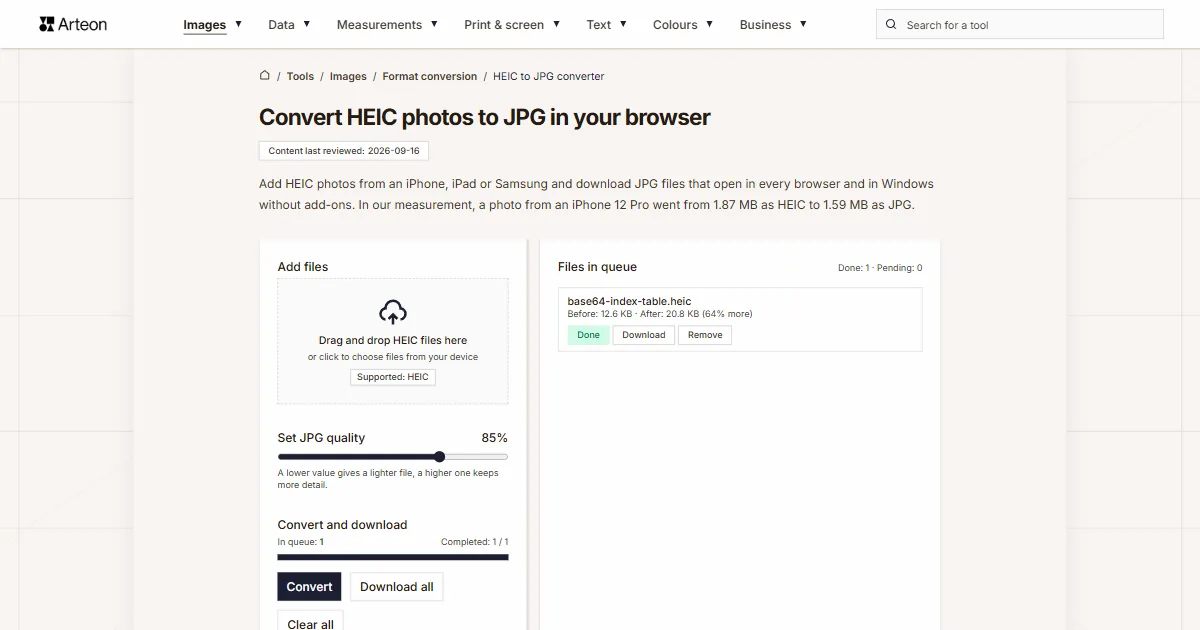
This batch adds 32 length converters in eight languages, fixes for the image converters, working downloads of single PDFs, a quality slider that shows the value you picked, a tool search and much, much more. See the details of the 16 September 2026 update.
New tools: 33 converters
The Length subcategory in Measurements now has as many as 58 separate tools, each in eight languages. The 26 pages that were already live are joined by 32 new ones. Every new tool has conversion tables, answers to questions about the unit, a list of sources and regional facts. Some converters also do things a plain calculator does not: the field takes a two-part entry such as 5'10" or 26 mi 385 yd, a line under the result gives the same measurement in feet and inches or in miles and yards, and the Mile type switch changes the calculation from the statute mile to the nautical mile. Below you will find all the new converters and what waits on their pages.
Metric units
- The centimeters to decimeters converter has a table of 43 ready conversions with a meters column, plus sizes taken from international standards, such as a payment card and an A4 sheet, in both units.
- The decimeters to centimeters converter shows where the decimeter is still a working unit: in draft marks on a ship's hull, in the hide area measured by tanneries and in the length of a polarimeter tube.
- The decimeters to meters converter explains the numbers on the draught scale of an inland vessel, which the European ES-TRIN standard requires to be graduated in decimeters.
- The meters to decimeters converter has two separate tables, one for values with a decimal point and one for whole meters.
- The centimeters to kilometers converter lets you read the ground distance from a length measured with a ruler on a map at 1:25,000, 1:50,000 and 1:100,000.
- The kilometers to centimeters converter lists map scales and shows how many centimeters one kilometer on the ground takes up on each of them.
- The decimeters to kilometers converter also writes the result out as whole kilometers and meters.
- The kilometers to decimeters converter shows large results under the field in scientific notation and has a separate table of such values.
- The kilometers to millimeters converter gives running distances from 100 meters to the marathon in both units.
- The millimeters to kilometers converter gives the result as a decimal, as a fraction and as a power of ten, and converts dimensions taken from technical documentation.
- The meters to millimeters converter has 79 ready conversions, fractions of a meter in millimeters and a description of the unit settings in SketchUp.
- The millimeters to meters converter gives standard sheet sizes in meters and describes the unit settings in AutoCAD and Blender.
- The millimeters to microns converter lists manufactured thicknesses and thousandths of an inch in microns.
- The microns to millimeters converter explains where the name micron comes from and gives sizes from bacteria through the PM2.5 and PM10 thresholds to the thickness of a sheet of paper.
- The millimeters to nanometers converter converts the track spacing on CDs, DVDs and Blu-ray discs and the line spacing of a diffraction grating into nanometers.
- The nanometers to millimeters converter gives laser and light wavelengths in both units and also shows small results under the field in scientific notation.
Imperial units next to metric ones
- The centimeters to feet converter shows a Feet and inches line under the result, so 180 cm reads straight away as 5 ft 10.9 in, and a table of old feet compares today's foot with measures such as the Roman pes, the pied du Roi and the Rhineland foot.
- The feet to centimeters converter takes a height typed as 5'10" and shows what the world still measures in feet, such as the height of a basketball hoop, the height of a soccer goal and the length of a shipping container.
- The centimeters to yards converter adds a Yards and inches line under the result and compares old cloth measures, such as the English ell and the aune de Paris, with the yard.
- The yards to centimeters converter takes an entry such as 3 yd 10 in and has a table of yard fractions in inches and centimeters.
- The millimeters to yards converter also shows the result as yards and inches, so 5500 mm appears as 6 yd 0.5 in.
- The yards to millimeters converter takes an entry such as 2 yd 18 in and compares the international yard with the United States survey yard and the English yard measured in 1895.
- The kilometers to yards converter explains why a certified race course measures 1,001 meters per kilometer and converts running, swimming and athletics distances into yards.
- The yards to kilometers converter helps you convert the length of a golf course from the scorecard and shows how large the difference between the international yard and the survey yard is.
- The inches to meters converter gives a screen diagonal in meters together with the picture width at 16:9 and converts heights written in feet and inches into meters.
- The meters to inches converter also writes the result in feet and inches and compares the international inch with earlier inches, such as the New Polish inch and the Prussian inch.
- The miles to yards converter takes the entry 26 mi 385 yd, which is the marathon distance, and the Mile type switch moves the calculation from the statute mile to the nautical mile.
- The yards to miles converter shows the result as whole miles with the yards left over, has the Mile type switch and explains where British road signs give yards and where they give miles.
- The miles to furlongs converter takes the entry 1 mi 4 fur, and the Mile type switch changes the calculation to the nautical mile.
- The furlongs to miles converter writes the result as miles and furlongs, the way a race card gives it, and converts race distances into miles and meters.
Astronomy
- The astronomical units to kilometers converter has a table of the distances of the eight planets from the Sun according to the Jet Propulsion Laboratory and a table of Solar System scale models. At the 1 to 10 billion scale of the Voyage model on the National Mall in Washington, DC, one astronomical unit takes up 14.96 meters.
- The kilometers to astronomical units converter shows how many astronomical units separate Earth from the Sun at perihelion and at aphelion, and how close to the Sun Parker Solar Probe flew on 24 December 2024.
Every converter comes as a pair that converts in one direction and the other, and the Swap order button takes you to the page with the reverse conversion. In the content of the other tools in the same subcategory we added links to the new converters, so you can reach them without searching the whole catalog.
Date to Unix timestamp converter
The catalog also gains a date to Unix timestamp converter. You type a date with a time, and as you type the tool gives the Unix timestamp, that is the number of seconds since 1 January 1970, plus the same moment in milliseconds on the In milliseconds line. With the Time zone switch you choose whether the time you typed is in UTC or in the local time of your device. The field takes 2023-11-14 22:13:20, 14.11.2023 22:13 and an ISO 8601 date with a zone, such as 2023-11-14T22:13:20Z, and for a date that does not exist in the calendar it shows a message under the field. The page lists the Unix timestamp for 1 January of every year from 2000 to 2040, the timestamps of the 2026 clock changes in New York and London, and ready formulas for Excel, Google Sheets, MySQL, PostgreSQL, Python and JavaScript.
New features
Tool search
The navigation bar now has a full Search for a tool field. When you type a phrase, such as px, a list under the field shows up to 7 tools that contain it, each with a short description. Clicking See all results takes you to the search page, which lists every tool that matches the phrase. You can also move through the results under the field with the arrow keys, open the highlighted tool with Enter and close the list with Esc (Escape). A phrase of several words returns only the tools that contain all of the words, so it works best to type a single word that the tool surely uses, such as kg when you look for a kilogram converter. You can copy the page with all results and send it with the search already filled in, for example https://arteontools.com/search?q=px.
On screens narrower than 1536 pixels the field hides behind a magnifier icon, which opens it in a separate row under the bar. The Ctrl+K shortcut opens the search from the keyboard. Letter case and extra spaces do not change the results, and a typo in one of the words does not end in an empty list.
Image and document converters
- The quality slider now shows the value you picked next to its name, right above the slider. The JPG to WebP converter, for example, lets you pick a value from 60% to 95%. When you move the slider, finished files go back to the waiting queue, so the next click on Convert saves them at the new quality.
- A multi-page TIFF file, for example from a scanner, goes into the PDF with all its pages. The queue shows the page range the file takes up in the merged document, for example pp. 2–4.
- Animated GIF, WebP and PNG files get a note in the queue saying that only the first frame of the animation is saved. A multi-page TIFF saved to an image format gets the same kind of note.
Unit converters
The Swap order button now carries the result over to the page of the reverse converter. If you type 180 cm in the centimeters to feet converter and click the button, the feet to centimeters converter opens with 5.9055 in the field. The selected switch options travel with the number, for example the mile, ounce or gallon type.
Email signature generator
Social network icons in the email signature generator are now PNG images, which Gmail and Outlook display without problems in the sent message. A text direction switch was added, together with a warning when the chosen layout leaves out fields you have already filled in. The second button with a link is available in every layout, and for an avatar saved as a data: URL the generator warns that Gmail will not display such an image.
Data format converters
- The JSON to CSV converter has a list of separators, which makes it easier to load the data into Excel later. Excel in the United States and the United Kingdom splits columns on a comma, while in countries where the comma marks decimals it expects a semicolon. The downloaded file opens in Excel with accented letters intact.
- The Markdown to HTML converter shows the result in two ways. The HTML code view gives code ready to copy, and the Preview view shows how that code will look on a page before you paste it into WordPress or another system. The preview does not run scripts from the pasted text, and links open in a new tab. The tool skips a front matter block at the top of the file, that is post metadata from Jekyll or Hugo, and says so under the result.
- The YAML to JSON converter turns a file with several documents separated by a --- line, such as several Kubernetes manifests, into one JSON array.
- The XML to JSON converter reads an uploaded file in the encoding named in its declaration, so a file saved in windows-1252 keeps accented letters such as é.
Image to Base64
The image to Base64 converter has an Output format list where you choose the form of the encoded image. data: URL gives an address to paste into page code, HTML <img> tag a ready image tag, CSS background (background-image) a rule for a style sheet, and Base64 string only the bare string, for example to send through an API. The result field and copying work on the chosen form, and the Download button saves the result to a text file named after the image, which helps with long strings. The converter now also accepts AVIF and ICO files.
Unix timestamp
The Unix timestamp converter has a Time zone switch. The UTC option shows the date in Coordinated Universal Time, and the Local time option converts it to the time zone set on your device and adds the offset from UTC to the time. This way the hour that repeats when the clocks go back in autumn can be told apart from the first one. The converter recognizes by the number of digits whether you pasted seconds, milliseconds, microseconds or nanoseconds and says so under the result, for example: Value read in milliseconds. The Swap order button opens the new date to Unix timestamp converter with the date carried over from the result field.
Fixed bugs
The most important fixes concern the image converters, where two bugs stopped the tools from working.
- HEIC converters stopped at the Processing… status and never finished the conversion. HEIC photos are now read by the HEVC decoder built into the browser, so the converter no longer needs an extra library for that. Safari almost always has this decoder, and according to WebCodecs Fundamentals data from more than a million sessions collected from January to March 2026, Chrome on Windows has it in 81 percent of sessions and Edge on Windows in 56 percent. Firefox almost never has it. In a browser without the decoder, a warning appears above the Add files field right away, saying that the conversion will not work and suggesting that you open the page in Chrome or Safari. If a HEIC file has transparency the browser cannot read, the converter saves just the image and says so next to the file. This applies to all six HEIC converters.
- Images to PDF with the option to merge into one document unchecked: the Download and Download all buttons did not download the files properly. Both are fixed and download the file correctly.
- An SVG file without a width and height came out of the converter as a 300 by 150 pixel image. The size now comes from the viewBox attribute, so an icon keeps its proportions.
- Safari saved a PNG file with a .webp extension when you chose WebP. A real WebP file is created now.
- A password-protected PDF file got the same message as a damaged file. The tool now shows a message saying that the file has a password, which prevents processing, and suggests saving a copy without the password.
- Error messages in the queue are now in the page language. Some of them used to show English text straight from the browser on every language version, and now you see a sentence in the language of the page, such as Failed to load the image. File weights use the number format of the page language, so the English page shows 1.87 MB and the German page 1,87 MB. A file that grows by a few bytes after conversion no longer shows a change of 0 percent. Instead, the queue shows <1% more when the file grew by less than one percent, and no change when its weight stayed the same.
- Unit converters: in every language except English the field read the entry 0.025 as 25, and in every language the entry 1×10⁻⁶ turned into 110. Both entries now work correctly and convert.
- QR code generator: a color code without the hash (a HEX code typed without the # at the start, for example 1a1a1a instead of #1a1a1a) and a CSS color name (for example navy or tomato) produced a black code, and text typed in the phone field produced a broken tel: link made of letters. The tool now reads the color or shows a message asking for a valid entry, and it keeps only the plus sign and the digits in the number. The plus sign stays only at the start of the number, so the entry +1+212+555+0100 gives the link tel:+12125550100 in the code. An email address or phone number typed in the URL field used to go into the code as plain text, and now it is saved as a mailto: or tel: link.
- The data size page showed only the list of tools in that group. It is now a full converter for all data units again.
- The counter above the progress bar in the file converters showed the wrong form In queue: 1 files. It now shows In queue: 1.
- Color converters: an alpha value written with a decimal comma, for example rgba(59, 130, 246, 0,5), produced a fully transparent color. The alpha is now 0.5.
- Contrast checker: the preview stayed empty when a color code was typed without the hash, and the large text sample was 14 to 16 pixels. The preview now works with every entry, and the large text sample is 20 pixels and bold, in line with the WCAG definition of large text.
- The lorem ipsum generator in its French version inserted Polish words when text in the page language was chosen, and in word mode it did not give the requested number of words. Both bugs are fixed.
- The image next to the form Help us improve our tools was empty on some pages. It now always shows a screenshot of the tool.
- Spacing under the table of contents: on six tools in eight languages the first heading sat right under the table of contents. The spacing now has the same height on every page.
Unusual entries and files the tools now handle correctly
We checked what happens when a field receives something other than the instructions describe, such as a number pasted together with its unit, a color code copied from a style sheet or a file in an unusual encoding. Such edge cases used to end in a wrong result or an empty field. Below are the tools where we fixed that.
- All unit converters read a number pasted together with a unit written with a slash, such as 100 Mb/s in the Mbps to MB/s converter, and a unit name pasted next to a number no longer moves the decimal point. The field reads scientific notation, such as 1e5, 1.5e-3, 1×10⁻⁶ and 10^3, and a broken entry gives an empty result instead of a guessed number. Digits typed on an Arabic keyboard turn into regular digits.
- The Unix timestamp converter recognizes the unit by the number of digits: 10 digits are seconds, 13 milliseconds, 16 microseconds and 19 nanoseconds, and it keeps the last digits intact. Spaces, underscores and apostrophes between digits are ignored, and commas or dots every three digits work as a thousands separator. A negative value gives a date before 1970, while text, several numbers at once, a hexadecimal value or a date typed into the timestamp field give an empty result instead of a guessed date.
- The HEX to RGB, RGB to HEX, RGB to CMYK and CMYK to RGB converters read a line copied from a style sheet, such as color: #3B82F6;, a value in quotes from JSON and a brand guide entry with channel letters, such as C 17 | M 38 | Y 83 | K 22. A HEX code can have 3, 4, 6 or 8 characters, and the hash can also stand at the end of the code. Values written as fractions from 0 to 1 are recognized too.
- The color contrast checker accepts a HEX code with or without the hash, rgb(), rgba(), hsl() and hsla() values, a 0x constant from Android, the word transparent and 148 CSS color names. It calculates semi-transparent text after placing it on the background, and it rejects an unknown name or an incomplete entry instead of inventing a color.
- The JSON to CSV converter takes headers from all objects in the array, not just the first one, finds the list of records inside an object too and does not freeze on very deeply nested data. An empty array, a bare string or CSV pasted into the JSON field give a message instead of an empty result.
- The CSV to JSON converter keeps spaces inside quotes, skips rows made only of empty fields, recognizes a file separated with a pipe character and shows a message when the first row has no column names.
- The XML to JSON converter keeps text that stands between elements under the #text key and collects elements with the same name into an array even when other elements sit between them. It reads UTF-16 files and files saved in windows-1252, and a document nested 5,000 levels deep still gives a result.
- The JSON to XML converter fixes keys that XML does not accept as names, such as keys starting with a digit, turns null into an empty element and writes the &, < and > characters as entities.
- The YAML to JSON converter reads values according to YAML 1.2, so yes and no stay text, and it rejects a tab in the indentation, a repeated key and a tag that runs code with a message that gives the row and column of the error. The JSON to YAML converter puts text that would change type, such as yes or 01234, in single quotes, so the result loaded back gives the same data.
- The HTML to Markdown converter turns a table without header cells and a table with merged cells into a Markdown table without losing values, and from a whole pasted page it skips buttons, form fields and SVG icon titles.
- In the QR code generator an address without https:// gets https://, spaces in the address are saved as %20, and an extension written after a word, such as ext. 21, and a zero in brackets (0) in an international number are dropped. Several email addresses separated by commas give one list of recipients, and a new line in the message body is kept. The default quiet zone of the code is now 4 modules instead of 2.
- The email signature generator builds the tel: link from digits and the plus sign only, adds https:// to a website address typed without the protocol, and turns @name or just a name in a social network field into the profile address, except for LinkedIn. In the WhatsApp field a phone number is enough. An entry without digits in the phone field stays plain text without a link, and imported settings reject injected tags.
New content on tool pages
A file weight table from our own measurement on all 60 image converters
Every image format converter now has, in eight languages, a table with a measurement we took ourselves in the browser. It gives the dimensions of each test file, its weight before conversion, its weight after conversion and the change, written the way the tool's queue shows them. The table also shows cases where a file grows after conversion, such as an icon with transparency saved as JPG. The PDF to image converters have a table of test documents with the page count and the total weight of the images in this place, and the SVG converters a table of SVG files with their dimensions. The tables that compare formats got a caption with sources: format capabilities follow the MDN guide, and browser versions follow Can I use.
- You will find the weight table on the AVIF to BMP, GIF, JPG, PNG, TIFF and WebP converters.
- You will find the weight table on the BMP to AVIF, GIF, JPG, PDF, PNG, TIFF and WebP converters.
- You will find the weight table on the GIF to AVIF, JPG, PNG and WebP converters.
- You will find the weight table on the HEIC to AVIF, JPG, PDF, PNG, TIFF and WebP converters.
- You will find the weight table on the JPG to AVIF, BMP, GIF, PDF, PNG, TIFF and WebP converters.
- You will find the weight table on the PDF to JPG, PNG and WebP converters.
- You will find the weight table on the PNG to AVIF, BMP, GIF, JPG, PDF, TIFF and WebP converters.
- You will find the weight table on the SVG to AVIF, GIF, JPG, PDF, PNG, TIFF and WebP converters.
- You will find the weight table on the TIFF to AVIF, BMP, JPG, PDF, PNG and WebP converters.
- You will find the weight table on the WebP to AVIF, BMP, GIF, JPG, PDF, PNG and TIFF converters.
HEIC converters: content rewritten from scratch in eight languages
The HEIC to JPG, HEIC to PNG, HEIC to WebP, HEIC to AVIF, HEIC to TIFF and HEIC to PDF pages have new content based on a measurement. We ran eight real HEIC photos from an iPhone 12 Pro, an iPad Air and a Samsung Galaxy A32 5G through the converters, and the weights in the tables are written exactly as the tool's queue shows them. We repeated the measurement on 16 September 2026 in Chrome, already with the new decoder. The converters with a slider have a separate weight table with eight slider settings, every 5 points from 60 to 95 percent.
- In the table Which HEIC files does the converter accept? you can check what you get from a .heif file, a file with several images, a file with transparency, a photo with EXIF data, a damaged file and a browser without an HEVC decoder. We checked every row in the tool.
- The instructions for the iPhone and the Mac give option names exactly as Apple Support writes them in the page language, for example Settings, Camera, Formats and Most Compatible, so you find the same words on your own screen.
- For Windows we name the two Microsoft Store extensions needed to open HEIC photos and give their price in the store of the country. On 15 September 2026 HEIF Image Extension was free, and HEVC Video Extensions cost $0.99 in the US store and £0.79 in the UK store.
- We also describe what happens to EXIF data, colors and transparency, because the date, the phone model and the location coordinates disappear from the output file.
- Every page explains in which browsers the converter works, based on HEVC decoder data from more than a million sessions.
PNG converters: content rewritten from scratch in eight languages
The PNG to JPG, PNG to WebP, PNG to AVIF, PNG to GIF, PNG to TIFF, PNG to BMP and PNG to PDF pages have format descriptions checked against the source documents, including the W3C PNG specification from June 2025 and RFC 9649 for WebP. Sentences on the pages quote rows of the weight table, also where the conversion makes the file bigger, such as an icon saved as JPG or a screenshot saved as TIFF and BMP. In our measurement WebP came out lighter than AVIF on all eight files, so the AVIF page suggests starting with WebP if weight is all that matters. The table Which PNG files does the converter accept? covers transparency, a semi-transparent shadow, 16 bits per channel, animated PNG, EXIF data and a damaged file. The PNG to PDF page gives the A4 page settings and, in other languages, a note on the local paper size, such as Letter in Canada.
QR code generator
The content of the QR code generator was rewritten in eight languages. Legal and tax topics are gone, and tables calculated with the tool's own functions were added: what the generator writes into the code for each type of data, how much a code can hold and what print width you get at 300 dots per inch.
Data format converters: content rewritten from scratch
- The CSV to JSON converter has a table showing what the tool does with each element of a CSV file, a table of the separators it recognizes and an answer on whether a file from a German or French spreadsheet needs any setting.
- The JSON to CSV converter suggests which separator to choose for your spreadsheet and explains what to do when a whole row lands in column A after you open the file.
- The JSON to XML converter shows how each JSON value looks in XML, how the tool fixes keys that XML does not accept as names and how its output differs from the fn:json-to-xml function described by the W3C.
- The XML to JSON converter describes how attributes, arrays and namespaces are written and whether it can open a sitemap.xml file.
- The JSON to YAML converter explains why some values come out in single quotes and compares YAML with JSON according to their specifications.
- The YAML to JSON converter has a table showing which YAML entries are booleans and which are text, plus steps to follow when an error message appears.
- The Markdown to HTML converter compares Gruber's Markdown, CommonMark and GitHub Flavored Markdown and shows how to put the result into WordPress.
- The HTML to Markdown converter has a table of HTML tags with their Markdown output and steps to move a post from WordPress into a Markdown file.
Other tools with new content
- The Unix timestamp converter has new content with 19 sources: a table of round Unix timestamps, a table that tells seconds, milliseconds and nanoseconds apart, formulas for Excel, Google Sheets and databases, and an explanation of why the time from the converter differs from your local time.
- The image to Base64 converter has a table that helps you choose the output form, a table of email clients that display a Base64 image and a table of the image forms accepted by AI model APIs. The Base64 to image converter explains whether it can read a string broken across several lines.
- The email signature generator has a table of the links created from each field, a table of the fields each layout shows and an explanation of why the signature looks different for the recipient than in the preview. The sections about legal requirements are gone.
- The color contrast checker has a table explaining how to type a color into the field, and the sections about legislation are gone.
- The decimal to binary converter and the decimal to hex converter have corrected FAQ answers, and the second one a new question about a Unix timestamp written in hexadecimal.
- The gallons to liters converter and the liters to gallons converter explain that the US dry gallon was a grain measure used until the 1990s.
- The RGB to CMYK converter has a corrected origin of the letter K, which stands for key colour, the key printing plate.
Existing length converters
The inches to cm, inches to mm, inches to feet, cm to inches, cm to meters, cm to mm, yards to meters, yards to feet, kilometers to meters, kilometers to miles, meters to cm, meters to yards, meters to kilometers, meters to miles, meters to feet, miles to kilometers, miles to meters, miles to feet, mm to inches, mm to cm, mm to feet, feet to inches, feet to yards, feet to meters, feet to miles and feet to mm converters got links to the new length converters in the sentences that talk about each unit.
Claims without a source
We removed sentences such as the most often converted value or the most popular format from the content of many tools, because no source backed them. We replaced them with specifics, such as the range of values in a table. This applies to the data unit, typography, pixel and DPI, color, length, volume and weight converters, for example the cm to px converter, the kg to lb converter and the ml to liters converter.
Spelling
Some German, Spanish, French, Italian, Portuguese and Czech texts were missing diacritics. We fixed this everywhere.
Photos in the content
New photos appeared in the content of the data format converters, the image to Base64 converter, the email signature generator, the QR code generator, the HEIC converters and the new length converters.
Design changes
- The navigation bar has a wider layout and a search field, and the language picker moved to the footer, where it opens a list of versions of the same page.
- The footer shows the catalog tree, each topic with its subcategories, instead of 40 links to single tools. The footer also has new News and Licenses links.
- The home page splits the tools into subcategory carousels, each with the number of tools and a link to the full list.
- Tool tiles on topic and subcategory pages have square corners, a shadow on hover and a four-column layout.
- In the file queue the file name takes the full width of the row, with the file details, the status and the buttons below it. A long name no longer breaks across three lines. The status and the Download and Remove buttons have the same height.
- Footnote numbers in table cells link to the list of sources.
- In the color palette generator and the image color extractor the copy button next to a swatch is now an icon with a tooltip on hover. The HEX code and the HSL or RGB value fit on one line, and the swatches line up in two columns when the palette has room for them.
- Placeholders in empty fields are full sentences, such as Enter the text color in HEX, RGB or HSL in the contrast checker. The decimal to binary and decimal to hex converters show a placeholder instead of a fixed value of 255.
- The QR code generator has a tip under the Error correction level field to download the SVG file for print, and the email signature generator has new names for the spacing options and a Restore defaults button.
- Tool screenshots show the new navigation bar and the current look of the tools.
Open source software licenses
The footer of the tools site and of the agency site now has a Licenses link. It leads to a text file that lists the open source software and fonts used to build and run the site, together with copyright notices and the full license texts. We use such libraries, for example, to save AVIF and PDF files, and their licenses require passing on the copyright notices, so we collect them in one place. The file on the tools site lists 236 entries, and the one on the agency site 226. The file is rebuilt every time the site is built, so the list matches what runs in each version. License texts are given in their original English wording. You can open the file at arteontools.com/licenses.txt and arteonagency.pl/licenses.txt.
What comes next?
From now on we will release new tools and fixes in weekly batches. We have tentatively planned them for Wednesdays, but the publishing days may still change.
In the next batches this month we plan to add two new languages, Arabic and Indonesian, new weight and volume converters, new text tools and new tools in the colors category.