Convert Mbps to MB/s – real download speed calculator
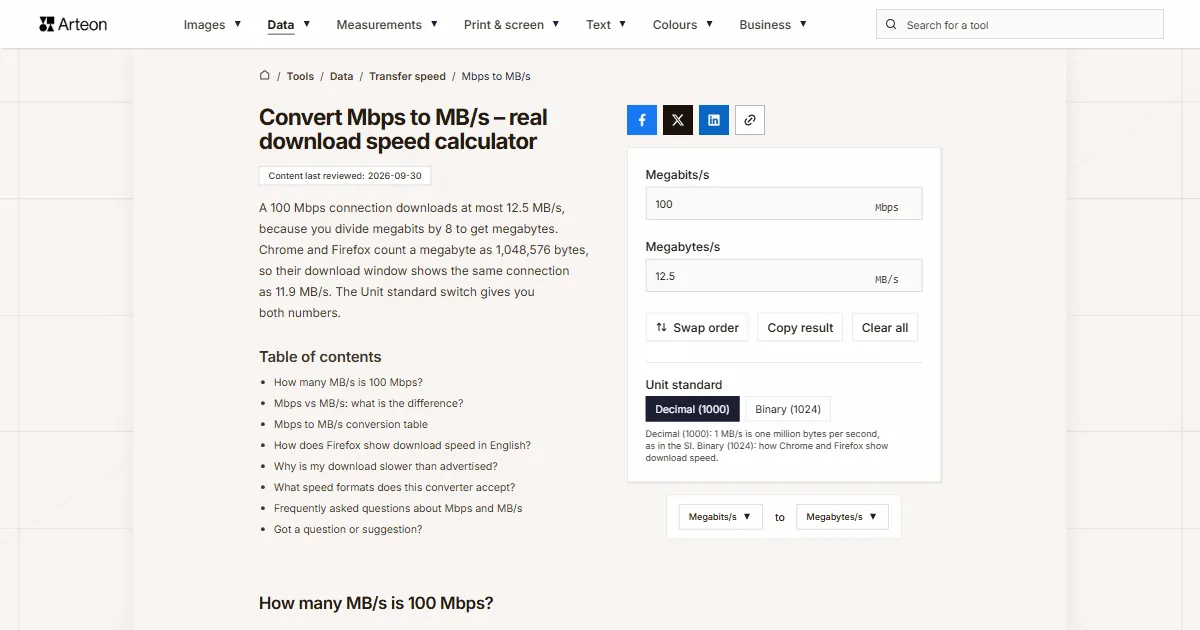
A 100 Mbps connection downloads at most 12.5 MB/s, because you divide megabits by 8 to get megabytes. Chrome and Firefox count a megabyte as 1,048,576 bytes, so their download window shows the same connection as 11.9 MB/s. The Unit standard switch gives you both numbers.
How many MB/s is 100 Mbps?
A 100 Mbps connection downloads at most 12.5 MB/s. Mbps to MB/s conversion works with a single division: a byte has eight bits[1], so MB/s = Mbps ÷ 8. Your provider quotes the speed in megabits, while the download window counts megabytes, which is why the number you see there is roughly eight times smaller.
Here is that division for a few plan speeds. A 300 Mbps plan gives 37.5 MB/s, 500 Mbps gives 62.5 MB/s, and a 1 Gbps plan, which is 1,000 Mbps, gives 125 MB/s.
Chrome and Firefox show smaller numbers for the same connections. Both browsers divide the byte count by 1,024 twice and still label the result MB/s[2][3]. Below 100 they keep one decimal place, and from 100 up they show a whole number, so a 100 Mbps connection appears as 11.9 MB/s and a 1 Gbps connection as 119 MB/s. Pick Binary (1024) in the converter to get the same figure.
If you read a speed in megabytes and want it back in megabits, use the MB/s to Mbps converter.
Mbps vs MB/s: what is the difference?
A bit is a single 0 or 1, and a byte is a group of eight bits[1]. File sizes and disk space are measured in bytes, while connection speeds, network ports and speed test results are measured in bits. The bytes to bits converter shows how many bits any number of bytes holds.
Mbps, Mb/s and Mbit/s all mean megabits per second, a million bits every second. NIST notes that this is how every telecommunications engineer uses the unit[1]. The only thing that separates Mbps from MBps is the case of the letter b: lowercase b is a bit, uppercase B is a byte, so MB/s and MBps are megabytes per second, a unit eight times larger.
A “1 gig” plan is a gigabit plan: 1,000 Mbps, or 125 MB/s.
A megabyte in the SI system is one million bytes, while a mebibyte, written MiB, is 1,048,576 bytes[1]. The Unit standard switch lets you choose between the two.

Mbps to MB/s conversion table
| Speed in Mbps | MB/s (decimal) | MB/s in the download window (1024) |
|---|---|---|
| 1 Mbps | 0.125 MB/s | 0.119 MB/s |
| 2 Mbps | 0.25 MB/s | 0.238 MB/s |
| 5 Mbps | 0.625 MB/s | 0.596 MB/s |
| 8 Mbps | 1 MB/s | 0.954 MB/s |
| 10 Mbps | 1.25 MB/s | 1.192 MB/s |
| 16 Mbps | 2 MB/s | 1.907 MB/s |
| 20 Mbps | 2.5 MB/s | 2.384 MB/s |
| 25 Mbps | 3.125 MB/s | 2.98 MB/s |
| 30 Mbps | 3.75 MB/s | 3.576 MB/s |
| 40 Mbps | 5 MB/s | 4.768 MB/s |
| 50 Mbps | 6.25 MB/s | 5.96 MB/s |
| 60 Mbps | 7.5 MB/s | 7.153 MB/s |
| 75 Mbps | 9.375 MB/s | 8.941 MB/s |
| 80 Mbps | 10 MB/s | 9.537 MB/s |
| 100 Mbps | 12.5 MB/s | 11.921 MB/s |
| 120 Mbps | 15 MB/s | 14.305 MB/s |
| 150 Mbps | 18.75 MB/s | 17.881 MB/s |
| 200 Mbps | 25 MB/s | 23.842 MB/s |
| 250 Mbps | 31.25 MB/s | 29.802 MB/s |
| 300 Mbps | 37.5 MB/s | 35.763 MB/s |
| 350 Mbps | 43.75 MB/s | 41.723 MB/s |
| 400 Mbps | 50 MB/s | 47.684 MB/s |
| 450 Mbps | 56.25 MB/s | 53.644 MB/s |
| 500 Mbps | 62.5 MB/s | 59.605 MB/s |
| 600 Mbps | 75 MB/s | 71.526 MB/s |
| 700 Mbps | 87.5 MB/s | 83.447 MB/s |
| 750 Mbps | 93.75 MB/s | 89.407 MB/s |
| 800 Mbps | 100 MB/s | 95.367 MB/s |
| 900 Mbps | 112.5 MB/s | 107.288 MB/s |
| 940 Mbps | 117.5 MB/s | 112.057 MB/s |
| 1,000 Mbps | 125 MB/s | 119.209 MB/s |
| 1,200 Mbps | 150 MB/s | 143.051 MB/s |
| 1,500 Mbps | 187.5 MB/s | 178.814 MB/s |
| 2,000 Mbps | 250 MB/s | 238.419 MB/s |
| 2,500 Mbps | 312.5 MB/s | 298.023 MB/s |
| 5,000 Mbps | 625 MB/s | 596.046 MB/s |
| 8,000 Mbps | 1,000 MB/s | 953.674 MB/s |
| 10,000 Mbps | 1,250 MB/s | 1,192.093 MB/s |
How does Firefox show download speed in English?
Next to a file that is still downloading, Firefox shows the time left, how much has arrived and the speed in brackets, for example (35.8 MB/sec). Both the US and the UK English versions of the browser write the unit that way, with /sec after MB[4][5].
On a 300 Mbps plan that bracket reads 35.8 MB/sec, not the 37.5 MB/s you get from dividing by 8. To check a Firefox reading against your plan, type the plan speed into the field and choose Binary (1024), and the result will match the browser.
Why is my download slower than advertised?
| Port | File data over TCP | MB/s over TCP (decimal) | MB/s over TCP in the download window (1024) |
|---|---|---|---|
| 100 Mbps | 94.93 Mbps | 11.87 MB/s | 11.32 MB/s |
| 1 Gbps | 949.28 Mbps | 118.66 MB/s | 113.16 MB/s |
| 2.5 Gbps | 2,373.21 Mbps | 296.65 MB/s | 282.91 MB/s |
| 5 Gbps | 4,746.42 Mbps | 593.3 MB/s | 565.82 MB/s |
| 10 Gbps | 9,492.85 Mbps | 1,186.61 MB/s | 1,131.64 MB/s |
What speed formats does this converter accept?
| What you type | What the converter shows | Note |
|---|---|---|
| 300 | 37.5 MB/s | A plain number counts as megabits per second, so the field divides it by 8 straight away. |
| 300 Mbps | 37.5 MB/s | The field reads a plan speed with its unit and keeps just the number. |
| Download 245.67 Mbps | 30.709 MB/s | This is a line copied from a speed test result, and the field takes only the number from it. |
| 1,500 | 187.5 MB/s | In English a comma separates thousands, so the field reads 1500. A note under the field says: Read as 1500. If you meant 1.5, type 1.5. |
| 12,5 | 1.563 MB/s | A decimal comma gives the same result as 12.5. |
| 1 gig | 125 MB/s | The short name of a gigabit plan becomes 1,000 Mbps, and the field says so below. |
| 1 Gbps | 125 MB/s | Gigabits are turned into 1,000 megabits per second, and the field says so below. |
| 35.8 MB/sec | 35.8 MB/s | Megabytes copied from Firefox are turned into megabits per second, and the field says so below, so the result comes back as 35.8 MB/s. |
Convert Megabits/s to other units
Sources
- Prefixes for binary multiples — National Institute of Standards and Technology
- Chromium source code: speed formatting (bytes_formatting.cc) — The Chromium Authors
- Firefox source code: DownloadUtils.sys.mjs — Mozilla
- Firefox English (US) strings: downloadUtils.ftl — Mozilla
- Firefox English (UK) strings: downloadUtils.ftl — Mozilla
- Ethernet frame — Wikipedia
- RFC 791: Internet Protocol — IETF
- RFC 9293: Transmission Control Protocol (TCP) — IETF
- Netflix-recommended internet speeds — Netflix Help Center
Every figure in the tables was computed from the unit definitions and checked arithmetically before publication. Historical values and the names of local units come from the sources listed above.
Content last reviewed: · written and checked by the Arteon team
Frequently asked questions about Mbps and MB/s
How long does it take to download 1 GB at 100 Mbps?
A 1 GB file, which is 1,000 MB, takes 80 seconds at 12.5 MB/s. Once Ethernet, IP and TCP headers are taken out, a 100 Mbps port delivers at most 11.87 MB/s, so the same file needs at least 84 seconds.
Why do internet providers advertise speeds in Mbps?
What speed do I need for 4K streaming on Netflix?
Netflix recommends 15 Mbps or higher for Ultra HD 4K[9]. That is 1.875 MB/s, so an hour of 4K viewing uses about 6.75 GB of data.
Got a question or suggestion?
Write to us if you would like to convert another speed unit or spot a value in the tables that needs fixing.