Convert kbps to Mbps
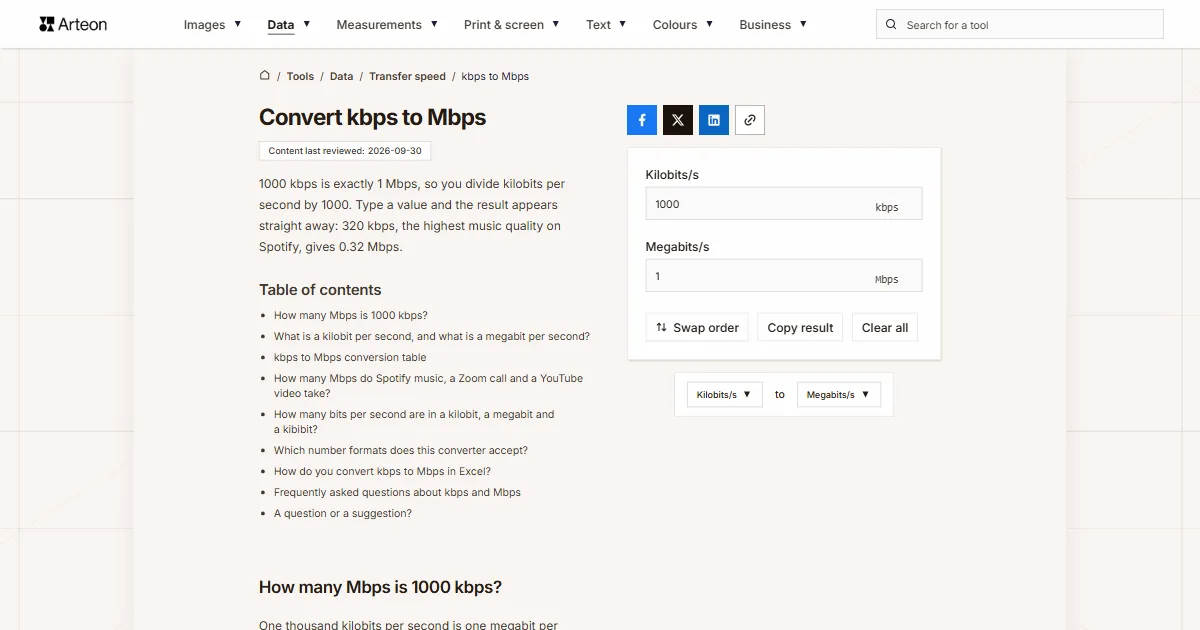
1000 kbps is exactly 1 Mbps, so you divide kilobits per second by 1000. Type a value and the result appears straight away: 320 kbps, the highest music quality on Spotify, gives 0.32 Mbps.
How many Mbps is 1000 kbps?
One thousand kilobits per second is one megabit per second. You divide the kbps figure by 1000: Mbps = kbps ÷ 1000[1].
Three examples show that division in figures. A value of 500 kbps gives 0.5 Mbps. A value of 2000 kbps is 2 Mbps. A value of 10,000 kbps comes to a round 10 Mbps.
You meet kilobit figures in fields that want an exact number: an audio quality setting, the bitrate box in streaming software or a router configuration page. You know your line speed in megabits, so only the conversion shows how much of the line that value will take.
In your head, move the decimal point three places to the left. A value of 3500 kbps turns into 3.5 Mbps, and 128 kbps into 0.128 Mbps.
A speed written in megabits goes back to kilobits in the Mbps to kbps converter.
What is a kilobit per second, and what is a megabit per second?
A kilobit per second says how many thousands of bits pass through a line in one second. A bit is the smallest piece of information, a single zero or one, so 1 kbps means a thousand of those digits every second. The quantity both units measure is called bit rate[2].
A megabit per second describes the same thing in millions of bits. Providers quote line speeds in this unit and speed tests report their result in it. One megabit per second is a million bits per second, because the kilo and mega prefixes keep their SI values of a thousand and a million when they sit next to bits[1].
English-language software writes the same unit in three ways. YouTube help writes Mbps for line speeds[3] and Kbps for audio[4], Spotify help gives audio quality in kbit/s[5], and OBS Studio labels a streaming service’s limit Maximum Video Bitrate, with the value in kbps[6]. All three count bits, and the Mbps to MB/s converter turns them into bytes per second.

kbps to Mbps conversion table
| Speed in kbps | The same in Mbps |
|---|---|
| 56 kbps | 0.056 Mbps |
| 64 kbps | 0.064 Mbps |
| 100 kbps | 0.1 Mbps |
| 128 kbps | 0.128 Mbps |
| 200 kbps | 0.2 Mbps |
| 256 kbps | 0.256 Mbps |
| 300 kbps | 0.3 Mbps |
| 384 kbps | 0.384 Mbps |
| 400 kbps | 0.4 Mbps |
| 500 kbps | 0.5 Mbps |
| 512 kbps | 0.512 Mbps |
| 600 kbps | 0.6 Mbps |
| 768 kbps | 0.768 Mbps |
| 800 kbps | 0.8 Mbps |
| 900 kbps | 0.9 Mbps |
| 1,000 kbps | 1 Mbps |
| 1,024 kbps | 1.024 Mbps |
| 2,000 kbps | 2 Mbps |
| 2,500 kbps | 2.5 Mbps |
| 3,000 kbps | 3 Mbps |
| 3,072 kbps | 3.072 Mbps |
| 3,500 kbps | 3.5 Mbps |
| 4,000 kbps | 4 Mbps |
| 4,096 kbps | 4.096 Mbps |
| 5,000 kbps | 5 Mbps |
| 6,000 kbps | 6 Mbps |
| 8,000 kbps | 8 Mbps |
| 8,192 kbps | 8.192 Mbps |
| 9,000 kbps | 9 Mbps |
| 10,000 kbps | 10 Mbps |
| 12,000 kbps | 12 Mbps |
| 15,000 kbps | 15 Mbps |
| 20,000 kbps | 20 Mbps |
| 25,000 kbps | 25 Mbps |
| 30,000 kbps | 30 Mbps |
| 35,000 kbps | 35 Mbps |
| 40,000 kbps | 40 Mbps |
| 50,000 kbps | 50 Mbps |
| 80,000 kbps | 80 Mbps |
| 100,000 kbps | 100 Mbps |
| 200,000 kbps | 200 Mbps |
| 500,000 kbps | 500 Mbps |
| 1,000,000 kbps | 1,000 Mbps |
How many Mbps do Spotify music, a Zoom call and a YouTube video take?
| Setting or requirement | In kbps | The same in Mbps |
|---|---|---|
| Spotify, Low setting | 24 kbps | 0.024 Mbps |
| Spotify, Normal setting | 96 kbps | 0.096 Mbps |
| Spotify, High setting | 160 kbps | 0.16 Mbps |
| Spotify, Very high setting | 320 kbps | 0.32 Mbps |
| Spotify Premium in the web player, AAC | 256 kbps | 0.256 Mbps |
| Zoom, screen sharing only | 50–75 kbps | 0.05–0.075 Mbps |
| Zoom, one-to-one call in high quality | 600 kbps | 0.6 Mbps |
| YouTube, video at 360p | 700 kbps | 0.7 Mbps |
How many bits per second are in a kilobit, a megabit and a kibibit?
| Unit | Bits per second | The same in kbps |
|---|---|---|
| bit per second (bit/s) | 1 | 0.001 |
| kilobit per second (kbps) | 1,000 | 1 |
| megabit per second (Mbps) | 1,000,000 | 1,000 |
| gigabit per second (Gbps) | 1,000,000,000 | 1,000,000 |
| kibibit per second (Kibit/s) | 1,024 | 1.024 |
| mebibit per second (Mibit/s) | 1,048,576 | 1,048.576 |
Which number formats does this converter accept?
| What you type | What the converter shows | Note |
|---|---|---|
| 320 | 0.32 Mbps | A number on its own is read as kilobits per second, because that is the unit on the field. |
| 96 kbit/s | 0.096 Mbps | Spotify help writes the unit as kbit/s, and the field reads it as kilobits per second. |
| 128 Kbps | 0.128 Mbps | YouTube help writes Kbps with a capital K, and the field reads it the same way. |
| 1411.2 | 1.411 Mbps | The decimal point separates the fraction, exactly as you would expect. |
| 1411,2 | 1.411 Mbps | A comma followed by one or two digits can only be a decimal comma, so the result is the same. |
| 1.500 | 0.0015 Mbps | A single point is always read as a decimal point, so the field counts one and a half kilobits per second. A note under the field says: Read as 1.5. If you meant 1500, type 1500. |
| 1,500 | 1.5 Mbps | A comma before three digits groups thousands in English, so this is fifteen hundred kilobits per second. A note under the field says: Read as 1500. If you meant 1.5, type 1.5. |
| 1 500 | 1.5 Mbps | A space between the thousands, as written in much of Europe and in SI style, gives the same result as 1,500. |
| 2 Mbps | 2 Mbps | Megabits are turned into 2,000 kbps, a line under the field says so, and the answer comes back as 2 Mbps. |
| 128 kB/s | 1.024 Mbps | Kilobytes per second from a download window are multiplied by eight, because a byte has eight bits, stored as 1,024 kbps and reported under the field. |
| AAC 256 kbit/s | 0.256 Mbps | The format name in front of the number is skipped, and the field takes the number right before the unit. |
How do you convert kbps to Mbps in Excel?
The CONVERT function knows the bit unit and takes metric prefixes with it. The steps use a value of 3500 kbps.
Enter the speed in kilobits
Put the kbps figure in a cell, for example 3500 in cell A2.Write the formula with the unit codes
Drag the formula down the column
Each row then converts its own value from column A, so a whole list of speeds moves to megabits without retyping the formula.Use the binary prefixes when you need the 1024 multiplier
Convert other units to Megabits/s
Sources
- Prefixes for binary multiples — National Institute of Standards and Technology
- Bit rate — Wikipedia
- YouTube system requirements — Google
- Live encoder settings, bitrates and resolutions — Google
- Audio quality — Spotify
- OBS Studio interface strings, en-US.ini — OBS Project
- System requirements, including bandwidth — Zoom
- CONVERT function — Microsoft
Every figure in the tables was computed from the unit definitions and checked arithmetically before publication. Historical values and the names of local units come from the sources listed above.
Content last reviewed: · written and checked by the Arteon team
Frequently asked questions about kbps and Mbps
Which is faster, kbps or Mbps?
A megabit per second is a unit a thousand times larger than a kilobit per second[1]. A 1 Mbps line moves as much in one second as a 1000 kbps line. The same speed written in kilobits therefore always carries a number a thousand times higher.
Is 1 Mbps 1000 or 1024 kbps?
It is 1000 kbps. Next to bits per second the kilo and mega prefixes keep their SI values of a thousand and a million. NIST puts it plainly: some designers of local area networks have used megabit per second to mean 1,048,576 bits per second, but all telecommunications engineers use it to mean a million bits per second[1]. The 1024 multiplier has a name and a symbol of its own, the kibibit per second, written Kibit/s[1].
What is the difference between kbps and kB/s?
A kilobit per second counts bits and a kilobyte per second counts bytes, and one byte contains eight bits. That makes 8000 kbps the same as 1000 kB/s, or 1 MB/s. Your provider quotes the line in bits while a download manager reports progress in bytes, and the Mbps to MB/s converter moves between the two.
A question or a suggestion?
Write to us if you need another bandwidth unit converted or you spot a value in the tables worth correcting.