Convert CMYK values to a hex code
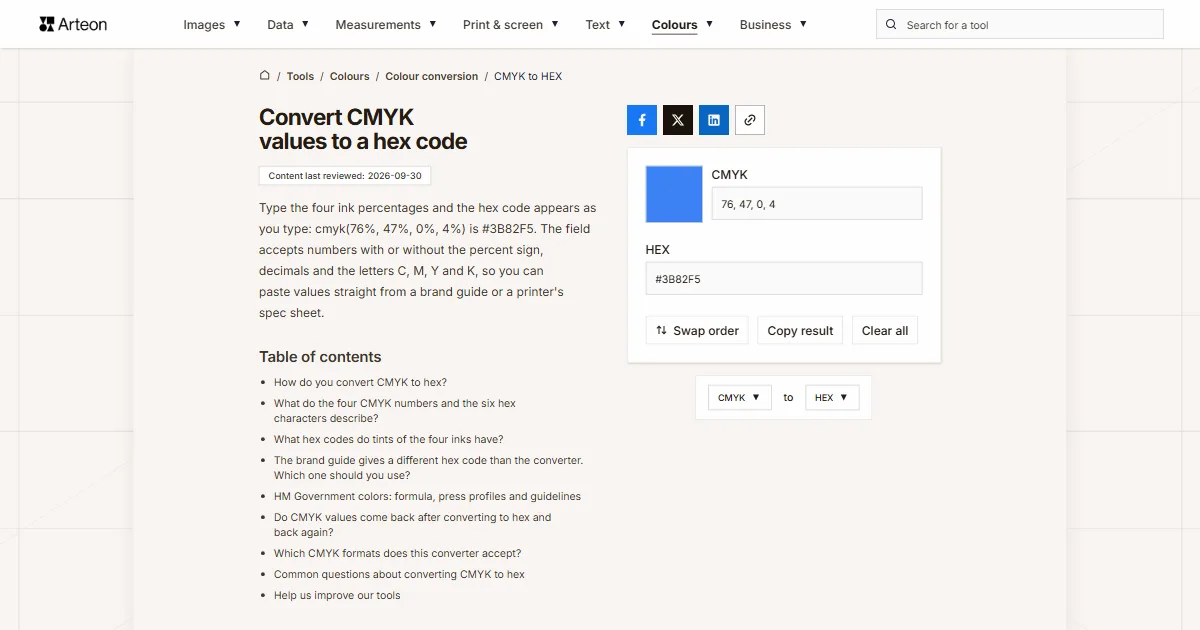
Type the four ink percentages and the hex code appears as you type: cmyk(76%, 47%, 0%, 4%) is #3B82F5. The field accepts numbers with or without the percent sign, decimals and the letters C, M, Y and K, so you can paste values straight from a brand guide or a printer's spec sheet.
How do you convert CMYK to hex?
First work out three channels of light from the four inks, then write each channel as two hexadecimal characters. Percentages go into the formula as fractions, so 76% becomes 0.76.
The formula: R = 255 × (1 − C) × (1 − K). Green comes from magenta in the same way, and blue from yellow.
For cmyk(76%, 47%, 0%, 4%) the red channel is 255 × 0.24 × 0.96, which is 59, green is 130 and blue is 245. Now divide each number by 16: 59 is 3 sixteens with 11 left over, and 11 is the letter B, so red becomes 3B. In the same way 130 becomes 82 and 245 becomes F5. The result is #3B82F5.
The CMYK to RGB converter stops halfway, at the three numbers. To turn a screen code into inks, use the HEX to CMYK converter.
What do the four CMYK numbers and the six hex characters describe?
The four CMYK numbers are a recipe for the press: how much of the paper to cover with cyan, magenta, yellow and black, the key plate[1]. That is why you find them in printer spec sheets and brand guides, since they describe ink rather than what appears on a screen.
The six hex characters are three numbers from 0 to 255 written in base 16, two characters each for red, green and blue light[2]. This is the code you paste into CSS, a website theme, Canva or Figma.
The result always has six characters, because ink has no transparency and there is nothing to put in a seventh and eighth character. We write the code in capitals, although a browser reads #3b82f5 the same way[2].
If your color is in another format, such as OKLCH, Lab or Android code, the color converter shows it in every format at once.
What hex codes do tints of the four inks have?
| CMYK values | Ink | Hex code |
|---|---|---|
| 100%, 0%, 0%, 0% | Cyan 100% | #00FFFF |
| 50%, 0%, 0%, 0% | Cyan 50% | #80FFFF |
| 20%, 0%, 0%, 0% | Cyan 20% | #CCFFFF |
| 0%, 100%, 0%, 0% | Magenta 100% | #FF00FF |
| 0%, 50%, 0%, 0% | Magenta 50% | #FF80FF |
| 0%, 20%, 0%, 0% | Magenta 20% | #FFCCFF |
| 0%, 0%, 100%, 0% | Yellow 100% | #FFFF00 |
| 0%, 0%, 50%, 0% | Yellow 50% | #FFFF80 |
| 0%, 0%, 20%, 0% | Yellow 20% | #FFFFCC |
| 0%, 0%, 0%, 100% | Black 100% | #000000 |
| 0%, 0%, 0%, 50% | Black 50% | #808080 |
| 0%, 0%, 0%, 20% | Black 20% | #CCCCCC |
| 0%, 0%, 0%, 10% | Black 10% | #E6E6E6 |
The brand guide gives a different hex code than the converter. Which one should you use?
Use the one in the brand guide. The formula assumes perfect inks on perfectly white paper, so its result comes out lighter and more saturated than a real print. The hex code in a guide usually sits much closer to what you see on paper.
The HM Government brand palette shows this clearly. For Pantone 660 C the guidelines give 77% cyan and 46% magenta together with the code #3D7DCA, and they state that these breakdowns were taken from Adobe Photoshop[3]. The formula turns the same inks into #3B8AFF, a bright, glowing blue. We ran the inks through two press profiles with the Little CMS library[4]: GRACoL 2013 from the ICC registry[5] gives #427BBA, and PSO Coated v3 from the European Color Initiative[6] gives #3977B9, both close to the code in the guidelines.
When a guide lists only CMYK, the converter gives you a working code. Compare it with a printed flyer or business card, and darken the color in Figma or your stylesheet if it glows more on screen than on paper.
HM Government colors: formula, press profiles and guidelines
| CMYK in the guidelines | Hex from the formula | Hex with GRACoL 2013 | Hex with PSO Coated v3 | Hex in the guidelines |
|---|---|---|---|---|
| 77%, 46%, 0%, 0% | #3B8AFF | #427BBA | #3977B9 | #3D7DCA |
| 33%, 97%, 0%, 0% | #AB08FF | #B12884 | #AF1282 | #B41A83 |
| 90%, 32%, 93%, 24% | #13840E | #0D6939 | #006532 | #006938 |
| 54%, 42%, 43%, 27% | #566C6A | #696D6C | #696E6A | #707271 |
#AB08FF, while both profiles and the guidelines land on a deep pink close to #B41A83.Do CMYK values come back after converting to hex and back again?
| Starting CMYK | Hex code | CMYK after the round trip |
|---|---|---|
| 100%, 80%, 0%, 0% | #0033FF | 100%, 80%, 0%, 0% |
| 76%, 47%, 0%, 4% | #3B82F5 | 76%, 47%, 0%, 4% |
| 0%, 12%, 100%, 5% | #F2D500 | 0%, 12%, 100%, 5% |
| 20%, 30%, 40%, 0% | #CCB399 | 0%, 12%, 25%, 20% |
| 40%, 30%, 20%, 10% | #8AA1B8 | 25%, 13%, 0%, 28% |
| 60%, 40%, 40%, 100% | #000000 | 0%, 0%, 0%, 100% |
| 100%, 100%, 100%, 100% | #000000 | 0%, 0%, 0%, 100% |
#000000, and only black ink comes back from that code. For a print file, enter the CMYK values from the brand guide or the printer's spec sheet, not the result of a round trip through hex.Which CMYK formats does this converter accept?
| What you type | What the converter shows | How we read it |
|---|---|---|
| 76, 47, 0, 4 | #3B82F5 | We read four numbers as percentages in the order cyan, magenta, yellow and black. |
| 76 47 0 4 | #3B82F5 | Spaces are enough, because the commas between numbers are optional. |
| cmyk(76%, 47%, 0%, 4%) | #3B82F5 | The bracketed form, the same as the result of the HEX to CMYK converter, is accepted with its name. |
| C: 76%, M: 47%, Y: 0%, K: 4% | #3B82F5 | We skip the channel letters that brand guides put in front of each ink and keep the numbers. |
| 76.5 47 0 4 | #3A82F5 | Decimal values are kept, so 76.5% cyan is calculated exactly. |
| 0.76, 0.47, 0, 0.04 | #3B82F5 | We convert fractions from 0 to 1, which some apps and libraries return, into percentages. |
| (76, 47, 0, 4) | #3B82F5 | We read a Python tuple together with its brackets. |
| device-cmyk(76% 47% 0% 4%) | #3B82F5 | The notation from the CSS Color Module Level 5 specification is accepted as well. |
| 150, 0, 0, 0 | #00FFFF | We cap a value above 100 at 100 and raise a negative value to zero, because ink cannot cover more than the whole surface. |
device-cmyk() notation is defined in CSS Color Module Level 5[7].Convert other units to HEX
Convert CMYK to other units
Sources
- CMYK color model — Wikipedia
- CSS Color Module Level 4: The RGB Hexadecimal Notations — W3C
- HMG Identity Guidelines 2022 — Government Communication Service
- Little CMS — Marti Maria
- GRACoL2013_CRPC6.icc — profile registry entry — International Color Consortium
- Downloads: ICC profiles from ECI — European Color Initiative
- CSS Color Module Level 5: Specifying Uncalibrated CMYK Colors — W3C
- Color Bridge Guide Coated — Pantone
Every figure in the tables was computed from the unit definitions and checked arithmetically before publication. Historical values and the names of local units come from the sources listed above.
Content last reviewed: · written and checked by the Arteon team
Common questions about converting CMYK to hex
Can I enter a Pantone color number?
No. The field takes four CMYK numbers, and a Pantone number refers to a premixed ink. The Pantone Color Bridge guide lists CMYK and HTML values for Pantone colors[8], and you can convert its CMYK values to a hex code here.
What happens if I type only three numbers?
The result field stays empty and a message below it says the entry cannot be read as a CMYK color, with an example of four numbers. The same happens with five numbers, because the converter does not guess which one to drop.
Can I use the hex code from this converter in CSS?
Yes. The result is in #RRGGBB form, which every browser accepts[2]. The Copy result button copies the code together with the hash sign.
Help us improve our tools
Have an idea for a feature, spotted a bug, or want to suggest another tool? Send us a message.