Convert centimeters to typographic points
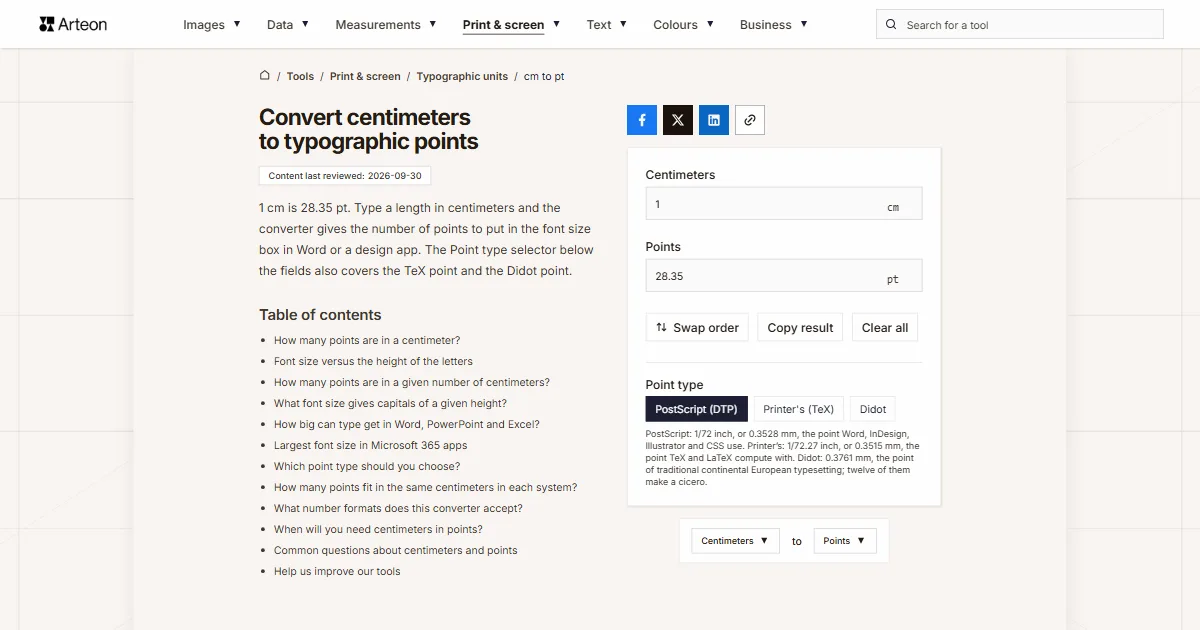
1 cm is 28.35 pt. Type a length in centimeters and the converter gives the number of points to put in the font size box in Word or a design app. The Point type selector below the fields also covers the TeX point and the Didot point.
How many points are in a centimeter?
One centimeter is 28.35 points. A point is 1/72 inch and an inch is 2.54 cm, so a centimeter holds 72 ÷ 2.54 points.[1]
The formula is points = centimeters × 72 ÷ 2.54. For 2 cm that gives 2 × 72 ÷ 2.54 = 56.69 pt, and 2.54 cm gives exactly 72 pt.
Word takes font sizes from 1 to 1,638 in steps of half a point.[2] A result of 56.69 pt becomes 56.5 or 57, and the two differ by less than 0.02 cm. To go the other way, use the points to centimeters converter.
Font size versus the height of the letters
The number in the font size box describes the box a font draws each character in, including the space above and below it, not the height of the letter.[3] Convert 5 cm to 141.73 pt, set that size, and the capitals will come out shorter than 5 cm.
How much shorter is written into the font file's metrics table.[4] We read those values from the fonts that come with Windows 11: capitals take up 71.6% of the size in Arial, 72.7% in Verdana, 66.2% in Times New Roman and 63.2% in Calibri. For Arial capitals 5 cm tall you need a 198 pt font, and in Calibri as much as 224.5 pt.
The plain conversion is what you want when you know the size of a text box, a gap or the line spacing. When you know the letter height, use the table for your typeface. A measurement in inches can be turned into centimeters first with the inches to cm converter, and one in millimeters with the mm to cm converter. When the letters are only a few millimeters tall, the mm to pt converter works out the size.
How many points are in a given number of centimeters?
| Centimeters | Points | Size to type in Word |
|---|---|---|
| 0.1 cm | 2.83 pt | 3 pt |
| 0.2 cm | 5.67 pt | 5.5 pt |
| 0.25 cm | 7.09 pt | 7 pt |
| 0.3 cm | 8.5 pt | 8.5 pt |
| 0.4 cm | 11.34 pt | 11.5 pt |
| 0.5 cm | 14.17 pt | 14 pt |
| 0.6 cm | 17.01 pt | 17 pt |
| 0.7 cm | 19.84 pt | 20 pt |
| 0.8 cm | 22.68 pt | 22.5 pt |
| 0.9 cm | 25.51 pt | 25.5 pt |
| 1 cm | 28.35 pt | 28.5 pt |
| 1.5 cm | 42.52 pt | 42.5 pt |
| 2 cm | 56.69 pt | 56.5 pt |
| 2.5 cm | 70.87 pt | 71 pt |
| 2.54 cm | 72 pt | 72 pt |
| 3 cm | 85.04 pt | 85 pt |
| 4 cm | 113.39 pt | 113.5 pt |
| 5 cm | 141.73 pt | 141.5 pt |
| 6 cm | 170.08 pt | 170 pt |
| 8 cm | 226.77 pt | 227 pt |
| 10 cm | 283.46 pt | 283.5 pt |
| 15 cm | 425.2 pt | 425 pt |
| 20 cm | 566.93 pt | 567 pt |
| 25 cm | 708.66 pt | 708.5 pt |
| 30 cm | 850.39 pt | 850.5 pt |
| 40 cm | 1,133.86 pt | 1,134 pt |
| 50 cm | 1,417.32 pt | 1,417.5 pt |
What font size gives capitals of a given height?
| Letter height | Arial | Calibri | Times New Roman | Verdana |
|---|---|---|---|---|
| 1 cm | 39.5 pt | 45 pt | 43 pt | 39 pt |
| 1.5 cm | 59.5 pt | 67.5 pt | 64 pt | 58.5 pt |
| 2 cm | 79 pt | 89.5 pt | 85.5 pt | 78 pt |
| 2.5 cm | 99 pt | 112 pt | 107 pt | 97.5 pt |
| 3 cm | 118.5 pt | 134.5 pt | 128.5 pt | 117 pt |
| 4 cm | 158.5 pt | 179.5 pt | 171 pt | 156 pt |
| 5 cm | 198 pt | 224.5 pt | 214 pt | 195 pt |
| 6 cm | 237.5 pt | 269 pt | 257 pt | 234 pt |
| 8 cm | 316.5 pt | 359 pt | 342.5 pt | 312 pt |
| 10 cm | 395.5 pt | 448.5 pt | 428 pt | 390 pt |
| 12 cm | 475 pt | 538.5 pt | 513.5 pt | 468 pt |
| 15 cm | 593.5 pt | 673 pt | 642 pt | 585 pt |
| 20 cm | 791.5 pt | 897.5 pt | 856 pt | 780 pt |
| 25 cm | 989.5 pt | 1,121.5 pt | 1,070.5 pt | 974.5 pt |
| 30 cm | 1,187 pt | 1,346 pt | 1,284.5 pt | 1,169.5 pt |
| 40 cm | 1,583 pt | 1,794.5 pt | 1,712.5 pt | 1,559.5 pt |
| 50 cm | 1,978.5 pt | 2,243 pt | 2,140.5 pt | 1,949.5 pt |
How big can type get in Word, PowerPoint and Excel?
Each Microsoft 365 app has its own font size range. Word accepts 1 to 1,638 points in half-point steps, PowerPoint 1 to 3,600 in steps of a tenth, and Excel 1 to 409 in half-point steps.[2]
In centimeters, an Arial capital in Word tops out at about 41 cm. If you need bigger lettering, lay it out in PowerPoint, where the same capital can be over 90 cm tall.
Largest font size in Microsoft 365 apps
| App | Smallest step | Largest size | Character box | Arial capital |
|---|---|---|---|---|
| Word | 0.5 pt | 1,638 pt | 57.79 cm | 41.39 cm |
| PowerPoint | 0.1 pt | 3,600 pt | 127 cm | 90.97 cm |
| Excel | 0.5 pt | 409 pt | 14.43 cm | 10.34 cm |
Which point type should you choose?
The Point type selector below the fields decides which points the result is given in. PostScript (DTP) is selected by default and matches Word, Adobe apps and CSS.
Choose Printer's (TeX) when the measurement is going into a LaTeX document. There the unit pt is 1/72.27 inch, so 1 cm is 28.45 points rather than 28.35.[3]
Didot uses the point of traditional continental European typesetting. It is only useful when you are recreating a size from old German, French or Eastern European print documentation.
How many points fit in the same centimeters in each system?
| Point type | 1 cm | 2.54 cm | 10 cm |
|---|---|---|---|
| PostScript (DTP) | 28.35 pt | 72 pt | 283.46 pt |
| Printer's (TeX) | 28.45 pt | 72.27 pt | 284.53 pt |
| Didot | 26.59 pt | 67.54 pt | 265.91 pt |
What number formats does this converter accept?
| What you type | What the converter shows | Note |
|---|---|---|
| 2.54 | 72 pt | A number without a unit is read as centimeters, because that is the unit of this field. |
| 2,54 | 72 pt | A decimal comma, as a European supplier would write it, is read the same way as the point. |
| 1/2 | 14.17 pt | We work out a slash fraction ourselves, so half a centimeter does not need to become 0.5 first. |
| 2½ | 70.87 pt | A ½ character copied from a document is added to the number in front of it. |
| 2.5 cm | 70.87 pt | A unit pasted along with the number does no harm, because it is the unit of this field. |
| 25 mm | 70.87 pt | Millimeters pasted into the centimeters field become 2.5 cm first, so the result is not ten times too big. |
| 1 in | 72 pt | Inches pasted into the field are turned into 2.54 cm, so an inch gives exactly 72 points. |
| 12 pt | 12 pt | Points pasted into the centimeters field are turned into centimeters, so the same 12 points come back as the result. |
When will you need centimeters in points?
Window lettering and shop signs
If you order cut vinyl letters by height and the design lives in Word or PowerPoint, the letter height table tells you which size gives capitals of the height you ordered.Door signs and labels
On a door sign 10 cm tall, one line of text has at most 283.46 pt of character box to work with. Do the same for a box file spine or a storage label by typing its height in centimeters.Posters and banners
For a poster title with Arial capitals 8 cm tall, set 316.5 pt. Once the capitals need to be taller than about 41 cm, move the design to PowerPoint or a design app, because Word will not accept the size.LaTeX documents
A frame width or gap measured with a ruler on a printout converts to TeX points once you choose Printer's (TeX). Type the result into the document with the pt unit.
Convert other units to Points
Convert Centimeters to other units
Sources
- CSS Values and Units Module Level 4 — W3C
- Change the font size — Microsoft Support
- Point (typography) — Wikipedia
- OS/2 — OS/2 and Windows Metrics Table — Microsoft Learn
Every figure in the tables was computed from the unit definitions and checked arithmetically before publication. Historical values and the names of local units come from the sources listed above.
Content last reviewed: · written and checked by the Arteon team
Common questions about centimeters and points
Does the result depend on DPI or screen resolution?
No. Centimeters and points are both lengths, so the ratio between them is fixed. Resolution only matters once you work in pixels, and the cm to px converter works those out for any DPI.
How do I work out the size for a typeface that is not in the table?
Print a test at a known size, for example 72 pt, measure a capital H with a ruler and divide its height by 2.54 cm. That gives the capital height of the typeface. Divide the letter height you need by that number and convert the result to points here.
How are points different from pixels for font size?
A point has a fixed length on paper, while a pixel only gets a size on a screen with a given density. In CSS, 12 pt equals 16 pixels, and the pt to px converter handles any other value.
Help us improve our tools
Have an idea for a feature, found a bug, or want to suggest another tool? Write to us, we read every message.