Convert millimeters to points
3 mm is 8.5 pt, because a millimeter holds 2.8346 typographic points. Type a line weight, a letter height or a page side in millimeters and the converter gives the value in points, ready to enter in a page layout program or a word processor. The Point type selector also covers the TeX point and the Didot point.
How many points are in a millimeter?
A millimeter is 2.8346 points, so you get points by multiplying millimeters by 2.8346. Three millimeters come to 8.5 pt, and 25.4 mm, one inch, to exactly 72 pt.
Formula: points = millimeters × 72 ÷ 25.4
The 72 comes from the point being 1/72 inch, and the 25.4 from the length of the inch in millimeters. The CSS standard defines both[1]. Results are rarely round, because the point was built on the inch and the millimeter on the meter. Whole inches and simple fractions of an inch come out round: 50.8 mm, two inches, is 144 pt, and 12.7 mm, half an inch, is 36 pt.
The pt to mm converter handles the other direction and also shows how tall letters are at common font sizes.
Why convert millimeters to points?
Print shops outside the US, sign makers, engravers and technical drawings give sizes in millimeters. The programs you design in set font size, stroke weight and line spacing in points. When a brief says “letters 5 mm tall” or “0.5 mm rule”, the value has to become points before you can type it into a field.
Today's point is 0.3528 mm, the desktop publishing point defined as 1/72 inch[2]. Older European type used the larger Didot point, and TeX still uses a slightly smaller one, which is why the converter has a Point type selector. The default, PostScript (DTP), matches Word, InDesign and web browsers.
If your size is in pixels rather than millimeters, the px to pt converter turns it into points and the px to mm converter into millimeters.
How many points are common sizes in millimeters?
| Millimeters | DTP point | Didot point |
|---|---|---|
| 0.1 mm | 0.28 pt | 0.27 dd |
| 0.2 mm | 0.57 pt | 0.53 dd |
| 0.25 mm | 0.71 pt | 0.66 dd |
| 0.3 mm | 0.85 pt | 0.8 dd |
| 0.5 mm | 1.42 pt | 1.33 dd |
| 1 mm | 2.83 pt | 2.66 dd |
| 1.5 mm | 4.25 pt | 3.99 dd |
| 2 mm | 5.67 pt | 5.32 dd |
| 2.5 mm | 7.09 pt | 6.65 dd |
| 3 mm | 8.5 pt | 7.98 dd |
| 4 mm | 11.34 pt | 10.64 dd |
| 5 mm | 14.17 pt | 13.3 dd |
| 6 mm | 17.01 pt | 15.95 dd |
| 8 mm | 22.68 pt | 21.27 dd |
| 10 mm | 28.35 pt | 26.59 dd |
| 12 mm | 34.02 pt | 31.91 dd |
| 15 mm | 42.52 pt | 39.89 dd |
| 20 mm | 56.69 pt | 53.18 dd |
| 25 mm | 70.87 pt | 66.48 dd |
| 25.4 mm | 72 pt | 67.54 dd |
| 30 mm | 85.04 pt | 79.77 dd |
| 50 mm | 141.73 pt | 132.96 dd |
| 100 mm | 283.46 pt | 265.91 dd |
What font size gives letters a few millimeters tall?
A font size in points measures the body of the type, not the letter, and in digital type each designer decides how tall the letters are within it[3]. So when an engraver or a sign spec asks for letters a set number of millimeters tall, converting those millimeters straight to points gives lettering that is too small.
The capital height is stored in the font file as a share of the font size[4]. We read it from the files that ship with Windows 11: capitals take up 71.6% of the font size in Arial, 66.2% in Times New Roman and 63.2% in Calibri. To pick a size, divide the letter height you need by that share and convert the result to points. A capital 5 mm tall needs a 6.98 mm body in Arial, which is 19.8 pt.
Font size for a capital letter of a given height
| Letter height | Arial | Times New Roman | Calibri |
|---|---|---|---|
| 1.5 mm | 5.9 pt | 6.4 pt | 6.7 pt |
| 2 mm | 7.9 pt | 8.6 pt | 9 pt |
| 2.5 mm | 9.9 pt | 10.7 pt | 11.2 pt |
| 3 mm | 11.9 pt | 12.8 pt | 13.5 pt |
| 3.5 mm | 13.9 pt | 15 pt | 15.7 pt |
| 4 mm | 15.8 pt | 17.1 pt | 17.9 pt |
| 5 mm | 19.8 pt | 21.4 pt | 22.4 pt |
| 6 mm | 23.7 pt | 25.7 pt | 26.9 pt |
| 8 mm | 31.7 pt | 34.2 pt | 35.9 pt |
| 10 mm | 39.6 pt | 42.8 pt | 44.9 pt |
| 15 mm | 59.4 pt | 64.2 pt | 67.3 pt |
| 20 mm | 79.1 pt | 85.6 pt | 89.7 pt |
| 25 mm | 98.9 pt | 107 pt | 112.2 pt |
| 50 mm | 197.9 pt | 214.1 pt | 224.3 pt |
Technical drawing line widths in points
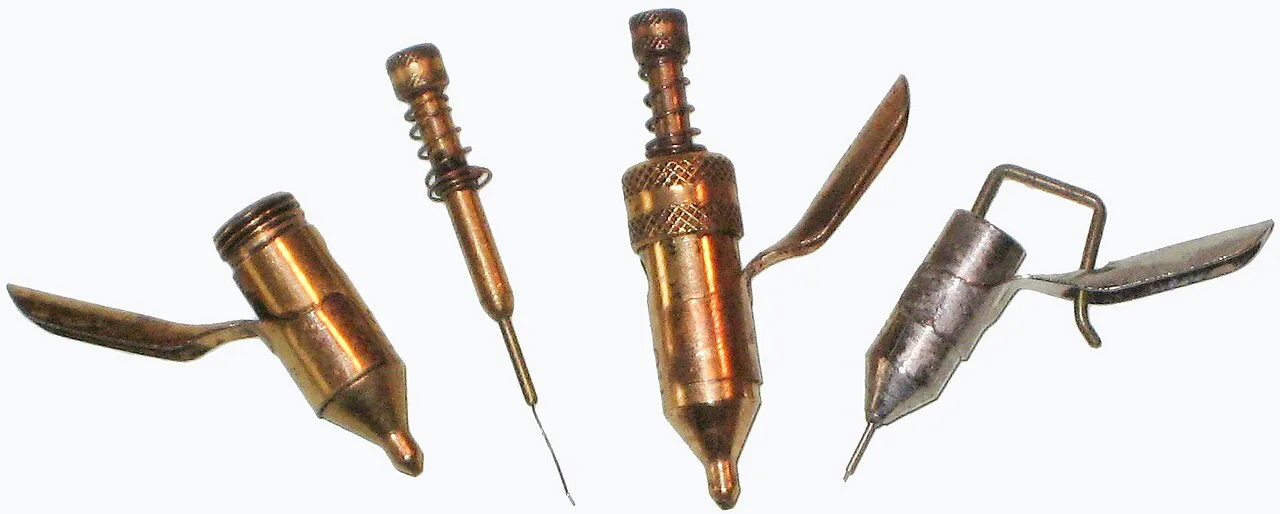
Technical drawings give line widths in millimeters, and a full set of technical pens covers the widths defined in ISO 128[5]. When you redraw such a drawing in a graphics program, the stroke weight has to go in as points.

How many points are technical pen widths?
| Pen width | Points |
|---|---|
| 0.1 mm | 0.28 pt |
| 0.13 mm | 0.37 pt |
| 0.18 mm | 0.51 pt |
| 0.25 mm | 0.71 pt |
| 0.35 mm | 0.99 pt |
| 0.5 mm | 1.42 pt |
| 0.7 mm | 1.98 pt |
| 1 mm | 2.83 pt |
| 1.4 mm | 3.97 pt |
| 2 mm | 5.67 pt |
How many points are paper and card sizes?
| Size | Millimeters | Points |
|---|---|---|
| A3 | 297 × 420 mm | 841.89 × 1,190.55 pt |
| A4 | 210 × 297 mm | 595.28 × 841.89 pt |
| A5 | 148 × 210 mm | 419.53 × 595.28 pt |
| A6 | 105 × 148 mm | 297.64 × 419.53 pt |
| C5 envelope | 162 × 229 mm | 459.21 × 649.13 pt |
| DL envelope | 110 × 220 mm | 311.81 × 623.62 pt |
| US Letter | 215.9 × 279.4 mm | 612 × 792 pt |
| US Legal | 215.9 × 355.6 mm | 612 × 1,008 pt |
| Tabloid | 279.4 × 431.8 mm | 792 × 1,224 pt |
| US business card | 88.9 × 50.8 mm | 252 × 144 pt |
| UK business card | 85 × 55 mm | 240.94 × 155.91 pt |
| Australian business card | 90 × 55 mm | 255.12 × 155.91 pt |
How to enter millimeters in a program that works in points
InDesign accepts a value in a different unit from the one set in its preferences. Type the number with its abbreviation, for example 48 mm, and the program converts it to the unit of the field[8]. The same help page states that an inch holds 72 PostScript points or 72.27 traditional printer's points, and lets you choose between the two in the preferences[8].
The second value is the point behind the Printer's (TeX) option in the selector. TeX took it from the old American point system[2]. If you set a length in a LaTeX document and give it in pt, pick that option, because 10 mm then comes to 28.45 pt rather than 28.35 pt.
What number formats does this converter accept?
| What you type | What the converter shows | How we read it |
|---|---|---|
| 3 | 8.5 pt | We read a bare number as millimeters, because that is the unit of the field. |
| 2.5 | 7.09 pt | A point separates the decimals in English, and that is how we read it. |
| 2,5 | 7.09 pt | A comma before a single digit comes from a European spec, so we read it as a decimal comma. |
| 1/4 | 0.71 pt | We work out a fraction with a slash ourselves, so it does not need to become 0.25 first. |
| ½ | 1.42 pt | A ½ character copied from a document counts as half a millimeter. |
| 3mm | 8.5 pt | The mm pasted with the number is the unit of the field, so we drop it. |
| 0.5 cm | 14.17 pt | We turn centimeters into millimeters first, so half a centimeter counts as 5 mm. |
| 1 in | 72 pt | An inch from a US spec becomes 25.4 mm before the conversion. |
| 12pt | 12 pt | Points pasted into the millimeters field become millimeters first, so the same number of points comes back. |
| 1,500 | 4251.97 pt | Three digits follow the comma, so we read it as a thousands separator and work with fifteen hundred millimeters. A note under the field shows the other possible reading, 1.5. |
Convert other units to Points
Convert Millimeters to other units
Sources
- CSS Values and Units Module Level 4 — W3C
- Point (typography) — Wikipedia
- Em (typography) — Wikipedia
- OS/2 and Windows metrics table (OpenType 1.9.1) — Microsoft Learn
- Technical pen — Wikipedia
- Paper size — Wikipedia
- Business card — Wikipedia
- InDesign: Ausrichten und Verteilen von Objekten mit Linealen (German version) — Adobe
Every figure in the tables was computed from the unit definitions and checked arithmetically before publication. Historical values and the names of local units come from the sources listed above.
Content last reviewed: · written and checked by the Arteon team
Frequently asked questions about mm to pt
How do I match a font size to the height of lowercase letters?
The same way as for capitals, with a different share. The lowercase x takes up 51.9% of the font size in Arial, so an x 3 mm tall needs a 5.78 mm body, which is 16.4 pt. This helps with signs and labels where the legibility of lowercase text matters most.
Why do I get fewer points with the Didot option?
Because the Didot point is longer. It is 0.376 mm against 0.353 mm for the DTP point, so fewer of them fit in the same length. Five millimeters are 14.17 DTP points but 13.3 Didot points.
What is the thinnest line I should use in print?
Print shops usually ask for lines no thinner than 0.25 pt, or 0.088 mm. In millimeters that means a 0.1 mm line (0.28 pt) is still safe, and anything thinner is best avoided.
Help us improve this converter
Missing a paper size or a line width in the charts? Write to us; we read every message ourselves.