Convert HSL to a HEX code
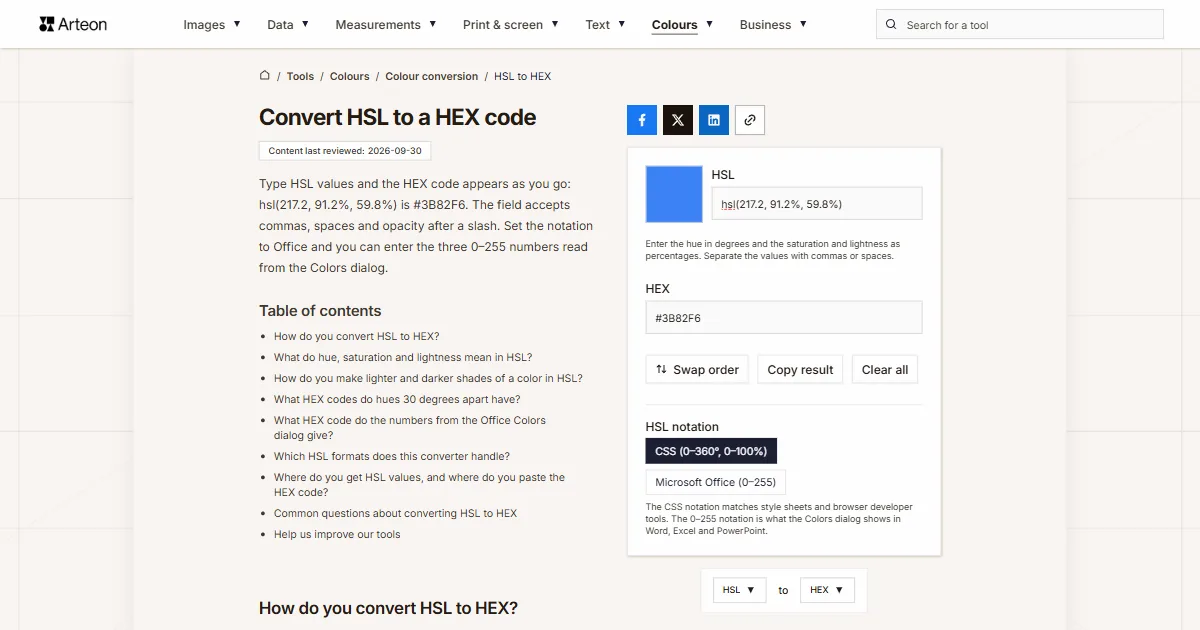
Type HSL values and the HEX code appears as you go: hsl(217.2, 91.2%, 59.8%) is #3B82F6. The field accepts commas, spaces and opacity after a slash. Set the notation to Office and you can enter the three 0–255 numbers read from the Colors dialog.
Enter the hue in degrees and the saturation and lightness as percentages. Separate the values with commas or spaces.
How do you convert HSL to HEX?
Turn saturation and lightness into fractions from 0 to 1, work out the three RGB channels from them and write each channel as two hexadecimal digits. The calculation is built on chroma, the difference between the strongest and weakest channel of the color[1]. If the numbers come from the Office Colors dialog, set the notation to Microsoft Office (0–255) first. If the field already holds a color, the switch rewrites it as the same color in the new notation.
Formula: C = (1 − |2L − 1|) × S, the strongest channel is L + C ÷ 2 and the weakest is L − C ÷ 2.
Take hsl(217.2, 91.2%, 59.8%). The chroma here is 0.733. The strongest channel has 0.965 and the weakest 0.231. A hue of 217.2° lies between cyan and blue. That makes blue the strongest channel and red the weakest, with green in between at 0.510[1].
Multiplied by 255, the channels come to 59, 130 and 246. In hexadecimal that is 3B, 82 and F6, so the code is #3B82F6. Each half of this route has its own tool: the HSL to RGB converter and the RGB to HEX converter.
What do hue, saturation and lightness mean in HSL?
The first value is the hue, given as an angle on the color wheel. The screen primaries lie 120 degrees apart: red at 0°, green at 120° and blue at 240°, and 360° is red again[2].
The second value is saturation. At 100% the color is fully saturated, and at 0% it turns into a gray in which the hue no longer affects the result. The third value is lightness. It gives black at 0%, white at 100%, and the full color of a hue at 50%[2].
CSS also accepts the hue in other angle units. A full turn is 360 degrees, 400 gradians, 2π radians or one turn written as 1turn[3]. The converter reads all of them, so 0.25turn gives the same color as 90°.
The HSL model was described in 1978, and in 1979 Tektronix introduced graphics terminals that set colors in HSL[1].
If your color is in another format, such as OKLCH, Lab or Android code, the color converter shows it in every format at once.
How do you make lighter and darker shades of a color in HSL?
hsl(217.2, 91.2%, 59.8%) and the HEX codes they produce.| Lightness | HSL | HEX code |
|---|---|---|
| 10% | hsl(217.2, 91.2%, 10%) | #021431 |
| 20% | hsl(217.2, 91.2%, 20%) | #042862 |
| 30% | hsl(217.2, 91.2%, 30%) | #073C92 |
| 40% | hsl(217.2, 91.2%, 40%) | #0950C3 |
| 50% | hsl(217.2, 91.2%, 50%) | #0B64F4 |
| 60% | hsl(217.2, 91.2%, 60%) | #3C83F6 |
| 70% | hsl(217.2, 91.2%, 70%) | #6DA2F8 |
| 80% | hsl(217.2, 91.2%, 80%) | #9DC1FB |
| 90% | hsl(217.2, 91.2%, 90%) | #CEE0FD |
What HEX codes do hues 30 degrees apart have?
| Hue | Hues in the CSS specification | HSL | HEX code |
|---|---|---|---|
| 0° | reds | hsl(0, 100%, 50%) | #FF0000 |
| 30° | red-yellows (oranges) | hsl(30, 100%, 50%) | #FF8000 |
| 60° | yellows | hsl(60, 100%, 50%) | #FFFF00 |
| 90° | yellow-greens | hsl(90, 100%, 50%) | #80FF00 |
| 120° | greens | hsl(120, 100%, 50%) | #00FF00 |
| 150° | green-cyans | hsl(150, 100%, 50%) | #00FF80 |
| 180° | cyans | hsl(180, 100%, 50%) | #00FFFF |
| 210° | cyan-blues | hsl(210, 100%, 50%) | #0080FF |
| 240° | blues | hsl(240, 100%, 50%) | #0000FF |
| 270° | blue-magentas | hsl(270, 100%, 50%) | #8000FF |
| 300° | magentas | hsl(300, 100%, 50%) | #FF00FF |
| 330° | magenta-reds | hsl(330, 100%, 50%) | #FF0080 |
What HEX code do the numbers from the Office Colors dialog give?
| Office values | HEX code | Same color in CSS |
|---|---|---|
| 0, 255, 128 | #FF0101 | hsl(0, 100%, 50.2%) |
| 42, 255, 128 | #FFFF01 | hsl(60, 100%, 50.2%) |
| 85, 255, 128 | #01FF01 | hsl(120, 100%, 50.2%) |
| 127, 255, 128 | #01FFFF | hsl(180, 100%, 50.2%) |
| 170, 255, 128 | #0101FF | hsl(240, 100%, 50.2%) |
| 213, 255, 128 | #FF01FF | hsl(300, 100%, 50.2%) |
| 154, 233, 153 | #3C83F6 | hsl(217.1, 91.2%, 60%) |
| 170, 0, 128 | #808080 | hsl(0, 0%, 50.2%) |
| 0, 0, 255 | #FFFFFF | hsl(0, 0%, 100%) |
| 0, 0, 0 | #000000 | hsl(0, 0%, 0%) |
Which HSL formats does this converter handle?
| What you type | Converter result | How we read it |
|---|---|---|
| hsl(217.2, 91.2%, 59.8%) | #3B82F6 | The older CSS notation with commas reads the same as the new one |
| hsl(217.2 91.2% 59.8%) | #3B82F6 | The newer CSS notation with spaces is taken as it stands |
| 217.2 91.2 59.8 | #3B82F6 | Plain numbers, without brackets and without percent signs — we go by their order |
| H: 217.2 S: 91.2% L: 59.8% | #3B82F6 | Channel letters with a colon, the way brand guidelines write them, are skipped and we take the numbers |
| hsl(217.2 91.2% 59.8% / 50%) | #3B82F680 | Opacity given after a slash is added to the result as the last two characters of the code |
| 180°, 100%, 50% | #00FFFF | A degree sign next to the hue is no trouble, we read the number alone |
| color: hsl(217, 91%, 60%); | #3C83F6 | Paste the whole line from a style sheet, we will pick the colour out of it |
| 154, 233, 153 | #3C83F6 | Three numbers on the 0–255 scale, the Microsoft Office notation from the Colors dialog in Word and Excel — with the Notation switch set that way we read them just like percentages |
Where do you get HSL values, and where do you paste the HEX code?
The first two places give you HSL values to convert, and the next two take the finished HEX code.
Office Colors dialog
Click Shape Fill and choose More Fill Colors[5]. On the Custom tab, set Color model to HSL and copy the numbers from the Hue, Sat and Lum boxes. In the converter, set the notation to Microsoft Office (0–255).CSS style sheet
Search the file forhsl(orhsla(and copy the whole value, brackets included. The converter accepts it with commas, spaces and opacity after a slash.Google Docs, Sheets and Slides
In the toolbar, click Text color or another tool with color options. Under Custom, click Add a custom color, paste the HEX code and click OK[6].Figma
Click the fill swatch in the right sidebar. In the list of color models under the sliders, choose Hex[7] and paste the code into the field next to it.
Convert other units to HEX
Convert HSL to other units
Sources
- HSL and HSV — Wikipedia
- CSS Color Module Level 4 — HSL Colors: hsl() and hsla() functions — W3C
- CSS Values and Units Module Level 4 — Angle Units — W3C
- Choosing colors in the Colors dialog box — Microsoft Support
- Change the colors in a text box or shape — Microsoft Support
- Change the color of text, objects, and backgrounds — Google Docs Editors Help
- Update fills using the color picker — Figma Help Center
Every figure in the tables was computed from the unit definitions and checked arithmetically before publication. Historical values and the names of local units come from the sources listed above.
Content last reviewed: · written and checked by the Arteon team
Common questions about converting HSL to HEX
Why does hsl(217, 91%, 60%) give a different code from #3B82F6?
HSL rounded to whole numbers describes the color less precisely. hsl(217, 91%, 60%) gives #3C83F6, while #3B82F6 is hsl(217.2, 91.2%, 59.8%). How many colors change with that kind of rounding is shown in a table on the HEX to HSL converter.
How do I enter an HSL color with transparency?
Add the opacity after a slash, for example hsl(217.2 91.2% 59.8% / 50%), or give it as the fourth value of hsla()[2]. The converter then gives the eight-character code #3B82F680, in which the last two digits hold the opacity.
What happens if I enter saturation outside 0–100%?
The converter clamps it to the edge of the range, so 150% counts as 100%. A negative value counts as 0%, which is what the CSS specification requires[2]. Lightness works the same way.
Is a hue of 360° the same color as 0°?
Yes. The hue is an angle, so 360° is the same red as 0°[2]. For the same reason 480° gives the same green as 120°, and −120° the same blue as 240°.
How do I convert HSL to RGB values?
Enter the value into the HSL to RGB converter, which gives three channels from 0 to 255. For hsl(217.2, 91.2%, 59.8%) the result is rgb(59, 130, 246).
How do I move a color from the Office dialog into a style sheet?
Set the notation to Microsoft Office (0–255) and enter the three numbers from the Colors dialog. You can paste the HEX code from the result field straight into CSS, and the HEX to HSL converter gives the same color in degrees and percentages.
Help us improve our tools
Have an idea, found a bug, or want to suggest a feature? Drop us a message.