Convert HSV values to RGB
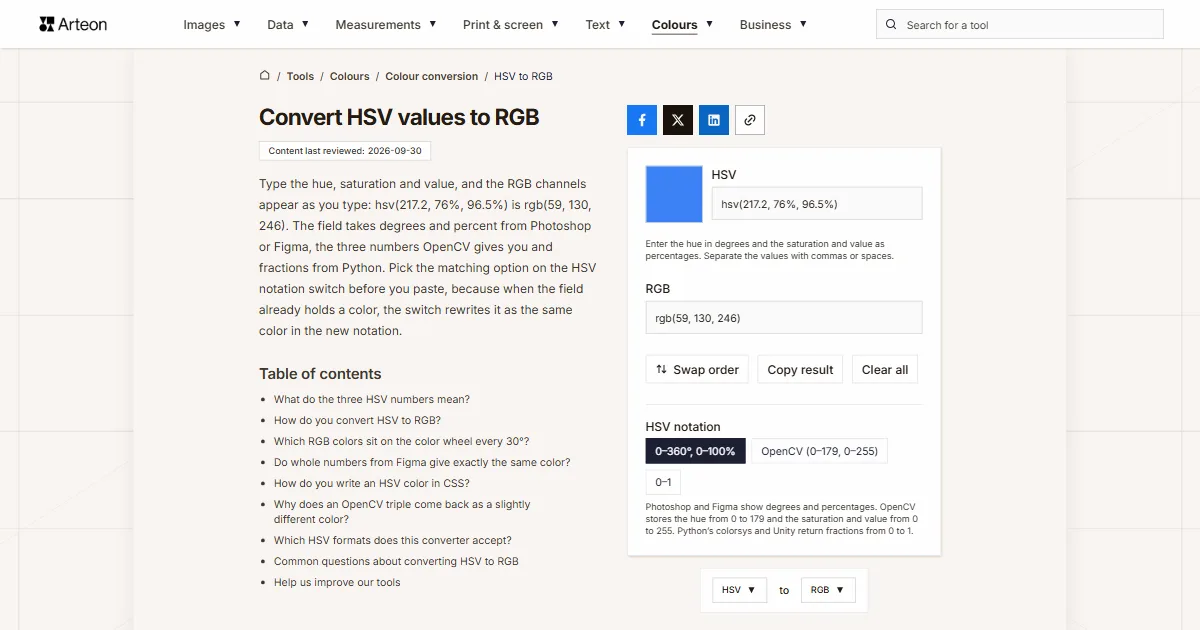
Type the hue, saturation and value, and the RGB channels appear as you type: hsv(217.2, 76%, 96.5%) is rgb(59, 130, 246). The field takes degrees and percent from Photoshop or Figma, the three numbers OpenCV gives you and fractions from Python. Pick the matching option on the HSV notation switch before you paste, because when the field already holds a color, the switch rewrites it as the same color in the new notation.
Enter the hue in degrees and the saturation and value as percentages. Separate the values with commas or spaces.
What do the three HSV numbers mean?
The first number is the hue (H), an angle on the color wheel: 0° is red, 120° is green and 240° is blue[1]. The second is saturation (S) and the third is value (V). Photoshop calls the same model HSB, and Adobe's help names its parts hue, saturation and brightness[2].
Saturation and value make the most sense if you think of paint. Alvy Ray Smith, who described the model in 1978, compared them to adding white and black to a pure hue: lower saturation means more white, lower value means more black[3]. That is why any color with a value of 0% is black whatever the other two numbers say, and a saturation of 0% leaves a gray of that value.
If your color is in another format, such as OKLCH, Lab or Android code, the color converter shows it in every format at once.
How do you convert HSV to RGB?
First work out the chroma, the spread between the channels: C = V × S. Then divide the hue by 60°. The whole part of the result picks one of six slices of the wheel, and the rest gives the middle channel: X = C × (1 − |(H ÷ 60°) mod 2 − 1|). Finally, add m = V − C to every channel[1].
Take hsv(217.2, 76%, 96.5%). The chroma is 0.965 × 0.76 = 0.733. The hue divided by 60° is 3.62, so the color lies in the slice between 180° and 240°, where red is zero, green is the middle channel and blue is full. The middle channel is 0.733 × (1 − |1.62 − 1|) = 0.279, and m = 0.965 − 0.733 = 0.232.
After adding m, the channels are 0.232, 0.511 and 0.965. Multiplied by 255 and rounded, that gives rgb(59, 130, 246), and the RGB to HEX converter turns it into a hex code.
Which RGB colors sit on the color wheel every 30°?
| HSV notation | RGB values | HEX code |
|---|---|---|
| hsv(0, 100%, 100%) | rgb(255, 0, 0) | #FF0000 |
| hsv(30, 100%, 100%) | rgb(255, 128, 0) | #FF8000 |
| hsv(60, 100%, 100%) | rgb(255, 255, 0) | #FFFF00 |
| hsv(90, 100%, 100%) | rgb(128, 255, 0) | #80FF00 |
| hsv(120, 100%, 100%) | rgb(0, 255, 0) | #00FF00 |
| hsv(150, 100%, 100%) | rgb(0, 255, 128) | #00FF80 |
| hsv(180, 100%, 100%) | rgb(0, 255, 255) | #00FFFF |
| hsv(210, 100%, 100%) | rgb(0, 128, 255) | #0080FF |
| hsv(240, 100%, 100%) | rgb(0, 0, 255) | #0000FF |
| hsv(270, 100%, 100%) | rgb(128, 0, 255) | #8000FF |
| hsv(300, 100%, 100%) | rgb(255, 0, 255) | #FF00FF |
| hsv(330, 100%, 100%) | rgb(255, 0, 128) | #FF0080 |
hsv(0, 100%, 50%) is rgb(128, 0, 0).Do whole numbers from Figma give exactly the same color?
| HSV notation | RGB values | HEX code |
|---|---|---|
| hsv(217.2, 76%, 96.5%) | rgb(59, 130, 246) | #3B82F6 |
| hsv(217, 76%, 96%) | rgb(59, 130, 245) | #3B82F5 |
| hsv(217, 76%, 97%) | rgb(59, 131, 247) | #3B83F7 |
| hsv(142.1, 82.7%, 77.3%) | rgb(34, 197, 94) | #22C55E |
| hsv(142, 83%, 77%) | rgb(33, 196, 93) | #21C45D |
How do you write an HSV color in CSS?
CSS has no hsv() function, but it does have hwb(), where the hue is followed by the amount of white and black mixed into it[5]. Alvy Ray Smith described the HWB model in 1996, and it comes from HSV through two short formulas: W = (1 − S) × V and B = 1 − V[6].
For hsv(217.2, 76%, 96.5%) the white is (1 − 0.76) × 0.965 = 23.1% and the black is 1 − 0.965 = 3.5%, so in a style sheet you write hwb(217.2 23.1% 3.5%). The browser shows the same color as rgb(59, 130, 246). If you would rather use a notation every tool understands, paste this converter's result instead.
Why does an OpenCV triple come back as a slightly different color?
OpenCV stores the hue of an 8-bit image as half the angle so that it fits into one byte[7]. Neighboring hue values are therefore 2° apart, and a color that falls between them has no exact match. The triple 109, 194, 246 that OpenCV gives for rgb(59, 130, 246) comes back with the OpenCV option as rgb(59, 127, 246), three steps lower on green. OpenCV itself returns exactly the same: we compared the OpenCV option with OpenCV.js 4.10 on every triple with a hue from 0 to 180.
If the result goes back into an image loaded with cv2.imread, use cv2.COLOR_HSV2BGR, because such an image keeps its channels in blue, green, red order[8].
Which HSV formats does this converter accept?
| What you type | What the converter shows | How we read it |
|---|---|---|
| hsv(217.2, 76%, 96.5%) | rgb(59, 130, 246) | We take the bracketed notation, the same one the RGB to HSV converter gives, as it is. |
| hsb(217.2, 76%, 96.5%) | rgb(59, 130, 246) | We treat the name HSB as HSV, because it is the same model. |
| H 217.2 S 76 B 96.5 | rgb(59, 130, 246) | We skip the field letters from the Photoshop Color Picker and keep the numbers. |
| 217.2°, 76%, 96.5% | rgb(59, 130, 246) | We accept the degree sign and percent signs along with the numbers. |
| (0.6034, 0.7602, 0.9647) | rgb(59, 130, 246) | We recognize a colorsys tuple of three fractions no larger than 1 and read it as with the 0–1 option. |
| hsva(217.2, 76%, 96.5%, 0.5) | rgba(59, 130, 246, 0.5) | We take the fourth number as opacity and carry it over as rgba. |
| array([109, 194, 246], dtype=uint8) | rgb(59, 127, 246) | We read a NumPy array printed by Python with the OpenCV option, wrapper and all. |
| -120, 100%, 100% | rgb(0, 0, 255) | We turn a negative hue around the wheel the way CSS does, so −120° is the same as 240°. |
| hsv(217.2, 76%, 96.5% | rgb(59, 130, 246) | A missing closing bracket is a typo, so we still read the numbers. |
Convert other units to RGB
Sources
- HSL and HSV — Wikipedia
- Choose colors in Adobe Photoshop — Adobe
- Color Gamut Transform Pairs (SIGGRAPH 78) — Alvy Ray Smith
- About color models — Figma Help Center
- CSS Color Module Level 4 — HWB Colors: hwb() function — W3C
- HWB — A More Intuitive Hue-Based Color Model — Alvy Ray Smith
- Color conversions: RGB ↔ HSV — OpenCV
- Image file reading and writing: imread — OpenCV
- colorsys — Conversions between color systems — Python Software Foundation
Every figure in the tables was computed from the unit definitions and checked arithmetically before publication. Historical values and the names of local units come from the sources listed above.
Content last reviewed: · written and checked by the Arteon team
Common questions about converting HSV to RGB
Why won't the converter accept a saturation of 194?
With the 0–360°, 0–100% option, saturation and value go up to 100. A larger number without a percent sign usually comes from OpenCV's 0 to 255 scale, so instead of quietly clipping it to 100%, the converter shows a message. Switch the HSV notation to OpenCV (0–179, 0–255).
Is the hue a fraction too in the 0–1 notation?
Yes. Python's colorsys module gives all three numbers from 0 to 1[9], so the hue is a fraction of a full turn. 0.6034 × 360° is 217.2°.
How do I convert HSV to a hex code?
Convert the value here, then paste the result into the RGB to HEX converter. You can also see the color straight away in the square swatch next to the field, and clicking it opens the system color picker.
How do I convert RGB to HSV?
Enter the channels in the RGB to HSV converter. The Swap order button takes you there with the current result.
Help us improve our tools
Got an idea for a new feature, found a bug or want to suggest another tool? Write to us.